HTML + JavaScript 实现记忆翻牌小游戏
 0
 0
 0
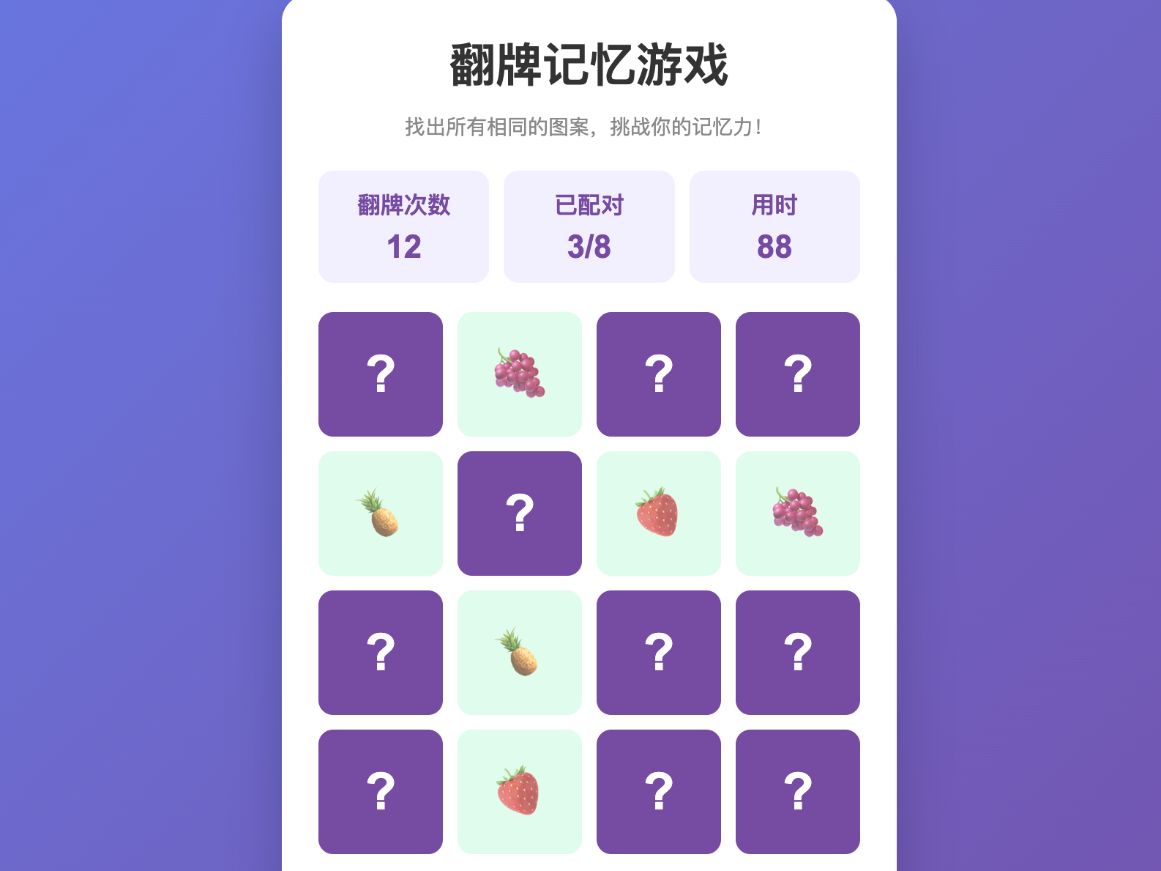
本项目是一款基于 HTML、CSS 和 JavaScript 开发的记忆翻牌小游戏。游戏包含16张随机排列的水果图案卡片,玩家需要通过翻牌寻找相同图案,完成全部8组配对即可通关。
游戏支持随机洗牌、卡片翻转、自动匹配判断、错误翻牌自动复位、翻牌次数统计、游戏计时和重新开始等功能。全部配对成功后,还会显示最终成绩和通关提示。
1
结构样式
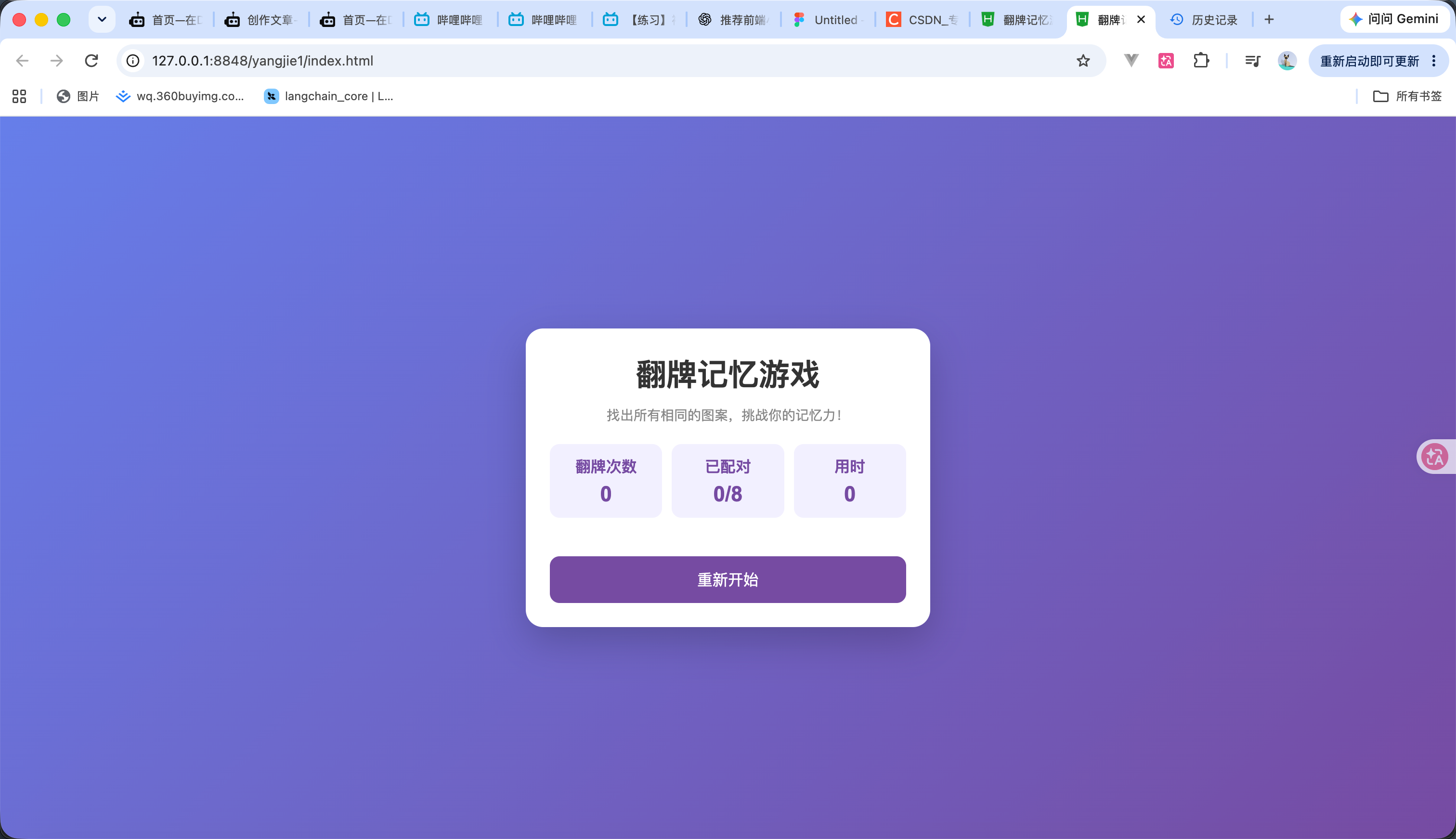
我们先 先使用 HTML 创建游戏结构,再通过 CSS 设置页面布局和基本样式。 效果如图 代码如下
<!DOCTYPE html>
<html lang="zh-CN">
<head>
<meta charset="UTF-8">
<meta name="viewport" content="width=device-width, initial-scale=1.0">
<title>翻牌记忆游戏</title>
<style>
* {
margin: 0;
padding: 0;
box-sizing: border-box;
}
body {
min-height: 100vh;
display: flex;
justify-content: center;
align-items: center;
background: linear-gradient(135deg, #667eea, #764ba2);
font-family: Arial, sans-serif;
}
.game {
width: 420px;
max-width: 95%;
padding: 25px;
background: white;
border-radius: 18px;
box-shadow: 0 15px 40px #0003;
}
h1 {
text-align: center;
color: #333;
margin-bottom: 10px;
}
.description {
text-align: center;
color: #888;
font-size: 14px;
margin-bottom: 20px;
}
.info {
display: flex;
justify-content: space-between;
gap: 10px;
margin-bottom: 20px;
}
.info div {
flex: 1;
padding: 12px 5px;
background: #f3f0ff;
border-radius: 10px;
text-align: center;
color: #764ba2;
font-weight: bold;
}
.info span {
display: block;
font-size: 22px;
margin-top: 5px;
}
.cards {
display: grid;
grid-template-columns: repeat(4, 1fr);
gap: 10px;
}
.card {
height: 85px;
background: #764ba2;
border-radius: 10px;
cursor: pointer;
display: flex;
justify-content: center;
align-items: center;
font-size: 35px;
user-select: none;
}
button {
width: 100%;
margin-top: 20px;
padding: 13px;
border: none;
border-radius: 10px;
background: #764ba2;
color: white;
font-size: 16px;
cursor: pointer;
}
</style>
</head>
<body>
<div class="game">
<h1>翻牌记忆游戏</h1>
<p class="description">
找出所有相同的图案,挑战你的记忆力!
</p>
<div class="info">
<div>
翻牌次数
<span id="moves">0</span>
</div>
<div>
已配对
<span id="pairs">0/8</span>
</div>
<div>
用时
<span id="time">0</span>
</div>
</div>
<div class="cards" id="cards"></div>
<div class="message" id="message"></div>
<button>重新开始</button>
</div>
</body>
</html>
2
生成卡片
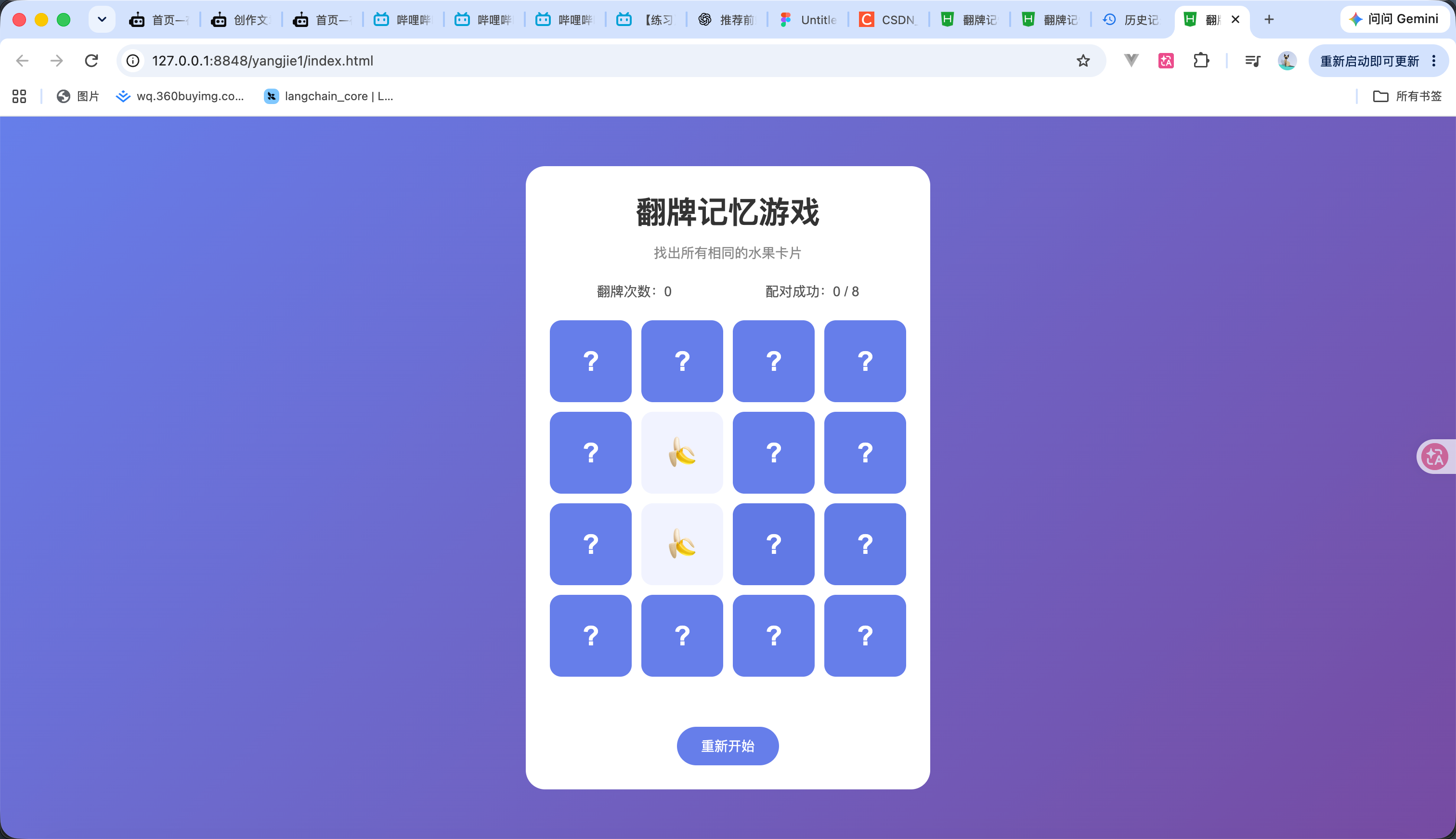
这一步我们来进行生成卡片
准备 8 种不同的水果图案,每种出现两次,共 16 张卡片。
然后再 随机打乱卡片 并把水果随机填入进去 代码如下
}
// 4. 开始游戏
function startGame() {
createCards();
}
// 页面加载时初始化游戏
startGame();
</script>
</body>
</html>
3
翻牌
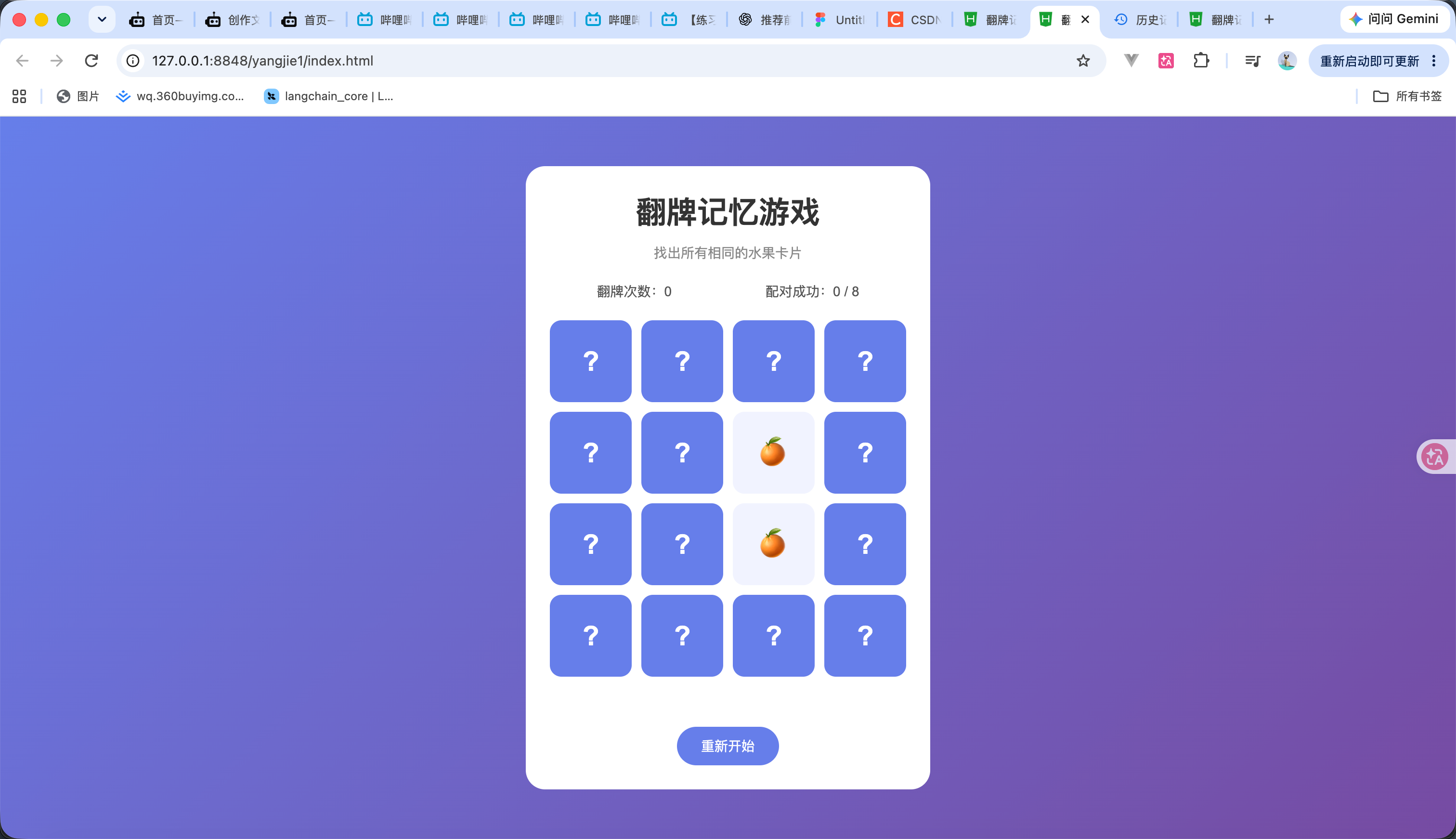
本步骤实现:同一张卡片不能重复点击。两张卡片翻开后,暂时锁定其他卡片,避免连续点击。
代码如下
<!DOCTYPE html>
<html lang="zh-CN">
<head>
<meta charset="UTF-8">
<meta name="viewport" content="width=device-width, initial-scale=1.0">
<title>翻牌记忆游戏</title>
<style>
* {
margin: 0;
padding: 0;
box-sizing: border-box;
}
body {
min-height: 100vh;
display: flex;
justify-content: center;
align-items: center;
background: linear-gradient(135deg, #667eea, #764ba2);
font-family: Arial, sans-serif;
}
.game {
width: 90%;
max-width: 420px;
padding: 25px;
background: white;
border-radius: 20px;
text-align: center;
}
h1 {
margin-bottom: 10px;
color: #333;
}
.description {
margin-bottom: 20px;
color: #888;
font-size: 14px;
}
.info {
display: flex;
justify-content: space-around;
margin-bottom: 20px;
color: #555;
font-size: 14px;
}
.game-board {
display: grid;
grid-template-columns: repeat(4, 1fr);
gap: 10px;
}
.card {
aspect-ratio: 1;
display: flex;
justify-content: center;
align-items: center;
background: #667eea;
border-radius: 12px;
cursor: pointer;
font-size: 32px;
transition: background 0.2s;
}
.card:hover {
background: #5268d8;
}
.card .content {
display: none;
}
.card.open {
background: #f1f3ff;
}
.card.open .content {
display: block;
}
.card:not(.open):not(.matched)::after {
content: "?";
color: white;
font-size: 28px;
font-weight: bold;
}
.card.matched {
background: #d1fae5;
cursor: default;
}
.card.matched .content {
display: block;
}
.message {
min-height: 24px;
margin-top: 18px;
color: #667eea;
font-weight: bold;
}
button {
margin-top: 10px;
padding: 10px 25px;
border: none;
border-radius: 20px;
background: #667eea;
color: white;
cursor: pointer;
font-size: 14px;
}
button:hover {
background: #5268d8;
}
</style>
</head>
<body>
<div class="game">
<h1>翻牌记忆游戏</h1>
<p class="description">
找出所有相同的水果卡片
</p>
<div class="info">
<span>翻牌次数:0</span>
<span>配对成功:0 / 8</span>
</div>
<div class="game-board" id="gameBoard"></div>
<div class="message" id="message"></div>
<button onclick="startGame()">重新开始</button>
</div>
<script>
// 1. 定义水果图案
const icons = [
"🍎", "🍌", "🍇", "🍊",
"🍓", "🍉", "🥝", "🍍"
];
// 2. 获取游戏容器
const gameBoard = document.getElementById("gameBoard");
// 3. 定义游戏状态
let selected = [];
let locked = false;
// 4. 生成卡片
function createCards() {
let cards = [...icons, ...icons];
cards.sort(() => Math.random() - 0.5);
gameBoard.innerHTML = "";
cards.forEach((icon) => {
const card = document.createElement("div");
card.className = "card";
card.dataset.icon = icon;
card.innerHTML = `
<div class="content">${icon}</div>
`;
// 点击卡片
card.addEventListener("click", () => {
flipCard(card);
});
gameBoard.appendChild(card);
});
}
// 5. 翻开卡片
function flipCard(card) {
// 如果游戏被锁定,不允许点击
if (locked) {
return;
}
// 如果卡片已经翻开或配对成功,不允许重复点击
if (
card.classList.contains("open") ||
card.classList.contains("matched")
) {
return;
}
// 翻开卡片
card.classList.add("open");
// 保存当前翻开的卡片
selected.push(card);
// 当翻开两张卡片时,锁定游戏
if (selected.length === 2) {
locked = true;
}
}
// 6. 开始游戏
function startGame() {
selected = [];
locked = false;
createCards();
}
// 页面加载时初始化
startGame();
</script>
</body>
</html>
4
计时 & 分数
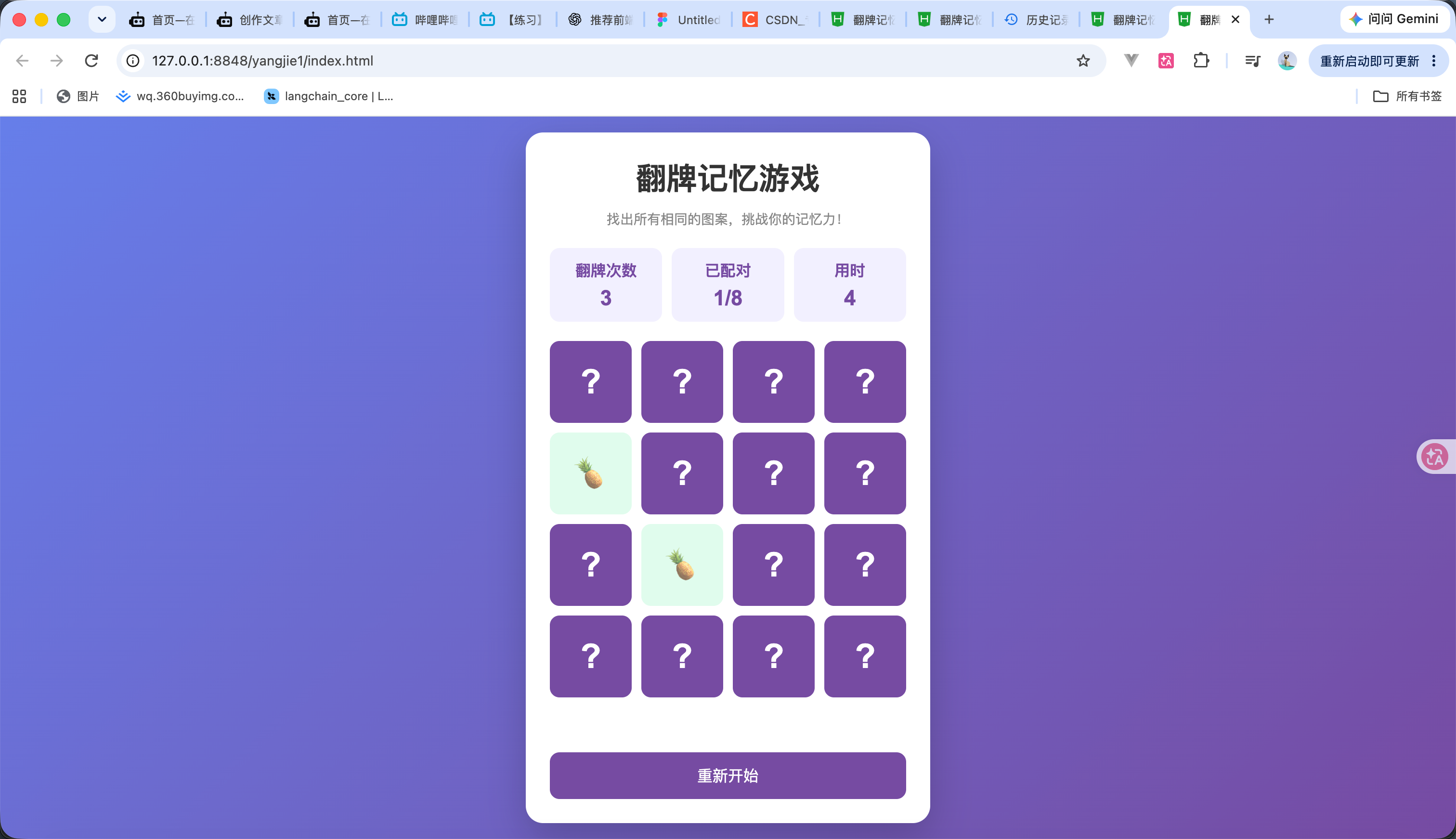
接下来我们添加一个计时功能 并且每次配对成功都进行计数 代码如下
<!DOCTYPE html>
<html lang="zh-CN">
<head>
<meta charset="UTF-8">
<meta name="viewport" content="width=device-width, initial-scale=1.0">
<title>翻牌记忆游戏</title>
<style>
* {
margin: 0;
padding: 0;
box-sizing: border-box;
}
body {
min-height: 100vh;
display: flex;
justify-content: center;
align-items: center;
background: linear-gradient(135deg, #667eea, #764ba2);
font-family: Arial, sans-serif;
}
.game {
width: 420px;
max-width: 95%;
padding: 25px;
background: white;
border-radius: 18px;
box-shadow: 0 15px 40px #0003;
}
h1 {
text-align: center;
color: #333;
margin-bottom: 10px;
}
.description {
text-align: center;
color: #888;
font-size: 14px;
margin-bottom: 20px;
}
.info {
display: flex;
justify-content: space-between;
margin-bottom: 20px;
gap: 10px;
}
.info div {
flex: 1;
padding: 12px 5px;
background: #f3f0ff;
border-radius: 10px;
text-align: center;
color: #764ba2;
font-weight: bold;
}
.info span {
display: block;
font-size: 22px;
margin-top: 5px;
}
.cards {
display: grid;
grid-template-columns: repeat(4, 1fr);
gap: 10px;
}
.card {
height: 85px;
background: #764ba2;
border-radius: 10px;
cursor: pointer;
display: flex;
justify-content: center;
align-items: center;
font-size: 35px;
transition: transform 0.3s, background 0.3s;
user-select: none;
}
.card:hover {
transform: scale(1.04);
}
.card.open {
background: #f3f0ff;
transform: rotateY(180deg);
}
.card.matched {
background: #d1fae5;
cursor: default;
opacity: 0.7;
}
.card .content {
display: none;
}
.card.open .content,
.card.matched .content {
display: block;
transform: rotateY(-180deg);
}
.card.matched {
pointer-events: none;
}
.card:not(.open):not(.matched)::after {
content: "?";
color: white;
font-weight: bold;
}
button {
width: 100%;
margin-top: 20px;
padding: 13px;
border: none;
border-radius: 10px;
background: #764ba2;
color: white;
font-size: 16px;
cursor: pointer;
}
button:hover {
background: #5e3789;
}
.message {
margin-top: 15px;
text-align: center;
color: #16a34a;
font-weight: bold;
min-height: 22px;
}
@media (max-width: 380px) {
.card {
height: 68px;
font-size: 28px;
}
.game {
padding: 15px;
}
}
</style>
</head>
<body>
<div class="game">
<h1>翻牌记忆游戏</h1>
<p class="description">
找出所有相同的图案,挑战你的记忆力!
</p>
<div class="info">
<div>
翻牌次数
<span id="moves">0</span>
</div>
<div>
已配对
<span id="pairs">0/8</span>
</div>
<div>
用时
<span id="time">0</span>
</div>
</div>
<div class="cards" id="cards"></div>
<div class="message" id="message"></div>
<button onclick="startGame()">重新开始</button>
</div>
<script>
// 图案列表
const icons = [
"🍎", "🍌", "🍇", "🍉",
"🍓", "🍒", "🍍", "🥝"
];
// 获取页面元素
const cardsContainer = document.getElementById("cards");
const movesElement = document.getElementById("moves");
const pairsElement = document.getElementById("pairs");
const timeElement = document.getElementById("time");
const messageElement = document.getElementById("message");
// 游戏状态
let cards = [];
let selected = [];
let moves = 0;
let pairs = 0;
let time = 0;
let locked = false;
let timer = null;
let started = false;
// 随机打乱数组
function shuffle(array) {
for (let i = array.length - 1; i > 0; i--) {
const j = Math.floor(Math.random() * (i + 1));
[array[i], array[j]] = [array[j], array[i]];
}
return array;
}
// 初始化游戏
function startGame() {
clearInterval(timer);
moves = 0;
pairs = 0;
time = 0;
selected = [];
locked = false;
started = false;
movesElement.textContent = moves;
pairsElement.textContent = "0/8";
timeElement.textContent = time;
messageElement.textContent = "";
// 每种图案复制两份
cards = shuffle([...icons, ...icons]);
// 创建卡片
cardsContainer.innerHTML = "";
cards.forEach((icon, index) => {
const card = document.createElement("div");
card.className = "card";
card.dataset.icon = icon;
card.innerHTML = `
<span class="content">${icon}</span>
`;
card.addEventListener("click", () => {
flipCard(card);
});
cardsContainer.appendChild(card);
});
}
// 开始计时
function startTimer() {
if (started) return;
started = true;
timer = setInterval(() => {
time++;
timeElement.textContent = time;
}, 1000);
}
// 翻开卡片
function flipCard(card) {
// 已锁定、已经翻开、已经配对的卡片不能点击
if (
locked ||
card.classList.contains("open") ||
card.classList.contains("matched")
) {
return;
}
startTimer();
// 翻开卡片
card.classList.add("open");
selected.push(card);
// 两张卡片翻开后进行比较
if (selected.length === 2) {
moves++;
movesElement.textContent = moves;
checkCards();
}
}
// 判断两张卡片是否相同
function checkCards() {
const [first, second] = selected;
if (first.dataset.icon === second.dataset.icon) {
// 配对成功
first.classList.add("matched");
second.classList.add("matched");
pairs++;
pairsElement.textContent = pairs + "/8";
selected = [];
// 判断游戏是否结束
if (pairs === 8) {
clearInterval(timer);
messageElement.textContent =
`恭喜通关!共翻牌 ${moves} 次,用时 ${time} 秒!`;
}
} else {
// 配对失败,暂时禁止继续点击
locked = true;
setTimeout(() => {
first.classList.remove("open");
second.classList.remove("open");
selected = [];
locked = false;
}, 800);
}
}
// 初始化
startGame();
</script>
</body>
</html>
5
演示
完整代码如下 演示看视频
<!DOCTYPE html>
<html lang="zh-CN">
<head>
<meta charset="UTF-8">
<meta name="viewport" content="width=device-width, initial-scale=1.0">
<title>翻牌记忆游戏</title>
<style>
* {
margin: 0;
padding: 0;
box-sizing: border-box;
}
body {
min-height: 100vh;
display: flex;
justify-content: center;
align-items: center;
background: linear-gradient(135deg, #667eea, #764ba2);
font-family: Arial, sans-serif;
}
.game {
width: 420px;
max-width: 95%;
padding: 25px;
background: white;
border-radius: 18px;
box-shadow: 0 15px 40px #0003;
}
h1 {
text-align: center;
color: #333;
margin-bottom: 10px;
}
.description {
text-align: center;
color: #888;
font-size: 14px;
margin-bottom: 20px;
}
.info {
display: flex;
justify-content: space-between;
margin-bottom: 20px;
gap: 10px;
}
.info div {
flex: 1;
padding: 12px 5px;
background: #f3f0ff;
border-radius: 10px;
text-align: center;
color: #764ba2;
font-weight: bold;
}
.info span {
display: block;
font-size: 22px;
margin-top: 5px;
}
.cards {
display: grid;
grid-template-columns: repeat(4, 1fr);
gap: 10px;
}
.card {
height: 85px;
background: #764ba2;
border-radius: 10px;
cursor: pointer;
display: flex;
justify-content: center;
align-items: center;
font-size: 35px;
transition: transform 0.3s, background 0.3s;
user-select: none;
}
.card:hover {
transform: scale(1.04);
}
.card.open {
background: #f3f0ff;
transform: rotateY(180deg);
}
.card.matched {
background: #d1fae5;
cursor: default;
opacity: 0.7;
}
.card .content {
display: none;
}
.card.open .content,
.card.matched .content {
display: block;
transform: rotateY(-180deg);
}
.card.matched {
pointer-events: none;
}
.card:not(.open):not(.matched)::after {
content: "?";
color: white;
font-weight: bold;
}
button {
width: 100%;
margin-top: 20px;
padding: 13px;
border: none;
border-radius: 10px;
background: #764ba2;
color: white;
font-size: 16px;
cursor: pointer;
}
button:hover {
background: #5e3789;
}
.message {
margin-top: 15px;
text-align: center;
color: #16a34a;
font-weight: bold;
min-height: 22px;
}
@media (max-width: 380px) {
.card {
height: 68px;
font-size: 28px;
}
.game {
padding: 15px;
}
}
</style>
</head>
<body>
<div class="game">
<h1>翻牌记忆游戏</h1>
<p class="description">
找出所有相同的图案,挑战你的记忆力!
</p>
<div class="info">
<div>
翻牌次数
<span id="moves">0</span>
</div>
<div>
已配对
<span id="pairs">0/8</span>
</div>
<div>
用时
<span id="time">0</span>
</div>
</div>
<div class="cards" id="cards"></div>
<div class="message" id="message"></div>
<button onclick="startGame()">重新开始</button>
</div>
<script>
// 图案列表
const icons = [
"🍎", "🍌", "🍇", "🍉",
"🍓", "🍒", "🍍", "🥝"
];
// 获取页面元素
const cardsContainer = document.getElementById("cards");
const movesElement = document.getElementById("moves");
const pairsElement = document.getElementById("pairs");
const timeElement = document.getElementById("time");
const messageElement = document.getElementById("message");
// 游戏状态
let cards = [];
let selected = [];
let moves = 0;
let pairs = 0;
let time = 0;
let locked = false;
let timer = null;
let started = false;
// 随机打乱数组
function shuffle(array) {
for (let i = array.length - 1; i > 0; i--) {
const j = Math.floor(Math.random() * (i + 1));
[array[i], array[j]] = [array[j], array[i]];
}
return array;
}
// 初始化游戏
function startGame() {
clearInterval(timer);
moves = 0;
pairs = 0;
time = 0;
selected = [];
locked = false;
started = false;
movesElement.textContent = moves;
pairsElement.textContent = "0/8";
timeElement.textContent = time;
messageElement.textContent = "";
// 每种图案复制两份
cards = shuffle([...icons, ...icons]);
// 创建卡片
cardsContainer.innerHTML = "";
cards.forEach((icon, index) => {
const card = document.createElement("div");
card.className = "card";
card.dataset.icon = icon;
card.innerHTML = `
<span class="content">${icon}</span>
`;
card.addEventListener("click", () => {
flipCard(card);
});
cardsContainer.appendChild(card);
});
}
// 开始计时
function startTimer() {
if (started) return;
started = true;
timer = setInterval(() => {
time++;
timeElement.textContent = time;
}, 1000);
}
// 翻开卡片
function flipCard(card) {
// 已锁定、已经翻开、已经配对的卡片不能点击
if (
locked ||
card.classList.contains("open") ||
card.classList.contains("matched")
) {
return;
}
startTimer();
// 翻开卡片
card.classList.add("open");
selected.push(card);
// 两张卡片翻开后进行比较
if (selected.length === 2) {
moves++;
movesElement.textContent = moves;
checkCards();
}
}
// 判断两张卡片是否相同
function checkCards() {
const [first, second] = selected;
if (first.dataset.icon === second.dataset.icon) {
// 配对成功
first.classList.add("matched");
second.classList.add("matched");
pairs++;
pairsElement.textContent = pairs + "/8";
selected = [];
// 判断游戏是否结束
if (pairs === 8) {
clearInterval(timer);
messageElement.textContent =
`恭喜通关!共翻牌 ${moves} 次,用时 ${time} 秒!`;
}
} else {
// 配对失败,暂时禁止继续点击
locked = true;
setTimeout(() => {
first.classList.remove("open");
second.classList.remove("open");
selected = [];
locked = false;
}, 800);
}
}
// 初始化
startGame();
</script>
</body>
</html>
 0
 0
 0
 qq空间
 微博
 复制链接
 分享
 本文未经作者允许授权,禁止转载
更多相关项目
猜你喜欢
评论/提问(已发布 0 条)

 评论
 收藏
 分享
 下载
 举报
 回顶部