html+js 实现别踩白块小游戏
 0
 0
 0
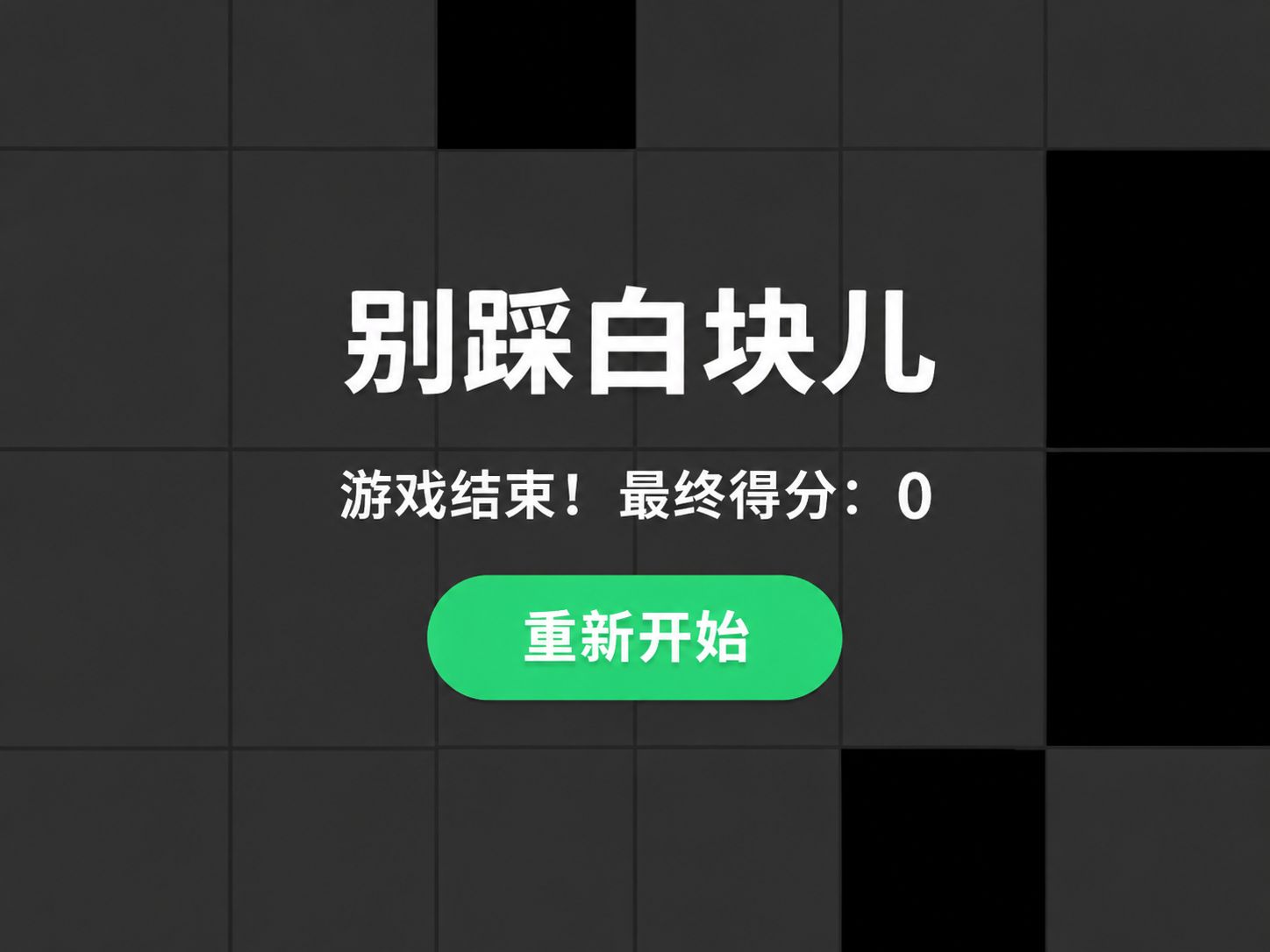
使用 HTML、CSS 和 JavaScript 制作《别踩白块儿》小游戏,玩家需要快速点击不断下落的黑色方块,避开白色方块获取积分,分数越高,游戏速度越快。项目适合前端初学者学习 HTML 页面结构、CSS 布局与样式、JavaScript DOM 操作、随机数生成、事件监听、定时器及动画控制等基础知识。
1
页面结构
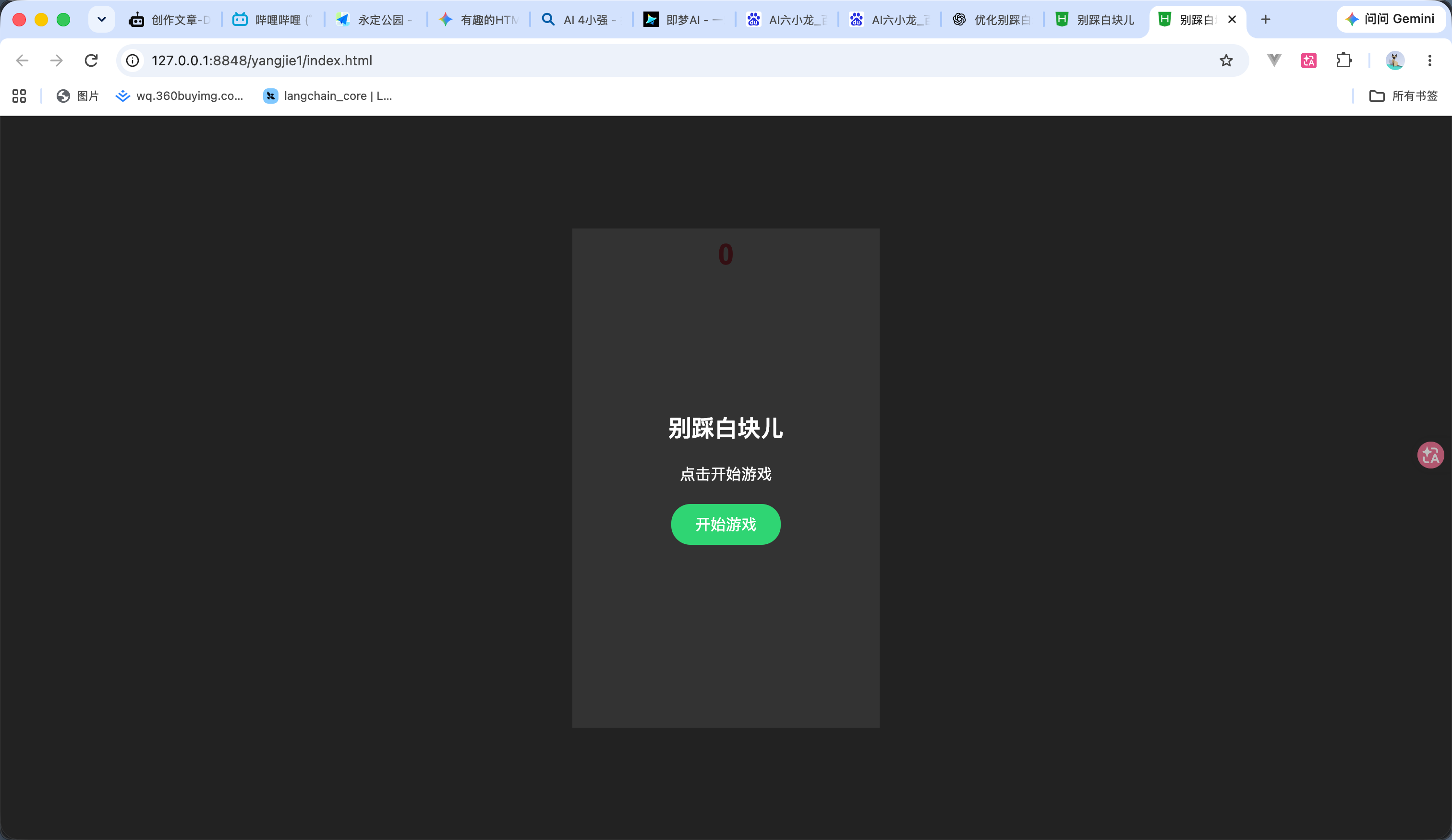
首先创建一个 HTML 文件,编写游戏的基本结构。 这部就很简单了 代码如下 效果如图
<!DOCTYPE html>
<html lang="zh-CN">
<head>
<meta charset="UTF-8">
<meta name="viewport" content="width=device-width, initial-scale=1.0">
<title>别踩白块儿</title>
<style>
* {
margin: 0;
padding: 0;
box-sizing: border-box;
}
body {
height: 100vh;
display: flex;
justify-content: center;
align-items: center;
background: #222;
font-family: Arial, sans-serif;
}
/* 游戏主容器 */
#game {
width: 320px;
height: 520px;
position: relative;
overflow: hidden;
background: white;
}
/* 分数区域 */
#score {
position: absolute;
top: 10px;
width: 100%;
text-align: center;
font-size: 30px;
font-weight: bold;
color: #ff4757;
z-index: 5;
}
/* 方块区域 */
#board {
position: absolute;
width: 100%;
top: -130px;
}
/* 每一行方块 */
.row {
display: flex;
height: 130px;
}
/* 单个方块 */
.cell {
flex: 1;
border: 1px solid #ddd;
background: white;
}
/* 黑色方块 */
.black {
background: #111;
}
/* 已点击的方块 */
.passed {
background: #ddd;
}
/* 游戏开始界面 */
#over {
position: absolute;
inset: 0;
background: rgba(0,0,0,.8);
color: white;
display: flex;
flex-direction: column;
justify-content: center;
align-items: center;
gap: 20px;
z-index: 10;
}
/* 开始按钮 */
button {
padding: 10px 25px;
border: none;
border-radius: 20px;
background: #2ed573;
color: white;
font-size: 16px;
cursor: pointer;
}
/* 隐藏元素 */
.hidden {
display: none !important;
}
</style>
</head>
<body>
<!-- 游戏主容器 -->
<div id="game">
<!-- 分数 -->
<div id="score">0</div>
<!-- 方块区域 -->
<div id="board"></div>
<!-- 开始界面 -->
<div id="over">
<h2>别踩白块儿</h2>
<p id="result">点击开始游戏</p>
<button id="start">开始游戏</button>
</div>
</div>
</body>
</html>
2
黑块
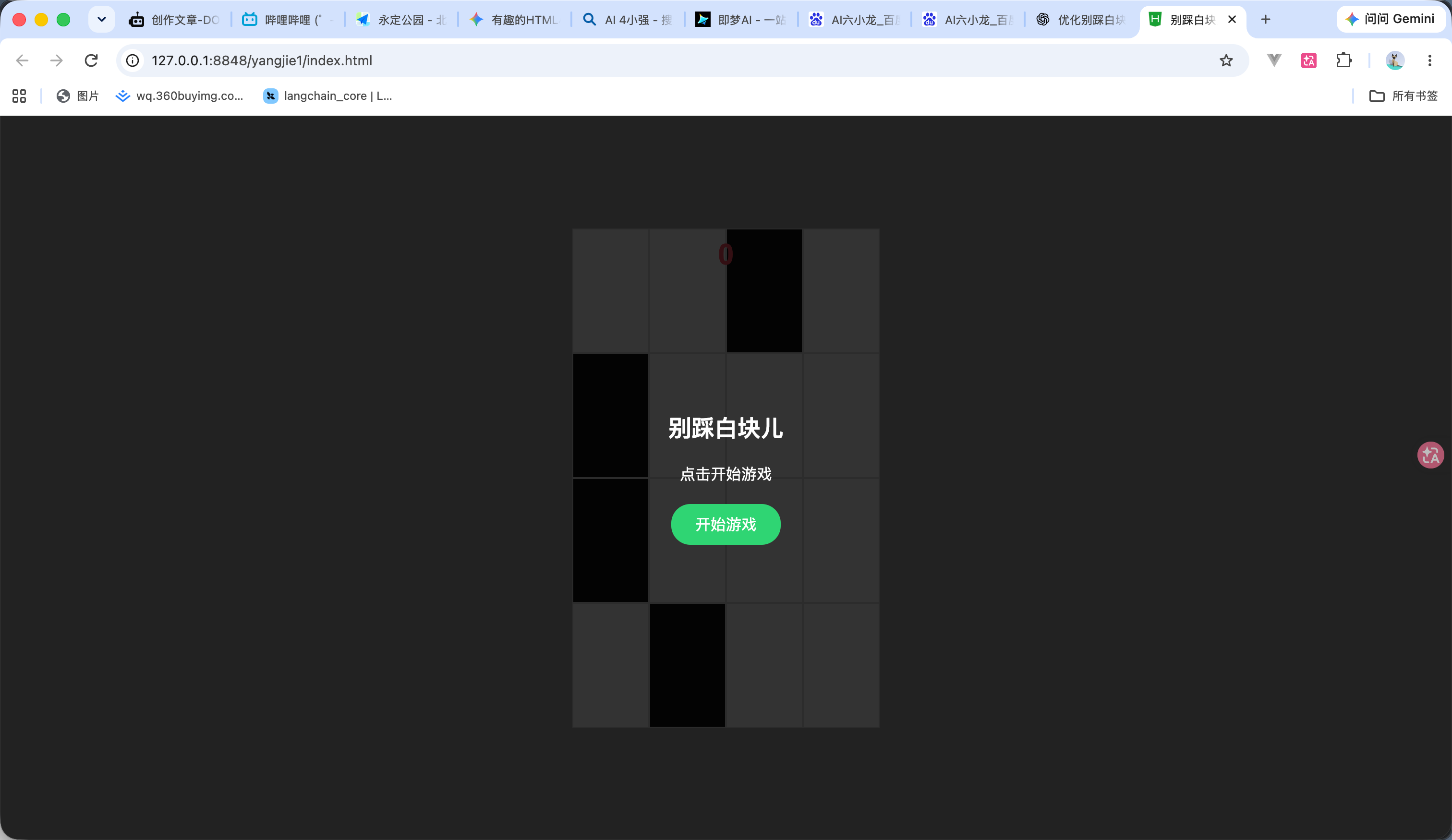
本步骤开始使用 JavaScript 创建游戏方块,实现每行四个方块,并随机生成一个黑块。
获取页面中 ID 为 board 的元素,后续创建的方块都会添加到这个区域中。 然后就是循环创建 代码如下 效果如图
<!DOCTYPE html>
<html lang="zh-CN">
<head>
<meta charset="UTF-8">
<meta name="viewport" content="width=device-width, initial-scale=1.0">
<title>别踩白块儿</title>
<style>
* {
margin: 0;
padding: 0;
box-sizing: border-box;
}
body {
height: 100vh;
display: flex;
justify-content: center;
align-items: center;
background: #222;
font-family: Arial, sans-serif;
}
/* 游戏主容器 */
#game {
width: 320px;
height: 520px;
position: relative;
overflow: hidden;
background: white;
}
/* 分数区域 */
#score {
position: absolute;
top: 10px;
width: 100%;
text-align: center;
font-size: 30px;
font-weight: bold;
color: #ff4757;
z-index: 5;
}
/* 方块区域 */
#board {
position: absolute;
width: 100%;
top: -130px;
}
/* 每一行方块 */
.row {
display: flex;
height: 130px;
}
/* 单个方块 */
.cell {
flex: 1;
border: 1px solid #ddd;
background: white;
}
/* 黑色方块 */
.black {
background: #111;
}
/* 已点击的方块 */
.passed {
background: #ddd;
}
/* 游戏开始界面 */
#over {
position: absolute;
inset: 0;
background: rgba(0,0,0,.8);
color: white;
display: flex;
flex-direction: column;
justify-content: center;
align-items: center;
gap: 20px;
z-index: 10;
}
/* 开始按钮 */
button {
padding: 10px 25px;
border: none;
border-radius: 20px;
background: #2ed573;
color: white;
font-size: 16px;
cursor: pointer;
}
/* 隐藏元素 */
.hidden {
display: none !important;
}
</style>
</head>
<body>
<!-- 游戏主容器 -->
<div id="game">
<!-- 分数 -->
<div id="score">0</div>
<!-- 方块区域 -->
<div id="board"></div>
<!-- 开始界面 -->
<div id="over">
<h2>别踩白块儿</h2>
<p id="result">点击开始游戏</p>
<button id="start">开始游戏</button>
</div>
</div>
</body>
</html>
<script>
const board = document.getElementById('board');
// 创建一行方块
function createRow() {
const row = document.createElement('div');
row.className = 'row';
// 随机生成黑块位置
const blackIndex = Math.floor(Math.random() * 4);
for (let i = 0; i < 4; i++) {
const cell = document.createElement('div');
cell.className = i === blackIndex
? 'cell black'
: 'cell';
row.appendChild(cell);
}
// 将新行添加到顶部
board.insertBefore(row, board.firstChild);
}
// 初始化游戏
function init() {
board.innerHTML = '';
for (let i = 0; i < 5; i++) {
createRow();
}
}
// 执行初始化
init();
</script>
3
方块移动
第三部添加了开始和向下移动的功能 原理就是 通过不断增加 topPos,改变方块区域距离顶部的位置,实现向下移动。 当方块区域移动到指定位置时,检查最底部的一行。
<!DOCTYPE html>
<html lang="zh-CN">
<head>
<meta charset="UTF-8">
<meta name="viewport" content="width=device-width, initial-scale=1.0">
<title>别踩白块儿</title>
<style>
* {
margin: 0;
padding: 0;
box-sizing: border-box;
}
body {
height: 100vh;
display: flex;
justify-content: center;
align-items: center;
background: #222;
font-family: Arial, sans-serif;
}
/* 游戏主容器 */
#game {
width: 320px;
height: 520px;
position: relative;
overflow: hidden;
background: white;
}
/* 分数区域 */
#score {
position: absolute;
top: 10px;
width: 100%;
text-align: center;
font-size: 30px;
font-weight: bold;
color: #ff4757;
z-index: 5;
}
/* 方块区域 */
#board {
position: absolute;
width: 100%;
top: -130px;
}
/* 每一行方块 */
.row {
display: flex;
height: 130px;
}
/* 单个方块 */
.cell {
flex: 1;
border: 1px solid #ddd;
background: white;
}
/* 黑色方块 */
.black {
background: #111;
}
/* 已点击的方块 */
.passed {
background: #ddd;
}
/* 游戏开始界面 */
#over {
position: absolute;
inset: 0;
background: rgba(0,0,0,.8);
color: white;
display: flex;
flex-direction: column;
justify-content: center;
align-items: center;
gap: 20px;
z-index: 10;
}
/* 开始按钮 */
button {
padding: 10px 25px;
border: none;
border-radius: 20px;
background: #2ed573;
color: white;
font-size: 16px;
cursor: pointer;
}
/* 隐藏元素 */
.hidden {
display: none !important;
}
</style>
</head>
<body>
<!-- 游戏主容器 -->
<div id="game">
<!-- 分数 -->
<div id="score">0</div>
<!-- 方块区域 -->
<div id="board"></div>
<!-- 开始界面 -->
<div id="over">
<h2>别踩白块儿</h2>
<p id="result">点击开始游戏</p>
<button id="start">开始游戏</button>
</div>
</div>
</body>
</html>
<script>
const board = document.getElementById('board');
const over = document.getElementById('over');
const startBtn = document.getElementById('start');
// 方块移动速度和初始位置
let speed = 2;
let topPos = -130;
let playing = false;
let animation;
// 创建一行方块
function createRow() {
const row = document.createElement('div');
row.className = 'row';
// 随机生成黑块位置
const blackIndex = Math.floor(Math.random() * 4);
for (let i = 0; i < 4; i++) {
const cell = document.createElement('div');
cell.className = i === blackIndex
? 'cell black'
: 'cell';
row.appendChild(cell);
}
// 将新行添加到顶部
board.insertBefore(row, board.firstChild);
}
// 初始化游戏
function init() {
board.innerHTML = '';
topPos = -130;
speed = 2;
board.style.top = topPos + 'px';
for (let i = 0; i < 5; i++) {
createRow();
}
}
// 方块移动动画
function gameLoop() {
if (!playing) return;
topPos += speed;
board.style.top = topPos + 'px';
// 判断方块是否移动到最底部
if (topPos >= 0) {
const lastRow = board.lastElementChild;
// 判断是否漏掉黑块
if (lastRow.querySelector('.black')) {
playing = false;
over.classList.remove('hidden');
document.getElementById('result').textContent = '游戏结束!';
startBtn.textContent = '重新开始';
return;
}
// 删除最底部的一行
lastRow.remove();
// 在顶部生成新的一行
createRow();
// 重置移动位置
topPos = -130;
board.style.top = topPos + 'px';
}
// 持续执行动画
animation = requestAnimationFrame(gameLoop);
}
// 开始游戏
function startGame() {
cancelAnimationFrame(animation);
playing = false;
init();
over.classList.add('hidden');
playing = true;
gameLoop();
}
// 绑定开始按钮
startBtn.addEventListener('click', startGame);
</script>
4
倒计时
这部添加了一个倒计时的效果 不然用户是反应不过来的 倒计时就方便理解了 就是一个定时器 然后改变遮罩层的效果 效果看视频
<!DOCTYPE html>
<html lang="zh-CN">
<head>
<meta charset="UTF-8">
<meta name="viewport" content="width=device-width, initial-scale=1.0">
<title>别踩白块儿</title>
<style>
* {
margin: 0;
padding: 0;
box-sizing: border-box;
}
body {
height: 100vh;
display: flex;
justify-content: center;
align-items: center;
background: #222;
font-family: Arial, sans-serif;
}
/* 游戏主容器 */
#game {
width: 320px;
height: 520px;
position: relative;
overflow: hidden;
background: white;
}
/* 分数区域 */
#score {
position: absolute;
top: 10px;
width: 100%;
text-align: center;
font-size: 30px;
font-weight: bold;
color: #ff4757;
z-index: 5;
}
/* 方块区域 */
#board {
position: absolute;
width: 100%;
top: -130px;
}
/* 每一行方块 */
.row {
display: flex;
height: 130px;
}
/* 单个方块 */
.cell {
flex: 1;
border: 1px solid #ddd;
background: white;
}
/* 黑色方块 */
.black {
background: #111;
}
/* 已点击的方块 */
.passed {
background: #ddd;
}
/* 游戏开始界面 */
#over {
position: absolute;
inset: 0;
background: rgba(0,0,0,.8);
color: white;
display: flex;
flex-direction: column;
justify-content: center;
align-items: center;
gap: 20px;
z-index: 10;
}
/* 开始按钮 */
button {
padding: 10px 25px;
border: none;
border-radius: 20px;
background: #2ed573;
color: white;
font-size: 16px;
cursor: pointer;
}
/* 倒计时界面 */
#countdown {
position: absolute;
inset: 0;
z-index: 8;
background: rgba(0,0,0,.5);
color: white;
display: flex;
justify-content: center;
align-items: center;
font-size: 80px;
font-weight: bold;
}
/* 隐藏元素 */
.hidden {
display: none !important;
}
</style>
</head>
<body>
<!-- 游戏主容器 -->
<div id="game">
<!-- 分数 -->
<div id="score">0</div>
<!-- 方块区域 -->
<div id="board"></div>
<!-- 倒计时界面 -->
<div id="countdown" class="hidden">
<span id="countdown-text">3</span>
</div>
<!-- 开始界面 -->
<div id="over">
<h2>别踩白块儿</h2>
<p id="result">点击开始游戏</p>
<button id="start">开始游戏</button>
</div>
</div>
</body>
</html>
<script>
const board = document.getElementById('board');
const over = document.getElementById('over');
const startBtn = document.getElementById('start');
const countdown = document.getElementById('countdown');
const countdownText = document.getElementById('countdown-text');
// 游戏变量
let speed = 2;
let topPos = -130;
let playing = false;
let animation;
let timer;
// 创建一行方块
function createRow() {
const row = document.createElement('div');
row.className = 'row';
// 随机生成黑块位置
const blackIndex = Math.floor(Math.random() * 4);
for (let i = 0; i < 4; i++) {
const cell = document.createElement('div');
cell.className = i === blackIndex
? 'cell black'
: 'cell';
row.appendChild(cell);
}
// 将新行添加到顶部
board.insertBefore(row, board.firstChild);
}
// 初始化游戏
function init() {
board.innerHTML = '';
topPos = -130;
speed = 2;
board.style.top = topPos + 'px';
for (let i = 0; i < 5; i++) {
createRow();
}
}
// 方块移动动画
function gameLoop() {
if (!playing) return;
topPos += speed;
board.style.top = topPos + 'px';
// 判断方块是否移动到最底部
if (topPos >= 0) {
const lastRow = board.lastElementChild;
// 判断是否漏掉黑块
if (lastRow.querySelector('.black')) {
gameOver();
return;
}
// 删除最底部的一行
lastRow.remove();
// 在顶部生成新的一行
createRow();
// 重置移动位置
topPos = -130;
board.style.top = topPos + 'px';
}
animation = requestAnimationFrame(gameLoop);
}
// 游戏结束
function gameOver() {
playing = false;
cancelAnimationFrame(animation);
clearInterval(timer);
countdown.classList.add('hidden');
over.classList.remove('hidden');
startBtn.textContent = '重新开始';
}
// 开始游戏:三秒倒计时
function startGame() {
cancelAnimationFrame(animation);
clearInterval(timer);
playing = false;
init();
over.classList.add('hidden');
countdown.classList.remove('hidden');
let count = 3;
countdownText.textContent = count;
timer = setInterval(function() {
count--;
if (count > 0) {
countdownText.textContent = count;
} else if (count === 0) {
countdownText.textContent = 'GO!';
} else {
clearInterval(timer);
timer = null;
countdown.classList.add('hidden');
playing = true;
gameLoop();
}
}, 1000);
}
// 绑定开始按钮
startBtn.addEventListener('click', startGame);
</script>
5
积分
现在就相当于是我们给每个随机生成的黑块 都添加一个点击事件,然后点击黑块之后会增加积分并把黑块改变成灰的 完整代码如下 效果看视频
<!DOCTYPE html>
<html lang="zh-CN">
<head>
<meta charset="UTF-8">
<meta name="viewport" content="width=device-width, initial-scale=1.0">
<title>别踩白块儿</title>
<style>
* {
margin: 0;
padding: 0;
box-sizing: border-box;
}
body {
height: 100vh;
display: flex;
justify-content: center;
align-items: center;
background: #222;
font-family: Arial, sans-serif;
}
/* 游戏主容器 */
#game {
width: 320px;
height: 520px;
position: relative;
overflow: hidden;
background: white;
}
/* 分数区域 */
#score {
position: absolute;
top: 10px;
width: 100%;
text-align: center;
font-size: 30px;
font-weight: bold;
color: #ff4757;
z-index: 5;
}
/* 方块区域 */
#board {
position: absolute;
width: 100%;
top: -130px;
}
/* 每一行方块 */
.row {
display: flex;
height: 130px;
}
/* 单个方块 */
.cell {
flex: 1;
border: 1px solid #ddd;
background: white;
}
/* 黑色方块 */
.black {
background: #111;
}
/* 已点击的方块 */
.passed {
background: #ddd;
}
/* 游戏开始界面 */
#over {
position: absolute;
inset: 0;
background: rgba(0,0,0,.8);
color: white;
display: flex;
flex-direction: column;
justify-content: center;
align-items: center;
gap: 20px;
z-index: 10;
}
/* 开始按钮 */
button {
padding: 10px 25px;
border: none;
border-radius: 20px;
background: #2ed573;
color: white;
font-size: 16px;
cursor: pointer;
}
/* 倒计时界面 */
#countdown {
position: absolute;
inset: 0;
z-index: 8;
background: rgba(0,0,0,.5);
color: white;
display: flex;
justify-content: center;
align-items: center;
font-size: 80px;
font-weight: bold;
}
/* 隐藏元素 */
.hidden {
display: none !important;
}
</style>
</head>
<body>
<!-- 游戏主容器 -->
<div id="game">
<!-- 分数 -->
<div id="score">0</div>
<!-- 方块区域 -->
<div id="board"></div>
<!-- 倒计时界面 -->
<div id="countdown" class="hidden">
<span id="countdown-text">3</span>
</div>
<!-- 开始界面 -->
<div id="over">
<h2>别踩白块儿</h2>
<p id="result">点击开始游戏</p>
<button id="start">开始游戏</button>
</div>
</div>
</body>
</html>
<script>
const board = document.getElementById('board');
const scoreText = document.getElementById('score');
const over = document.getElementById('over');
const result = document.getElementById('result');
const startBtn = document.getElementById('start');
const countdown = document.getElementById('countdown');
const countdownText = document.getElementById('countdown-text');
// 游戏变量
let score = 0;
let speed = 2;
let topPos = -130;
let playing = false;
let animation;
let timer;
// 创建一行方块
function createRow() {
const row = document.createElement('div');
row.className = 'row';
// 随机生成黑块位置
const blackIndex = Math.floor(Math.random() * 4);
for (let i = 0; i < 4; i++) {
const cell = document.createElement('div');
cell.className = i === blackIndex
? 'cell black'
: 'cell';
row.appendChild(cell);
}
// 将新行添加到顶部
board.insertBefore(row, board.firstChild);
}
// 初始化游戏
function init() {
board.innerHTML = '';
topPos = -130;
speed = 2;
score = 0;
scoreText.textContent = score;
board.style.top = topPos + 'px';
for (let i = 0; i < 5; i++) {
createRow();
}
}
// 方块移动动画
function gameLoop() {
if (!playing) return;
topPos += speed;
board.style.top = topPos + 'px';
// 判断方块是否移动到最底部
if (topPos >= 0) {
const lastRow = board.lastElementChild;
// 判断是否漏掉黑块
if (lastRow.querySelector('.black')) {
gameOver();
return;
}
// 删除最底部的一行
lastRow.remove();
// 在顶部生成新的一行
createRow();
// 重置移动位置
topPos = -130;
board.style.top = topPos + 'px';
}
animation = requestAnimationFrame(gameLoop);
}
// 点击方块
board.addEventListener('click', function(e) {
if (!playing) return;
const cell = e.target;
// 判断是否点击了方块
if (!cell.classList.contains('cell')) return;
// 点击黑块
if (cell.classList.contains('black')) {
cell.classList.remove('black');
cell.classList.add('passed');
score++;
scoreText.textContent = score;
}
// 点击白块
else if (!cell.classList.contains('passed')) {
gameOver();
}
});
// 游戏结束
function gameOver() {
playing = false;
cancelAnimationFrame(animation);
clearInterval(timer);
countdown.classList.add('hidden');
result.textContent = '游戏结束!得分:' + score;
startBtn.textContent = '重新开始';
over.classList.remove('hidden');
}
// 开始游戏:三秒倒计时
function startGame() {
cancelAnimationFrame(animation);
clearInterval(timer);
playing = false;
init();
over.classList.add('hidden');
countdown.classList.remove('hidden');
let count = 3;
countdownText.textContent = count;
timer = setInterval(function() {
count--;
if (count > 0) {
countdownText.textContent = count;
} else if (count === 0) {
countdownText.textContent = 'GO!';
} else {
clearInterval(timer);
timer = null;
countdown.classList.add('hidden');
playing = true;
gameLoop();
}
}, 1000);
}
// 绑定开始按钮
startBtn.addEventListener('click', startGame);
</script>
6
速度递增
最后添加一个速度递增的功能 可以越点越快增加难度每获得 5 分,方块移动速度增加 完整代码如下 效果看视频
<!DOCTYPE html>
<html lang="zh-CN">
<head>
<meta charset="UTF-8">
<meta name="viewport" content="width=device-width, initial-scale=1.0">
<title>别踩白块儿</title>
<style>
* {
margin: 0;
padding: 0;
box-sizing: border-box;
}
body {
height: 100vh;
display: flex;
justify-content: center;
align-items: center;
background: #222;
font-family: Arial, sans-serif;
}
/* 游戏主容器 */
#game {
width: 320px;
height: 520px;
position: relative;
overflow: hidden;
background: white;
}
/* 分数区域 */
#score {
position: absolute;
top: 10px;
width: 100%;
text-align: center;
font-size: 30px;
font-weight: bold;
color: #ff4757;
z-index: 5;
}
/* 方块区域 */
#board {
position: absolute;
width: 100%;
top: -130px;
}
/* 每一行方块 */
.row {
display: flex;
height: 130px;
}
/* 单个方块 */
.cell {
flex: 1;
border: 1px solid #ddd;
background: white;
}
/* 黑色方块 */
.black {
background: #111;
}
/* 已点击的方块 */
.passed {
background: #ddd;
}
/* 游戏开始界面 */
#over {
position: absolute;
inset: 0;
background: rgba(0,0,0,.8);
color: white;
display: flex;
flex-direction: column;
justify-content: center;
align-items: center;
gap: 20px;
z-index: 10;
}
/* 开始按钮 */
button {
padding: 10px 25px;
border: none;
border-radius: 20px;
background: #2ed573;
color: white;
font-size: 16px;
cursor: pointer;
}
/* 倒计时界面 */
#countdown {
position: absolute;
inset: 0;
z-index: 8;
background: rgba(0,0,0,.5);
color: white;
display: flex;
justify-content: center;
align-items: center;
font-size: 80px;
font-weight: bold;
}
/* 隐藏元素 */
.hidden {
display: none !important;
}
</style>
</head>
<body>
<!-- 游戏主容器 -->
<div id="game">
<!-- 分数 -->
<div id="score">0</div>
<!-- 方块区域 -->
<div id="board"></div>
<!-- 倒计时界面 -->
<div id="countdown" class="hidden">
<span id="countdown-text">3</span>
</div>
<!-- 开始界面 -->
<div id="over">
<h2>别踩白块儿</h2>
<p id="result">点击开始游戏</p>
<button id="start">开始游戏</button>
</div>
</div>
</body>
</html>
<script>
const board = document.getElementById('board');
const scoreText = document.getElementById('score');
const over = document.getElementById('over');
const result = document.getElementById('result');
const startBtn = document.getElementById('start');
const countdown = document.getElementById('countdown');
const countdownText = document.getElementById('countdown-text');
// 游戏变量
let score = 0;
let speed = 2;
let topPos = -130;
let playing = false;
let animation;
let timer;
// 创建一行方块
function createRow() {
const row = document.createElement('div');
row.className = 'row';
// 随机生成黑块位置
const blackIndex = Math.floor(Math.random() * 4);
for (let i = 0; i < 4; i++) {
const cell = document.createElement('div');
cell.className = i === blackIndex
? 'cell black'
: 'cell';
row.appendChild(cell);
}
// 将新行添加到顶部
board.insertBefore(row, board.firstChild);
}
// 初始化游戏
function init() {
board.innerHTML = '';
topPos = -130;
speed = 2;
score = 0;
scoreText.textContent = score;
board.style.top = topPos + 'px';
for (let i = 0; i < 5; i++) {
createRow();
}
}
// 方块移动动画
function gameLoop() {
if (!playing) return;
topPos += speed;
board.style.top = topPos + 'px';
// 判断方块是否移动到最底部
if (topPos >= 0) {
const lastRow = board.lastElementChild;
// 判断是否漏掉黑块
if (lastRow.querySelector('.black')) {
gameOver();
return;
}
// 删除最底部的一行
lastRow.remove();
// 在顶部生成新的一行
createRow();
// 重置移动位置
topPos = -130;
board.style.top = topPos + 'px';
}
animation = requestAnimationFrame(gameLoop);
}
// 点击方块
board.addEventListener('click', function(e) {
if (!playing) return;
const cell = e.target;
// 判断是否点击了方块
if (!cell.classList.contains('cell')) return;
// 点击黑块
if (cell.classList.contains('black')) {
cell.classList.remove('black');
cell.classList.add('passed');
score++;
scoreText.textContent = score;
// 每获得5分,提高移动速度
if (score % 5 === 0) {
speed += 0.5;
}
}
// 点击白块
else if (!cell.classList.contains('passed')) {
gameOver();
}
});
// 游戏结束
function gameOver() {
playing = false;
cancelAnimationFrame(animation);
clearInterval(timer);
countdown.classList.add('hidden');
result.textContent = '游戏结束!最终得分:' + score;
startBtn.textContent = '重新开始';
over.classList.remove('hidden');
}
// 开始游戏:三秒倒计时
function startGame() {
cancelAnimationFrame(animation);
clearInterval(timer);
playing = false;
init();
over.classList.add('hidden');
countdown.classList.remove('hidden');
let count = 3;
countdownText.textContent = count;
timer = setInterval(function() {
count--;
if (count > 0) {
countdownText.textContent = count;
} else if (count === 0) {
countdownText.textContent = 'GO!';
} else {
clearInterval(timer);
timer = null;
countdown.classList.add('hidden');
playing = true;
gameLoop();
}
}, 1000);
}
// 绑定开始按钮
startBtn.addEventListener('click', startGame);
</script>
 0
 0
 0
 qq空间
 微博
 复制链接
 分享
 本文未经作者允许授权,禁止转载
更多相关项目
猜你喜欢
评论/提问(已发布 0 条)

 评论
 收藏
 分享
 下载
 举报
 回顶部