html+js 实现井字棋
 0
0 0
0 0
0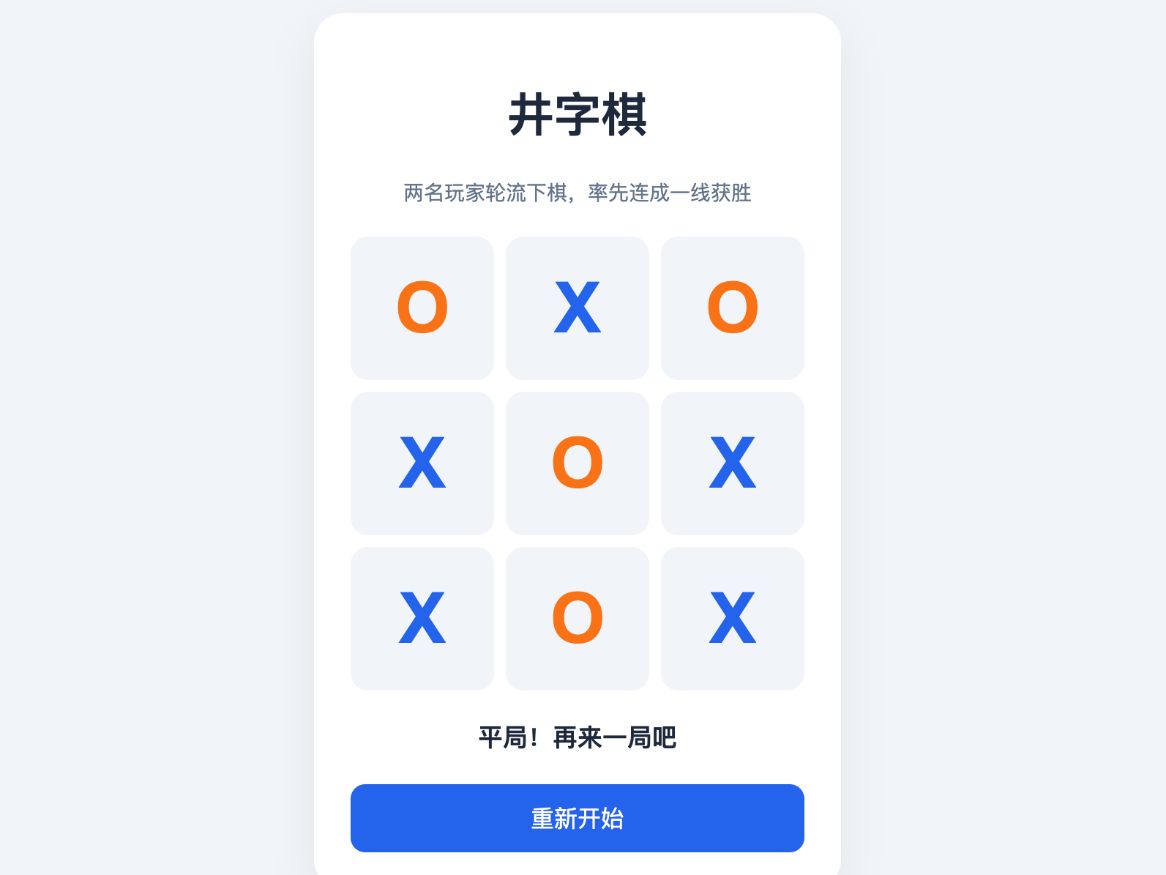
本项目使用 HTML、CSS 和 JavaScript 实现一个简单的井字棋小游戏。支持双人轮流下棋、自动判断胜负、平局检测、获胜位置高亮和重新开始等功能。整个项目无需安装第三方依赖,只需一个 HTML 文件即可运行,适合前端初学者学习网页交互与基础游戏逻辑。
1
搭建框架
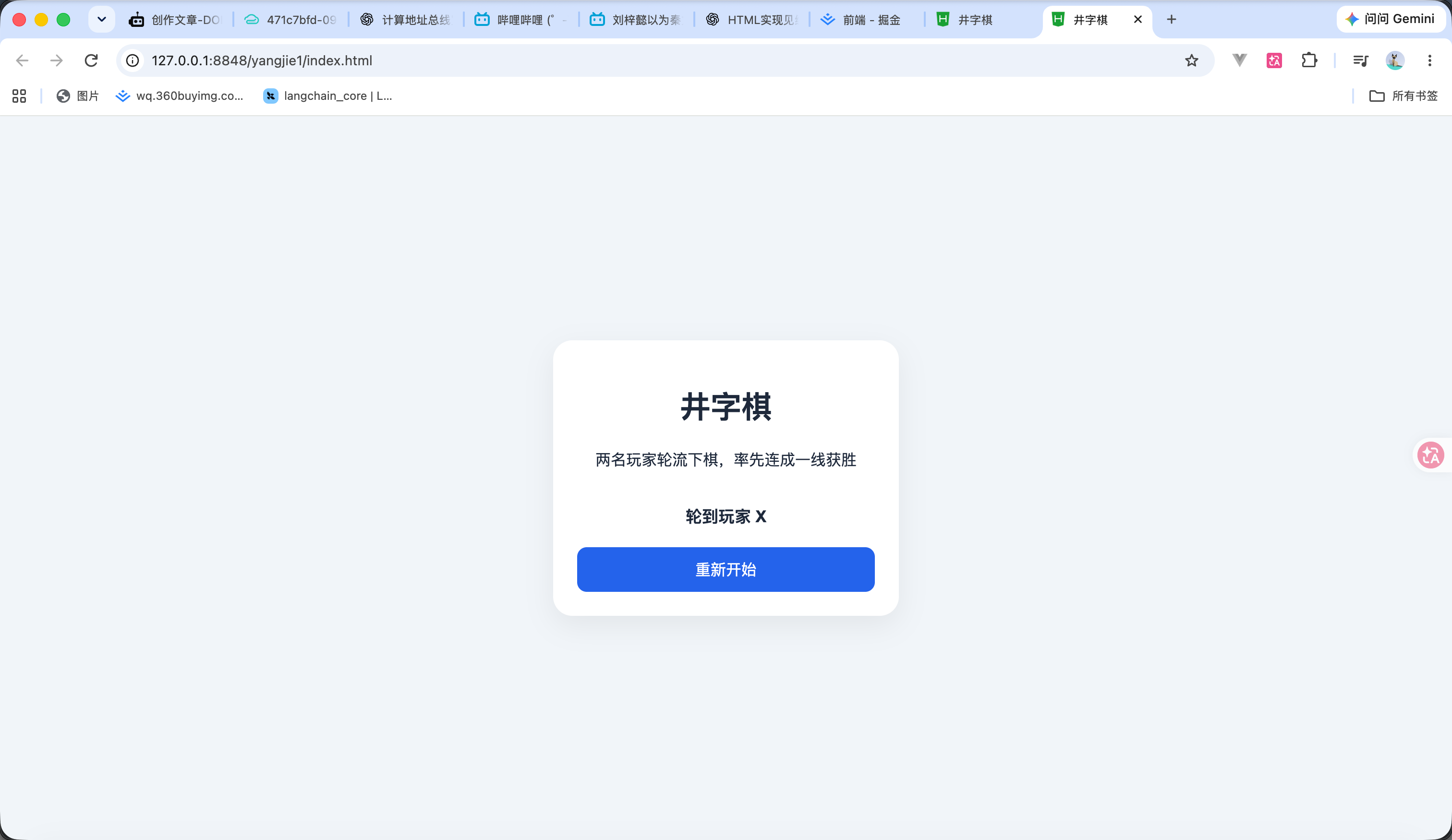
首先我们先搭建一个简单的架构 如图所示 代码如下
<!DOCTYPE html>
<html lang="zh-CN">
<head>
<meta charset="UTF-8">
<meta name="viewport" content="width=device-width, initial-scale=1.0">
<title>井字棋</title>
<style>
* {
box-sizing: border-box;
}
body {
margin: 0;
min-height: 100vh;
display: flex;
justify-content: center;
align-items: center;
background: #f1f5f9;
font-family: Arial, sans-serif;
color: #1e293b;
}
.game {
width: 90%;
max-width: 360px;
padding: 25px;
background: white;
border-radius: 20px;
box-shadow: 0 10px 30px #0001;
text-align: center;
}
.board {
display: grid;
grid-template-columns: repeat(3, 1fr);
gap: 8px;
}
.cell {
aspect-ratio: 1;
border: none;
border-radius: 12px;
background: #f1f5f9;
font-size: 48px;
font-weight: bold;
color: #2563eb;
cursor: pointer;
}
.cell:hover {
background: #e2e8f0;
}
.cell.o {
color: #f97316;
}
.cell.win {
background: #bbf7d0;
}
#status {
margin: 20px 0;
font-size: 17px;
font-weight: bold;
}
.restart {
width: 100%;
padding: 12px;
border: none;
border-radius: 10px;
background: #2563eb;
color: white;
font-size: 16px;
cursor: pointer;
}
</style>
</head>
<body>
<div class="game">
<h1>井字棋</h1>
<p>两名玩家轮流下棋,率先连成一线获胜</p>
<div class="board" id="board"></div>
<div id="status">轮到玩家 X</div>
<button class="restart" onclick="restartGame()">重新开始</button>
</div>
<script>
// 后续步骤编写 JavaScript
</script>
</body>
</html>
2
绘制格子
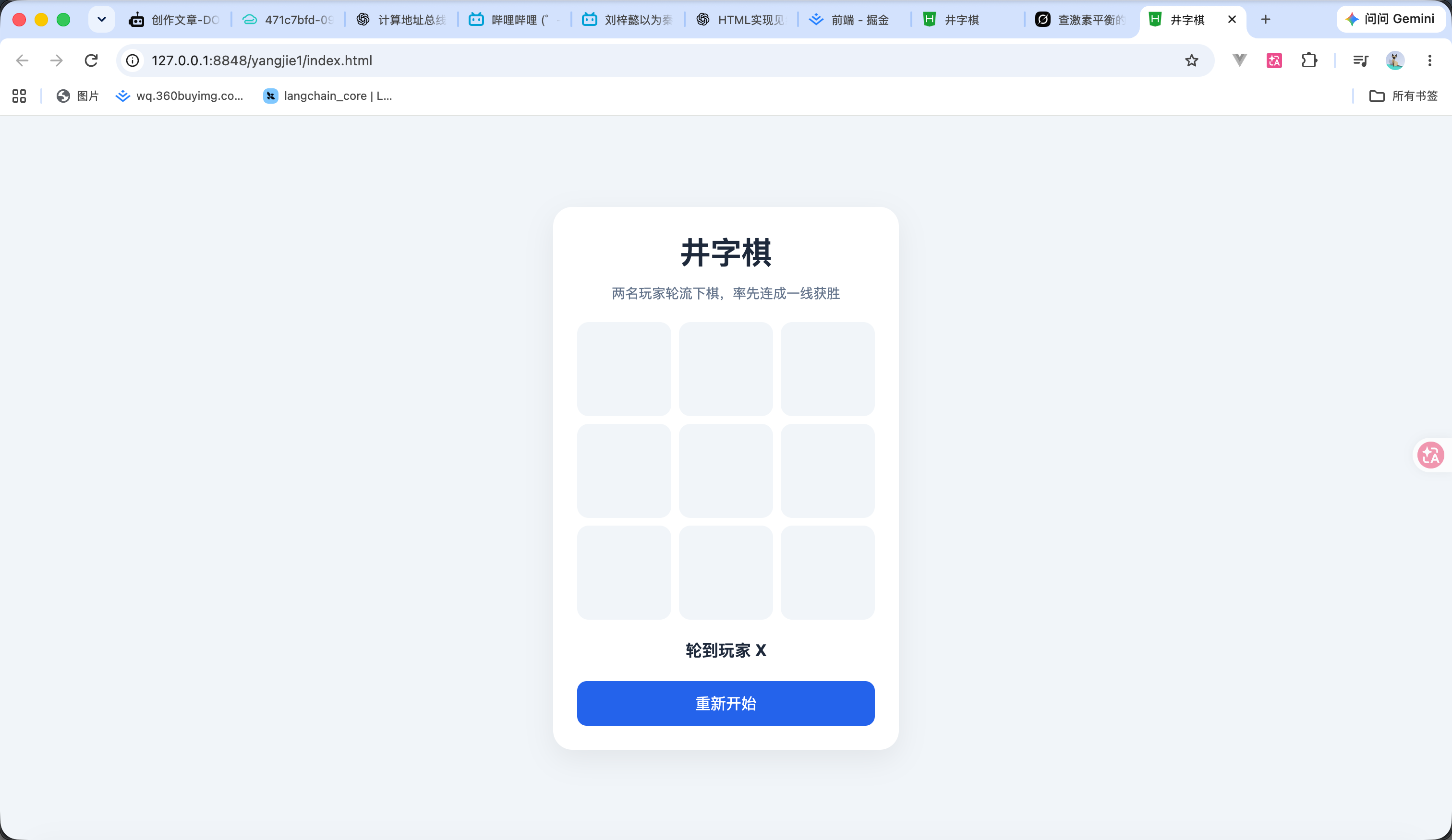
接下来我们来绘制键盘通过js
原理就是通过js循环往架构下添加九个按钮 然后给每个按钮添加样式
代码如下
<!DOCTYPE html>
<html lang="zh-CN">
<head>
<meta charset="UTF-8">
<meta name="viewport" content="width=device-width, initial-scale=1.0">
<title>井字棋</title>
<style>
* {
box-sizing: border-box;
}
body {
margin: 0;
min-height: 100vh;
display: flex;
justify-content: center;
align-items: center;
background: #f1f5f9;
font-family: Arial, sans-serif;
color: #1e293b;
}
.game {
width: 90%;
max-width: 360px;
padding: 25px;
background: white;
border-radius: 20px;
box-shadow: 0 10px 30px #0001;
text-align: center;
}
h1 {
margin: 0 0 10px;
}
.info {
color: #64748b;
margin-bottom: 20px;
font-size: 14px;
}
.board {
display: grid;
grid-template-columns: repeat(3, 1fr);
gap: 8px;
}
.cell {
aspect-ratio: 1;
border: none;
border-radius: 12px;
background: #f1f5f9;
font-size: 48px;
font-weight: bold;
color: #2563eb;
cursor: pointer;
}
.cell:hover {
background: #e2e8f0;
}
.cell.o {
color: #f97316;
}
.cell.win {
background: #bbf7d0;
}
#status {
margin: 20px 0;
font-size: 17px;
font-weight: bold;
}
.restart {
width: 100%;
padding: 12px;
border: none;
border-radius: 10px;
background: #2563eb;
color: white;
font-size: 16px;
cursor: pointer;
}
</style>
</head>
<body>
<div class="game">
<h1>井字棋</h1>
<div class="info">
两名玩家轮流下棋,率先连成一线获胜
</div>
<div class="board" id="board"></div>
<div id="status">轮到玩家 X</div>
<button class="restart" onclick="restartGame()">
重新开始
</button>
</div>
<script>
// 获取页面元素
const board = document.getElementById('board');
const statusText = document.getElementById('status');
// 棋盘数据,空字符串表示没有棋子
let cells = Array(9).fill('');
// 当前下棋的玩家
let currentPlayer = 'X';
// 游戏是否结束
let gameOver = false;
// 所有可能获胜的组合
const winPatterns = [
[0, 1, 2],
[3, 4, 5],
[6, 7, 8],
[0, 3, 6],
[1, 4, 7],
[2, 5, 8],
[0, 4, 8],
[2, 4, 6]
];
// 根据数组生成棋盘
function createBoard() {
board.innerHTML = '';
cells.forEach((value, index) => {
const cell = document.createElement('button');
cell.className = 'cell';
cell.textContent = value;
if (value === 'O') {
cell.classList.add('o');
}
board.appendChild(cell);
});
}
// 暂时用于重新生成空棋盘
function restartGame() {
cells = Array(9).fill('');
currentPlayer = 'X';
gameOver = false;
statusText.textContent = '轮到玩家 X';
createBoard();
}
// 初始化棋盘
createBoard();
</script>
</body>
</html>
3
放置棋子
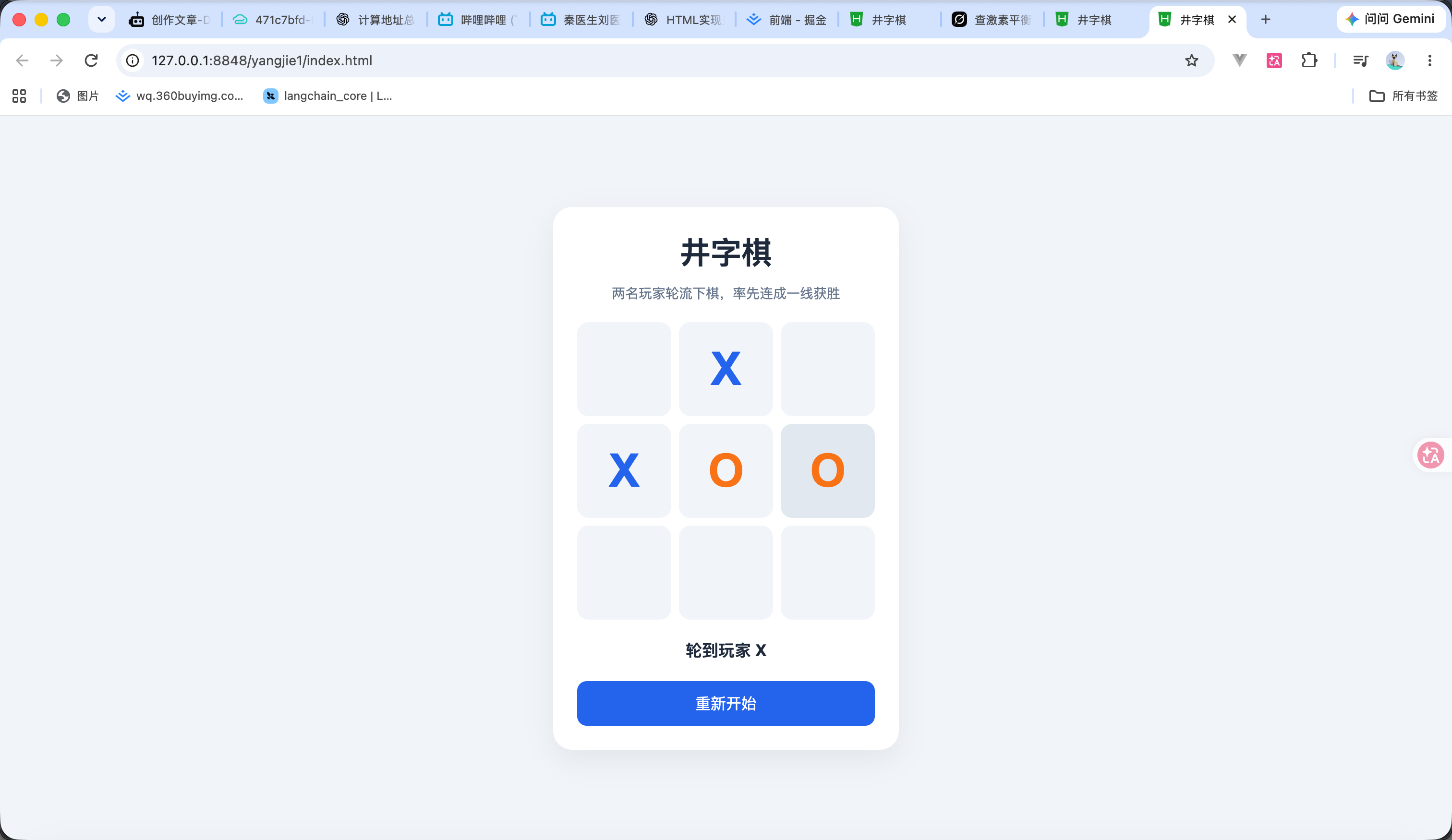
这些代码是完成了增加点击格子放置棋子、限制重复落子、自动切换玩家的功能。
原理就是通过 JavaScript 循环往棋盘容器中动态添加九个按钮,并给每个按钮设置样式和点击事件。玩家点击按钮后,程序将当前玩家的棋子保存到对应的数组位置,再根据数组数据重新渲染棋盘,同时切换当前玩家,实现双人轮流下棋的功能。
代码如下
<!DOCTYPE html>
<html lang="zh-CN">
<head>
<meta charset="UTF-8">
<meta name="viewport" content="width=device-width, initial-scale=1.0">
<title>井字棋</title>
<style>
* {
box-sizing: border-box;
}
body {
margin: 0;
min-height: 100vh;
display: flex;
justify-content: center;
align-items: center;
background: #f1f5f9;
font-family: Arial, sans-serif;
color: #1e293b;
}
.game {
width: 90%;
max-width: 360px;
padding: 25px;
background: white;
border-radius: 20px;
box-shadow: 0 10px 30px #0001;
text-align: center;
}
h1 {
margin: 0 0 10px;
}
.info {
color: #64748b;
margin-bottom: 20px;
font-size: 14px;
}
.board {
display: grid;
grid-template-columns: repeat(3, 1fr);
gap: 8px;
}
.cell {
aspect-ratio: 1;
border: none;
border-radius: 12px;
background: #f1f5f9;
font-size: 48px;
font-weight: bold;
color: #2563eb;
cursor: pointer;
}
.cell:hover {
background: #e2e8f0;
}
.cell.o {
color: #f97316;
}
.cell.win {
background: #bbf7d0;
}
#status {
margin: 20px 0;
font-size: 17px;
font-weight: bold;
}
.restart {
width: 100%;
padding: 12px;
border: none;
border-radius: 10px;
background: #2563eb;
color: white;
font-size: 16px;
cursor: pointer;
}
.restart:hover {
background: #1d4ed8;
}
</style>
</head>
<body>
<div class="game">
<h1>井字棋</h1>
<div class="info">
两名玩家轮流下棋,率先连成一线获胜
</div>
<div class="board" id="board"></div>
<div id="status">轮到玩家 X</div>
<button class="restart" onclick="restartGame()">
重新开始
</button>
</div>
<script>
// 获取页面元素
const board = document.getElementById('board');
const statusText = document.getElementById('status');
// 棋盘数据,空字符串表示没有棋子
let cells = Array(9).fill('');
// 当前下棋的玩家
let currentPlayer = 'X';
// 游戏是否结束
let gameOver = false;
// 所有可能获胜的组合,第四步使用
const winPatterns = [
[0, 1, 2],
[3, 4, 5],
[6, 7, 8],
[0, 3, 6],
[1, 4, 7],
[2, 5, 8],
[0, 4, 8],
[2, 4, 6]
];
// 创建棋盘
function createBoard() {
board.innerHTML = '';
cells.forEach((value, index) => {
const cell = document.createElement('button');
cell.className = 'cell';
cell.textContent = value;
if (value === 'O') {
cell.classList.add('o');
}
// 点击格子时执行落子
cell.addEventListener('click', () => play(index));
board.appendChild(cell);
});
}
// 玩家落子
function play(index) {
// 游戏结束或格子已有棋子时,不执行操作
if (gameOver || cells[index] !== '') {
return;
}
// 在当前格子放置棋子
cells[index] = currentPlayer;
// 切换玩家
currentPlayer = currentPlayer === 'X' ? 'O' : 'X';
// 更新提示文字
statusText.textContent = `轮到玩家 ${currentPlayer}`;
// 重新绘制棋盘
createBoard();
}
// 重新开始游戏
function restartGame() {
cells = Array(9).fill('');
currentPlayer = 'X';
gameOver = false;
statusText.textContent = '轮到玩家 X';
createBoard();
}
// 初始化棋盘
createBoard();
</script>
</body>
</html>
4
胜负判定
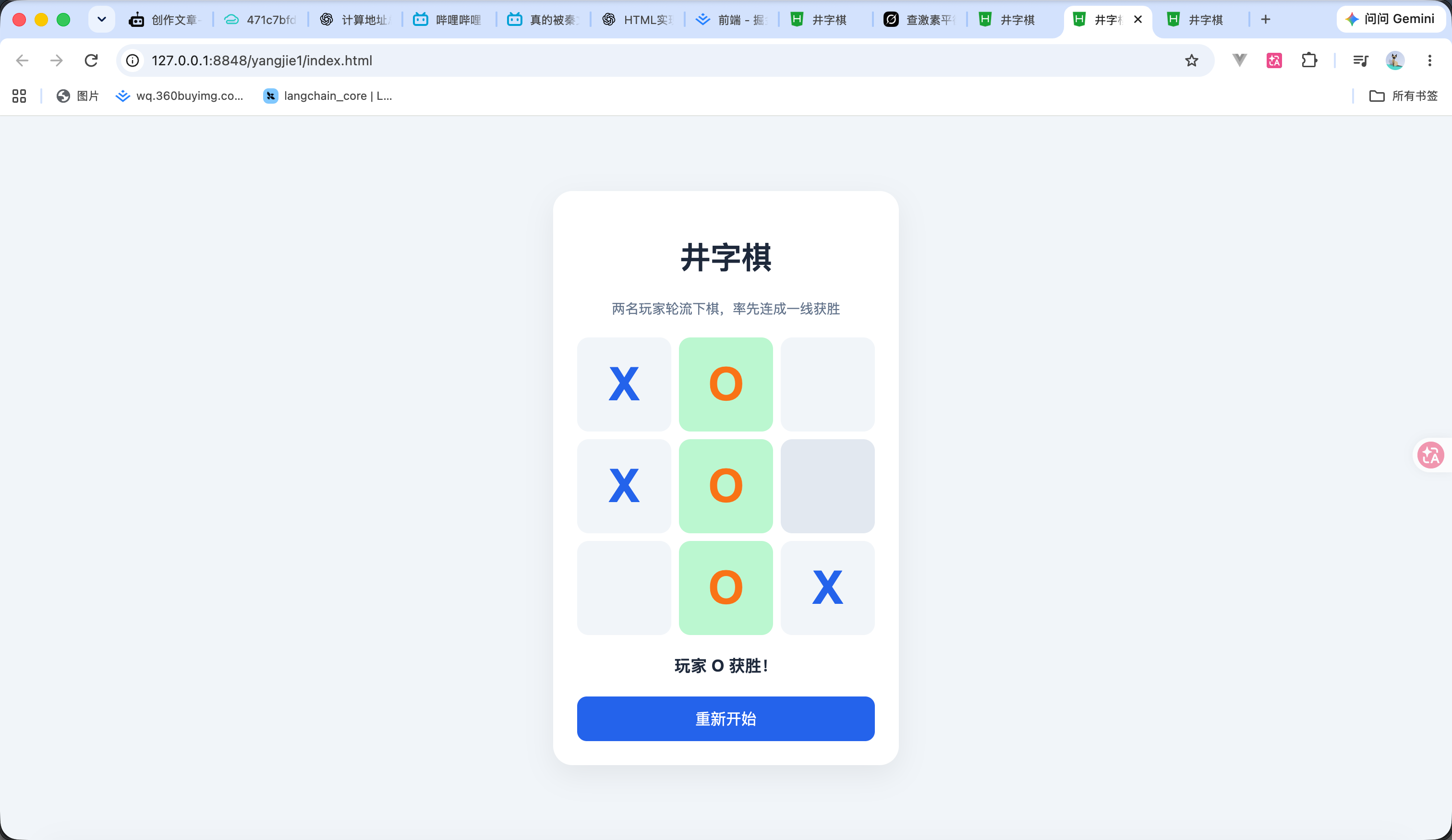
玩家落子后,程序会检查是否有三个相同的棋子连成一条线。如果满足条件,就宣布获胜并高亮对应格子;如果九个格子全部填满且无人获胜,则判定为平局。
原理就是通过预设获胜组合并检查棋盘数组,实现了自动判断胜负、检测平局和高亮获胜位置。
代码如下
<!DOCTYPE html>
<html lang="zh-CN">
<head>
<meta charset="UTF-8">
<meta name="viewport" content="width=device-width, initial-scale=1.0">
<title>井字棋</title>
<style>
* {
box-sizing: border-box;
}
body {
margin: 0;
min-height: 100vh;
display: flex;
justify-content: center;
align-items: center;
background: #f1f5f9;
font-family: Arial, sans-serif;
color: #1e293b;
}
.game {
width: 90%;
max-width: 360px;
padding: 25px;
background: white;
border-radius: 20px;
box-shadow: 0 10px 30px #0001;
text-align: center;
}
.info {
color: #64748b;
margin-bottom: 20px;
font-size: 14px;
}
.board {
display: grid;
grid-template-columns: repeat(3, 1fr);
gap: 8px;
}
.cell {
aspect-ratio: 1;
border: none;
border-radius: 12px;
background: #f1f5f9;
font-size: 48px;
font-weight: bold;
color: #2563eb;
cursor: pointer;
}
.cell:hover {
background: #e2e8f0;
}
.cell.o {
color: #f97316;
}
.cell.win {
background: #bbf7d0;
}
#status {
margin: 20px 0;
font-size: 17px;
font-weight: bold;
}
.restart {
width: 100%;
padding: 12px;
border: none;
border-radius: 10px;
background: #2563eb;
color: white;
font-size: 16px;
cursor: pointer;
}
</style>
</head>
<body>
<div class="game">
<h1>井字棋</h1>
<div class="info">两名玩家轮流下棋,率先连成一线获胜</div>
<div class="board" id="board"></div>
<div id="status">轮到玩家 X</div>
<button class="restart" onclick="restartGame()">重新开始</button>
</div>
<script>
const board = document.getElementById('board');
const statusText = document.getElementById('status');
let cells = Array(9).fill('');
let currentPlayer = 'X';
let gameOver = false;
// 所有可能获胜的组合
const winPatterns = [
[0, 1, 2],
[3, 4, 5],
[6, 7, 8],
[0, 3, 6],
[1, 4, 7],
[2, 5, 8],
[0, 4, 8],
[2, 4, 6]
];
// 创建棋盘
function createBoard() {
board.innerHTML = '';
cells.forEach((value, index) => {
const cell = document.createElement('button');
cell.className = 'cell';
cell.textContent = value;
if (value === 'O') {
cell.classList.add('o');
}
cell.addEventListener('click', () => play(index));
board.appendChild(cell);
});
}
// 玩家落子与胜负判断
function play(index) {
if (gameOver || cells[index] !== '') return;
cells[index] = currentPlayer;
// 查找是否存在获胜组合
const pattern = winPatterns.find(line =>
line.every(i => cells[i] === currentPlayer)
);
if (pattern) {
gameOver = true;
createBoard();
// 高亮获胜的三个格子
pattern.forEach(index => {
board.children[index].classList.add('win');
});
statusText.textContent = `玩家 ${currentPlayer} 获胜!`;
return;
}
// 检查是否平局
if (cells.every(cell => cell !== '')) {
gameOver = true;
createBoard();
statusText.textContent = '平局!再来一局吧';
return;
}
// 切换玩家
currentPlayer = currentPlayer === 'X' ? 'O' : 'X';
statusText.textContent = `轮到玩家 ${currentPlayer}`;
createBoard();
}
// 重新开始游戏
function restartGame() {
cells = Array(9).fill('');
currentPlayer = 'X';
gameOver = false;
statusText.textContent = '轮到玩家 X';
createBoard();
}
// 初始化棋盘
createBoard();
</script>
</body>
</html>
5
重开&演示
我们添加重新开始功能 就是把数据清空一切回到最初即可 代码如下 完整效果看视频
<!DOCTYPE html>
<html lang="zh-CN">
<head>
<meta charset="UTF-8">
<meta name="viewport" content="width=device-width, initial-scale=1.0">
<title>井字棋</title>
<style>
* {
box-sizing: border-box;
}
body {
margin: 0;
min-height: 100vh;
display: flex;
justify-content: center;
align-items: center;
background: #f1f5f9;
font-family: Arial, sans-serif;
color: #1e293b;
}
.game {
width: 90%;
max-width: 360px;
padding: 25px;
background: white;
border-radius: 20px;
box-shadow: 0 10px 30px #0001;
text-align: center;
}
.info {
color: #64748b;
margin-bottom: 20px;
font-size: 14px;
}
.board {
display: grid;
grid-template-columns: repeat(3, 1fr);
gap: 8px;
}
.cell {
aspect-ratio: 1;
border: none;
border-radius: 12px;
background: #f1f5f9;
font-size: 48px;
font-weight: bold;
color: #2563eb;
cursor: pointer;
}
.cell:hover {
background: #e2e8f0;
}
.cell.o {
color: #f97316;
}
.cell.win {
background: #bbf7d0;
}
#status {
margin: 20px 0;
font-size: 17px;
font-weight: bold;
}
.restart {
width: 100%;
padding: 12px;
border: none;
border-radius: 10px;
background: #2563eb;
color: white;
font-size: 16px;
cursor: pointer;
}
.restart:hover {
background: #1d4ed8;
}
</style>
</head>
<body>
<div class="game">
<h1>井字棋</h1>
<div class="info">两名玩家轮流下棋,率先连成一线获胜</div>
<div class="board" id="board"></div>
<div id="status">轮到玩家 X</div>
<button class="restart" onclick="restartGame()">重新开始</button>
</div>
<script>
const board = document.getElementById('board');
const statusText = document.getElementById('status');
let cells = Array(9).fill('');
let currentPlayer = 'X';
let gameOver = false;
// 所有可能获胜的组合
const winPatterns = [
[0, 1, 2],
[3, 4, 5],
[6, 7, 8],
[0, 3, 6],
[1, 4, 7],
[2, 5, 8],
[0, 4, 8],
[2, 4, 6]
];
// 创建棋盘
function createBoard() {
board.innerHTML = '';
cells.forEach((value, index) => {
const cell = document.createElement('button');
cell.className = 'cell';
cell.textContent = value;
if (value === 'O') {
cell.classList.add('o');
}
cell.addEventListener('click', () => play(index));
board.appendChild(cell);
});
}
// 玩家落子与胜负判断
function play(index) {
if (gameOver || cells[index] !== '') return;
cells[index] = currentPlayer;
// 判断是否获胜
const pattern = winPatterns.find(line =>
line.every(i => cells[i] === currentPlayer)
);
if (pattern) {
gameOver = true;
createBoard();
// 高亮获胜的三个格子
pattern.forEach(index => {
board.children[index].classList.add('win');
});
statusText.textContent = `玩家 ${currentPlayer} 获胜!`;
return;
}
// 判断是否平局
if (cells.every(cell => cell !== '')) {
gameOver = true;
createBoard();
statusText.textContent = '平局!再来一局吧';
return;
}
// 切换玩家
currentPlayer = currentPlayer === 'X' ? 'O' : 'X';
statusText.textContent = `轮到玩家 ${currentPlayer}`;
createBoard();
}
// 重新开始游戏
function restartGame() {
cells = Array(9).fill('');
currentPlayer = 'X';
gameOver = false;
statusText.textContent = '轮到玩家 X';
createBoard();
}
// 初始化游戏
createBoard();
</script>
</body>
</html>
 0
0 0
0 0
0 qq空间
qq空间  微博
微博  复制链接
复制链接  分享
分享  本文未经作者允许授权,禁止转载
 更多相关项目
猜你喜欢
评论/提问(已发布 0 条)

 评论
评论  收藏
收藏  分享
分享  下载
下载  举报
举报  回顶部
回顶部