Vue 实现 2048小游戏

 0
0 0
0 0
0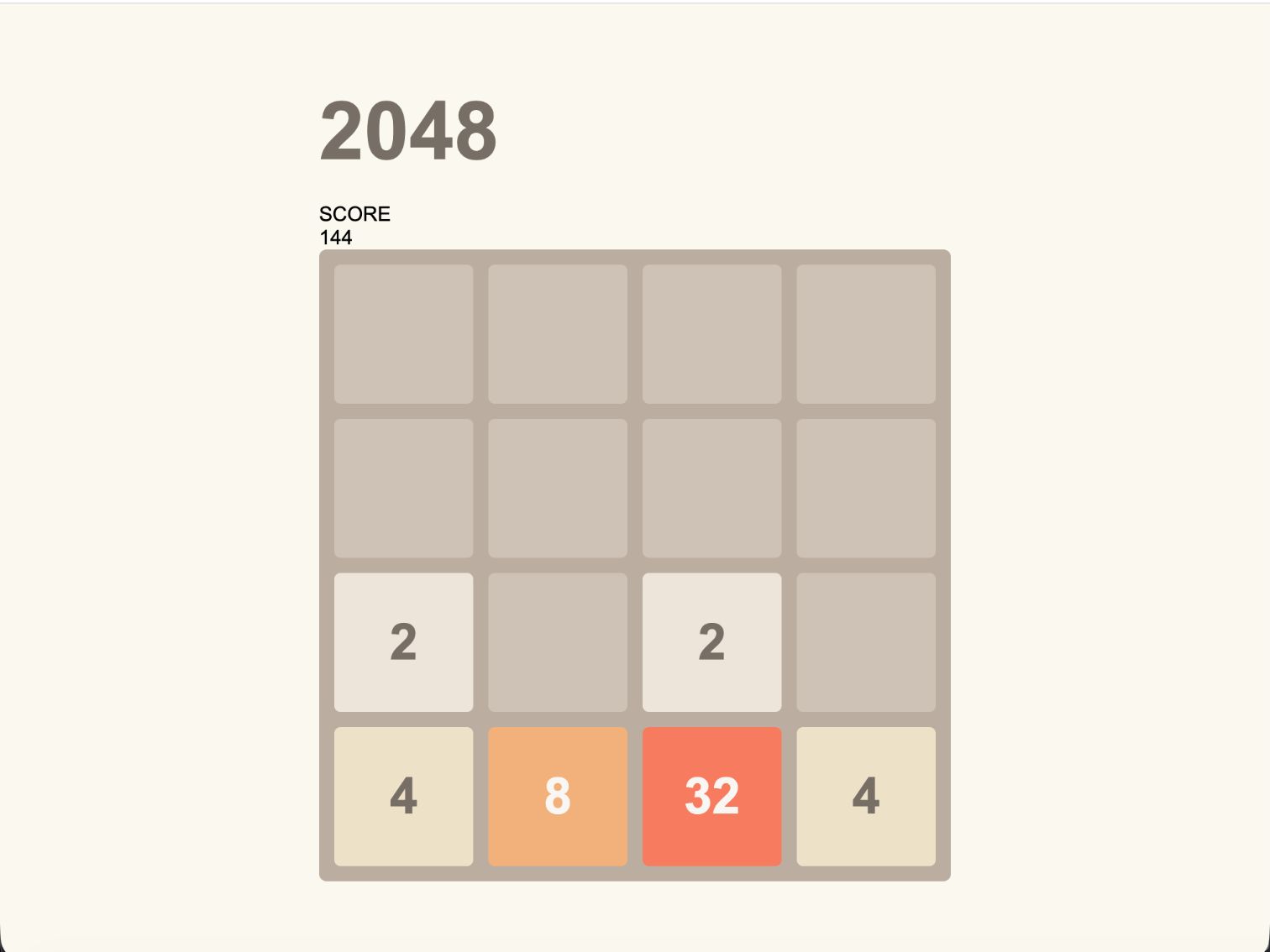
来玩一局经典的 2048!通过上下左右移动数字,让相同的数字不断合并,在有限的棋盘空间中规划每一步,挑战更高的数字与分数。本文以制作一个真正可玩的 2048 小游戏为主,带你完成数字生成、滑动、合并、计分和胜负判断等核心玩法,同时使用 Vue 3 + TypeScript 处理游戏状态、棋盘数据和交互, 适合作为 Vue 入门与小游戏实战练习。
1
创建棋盘
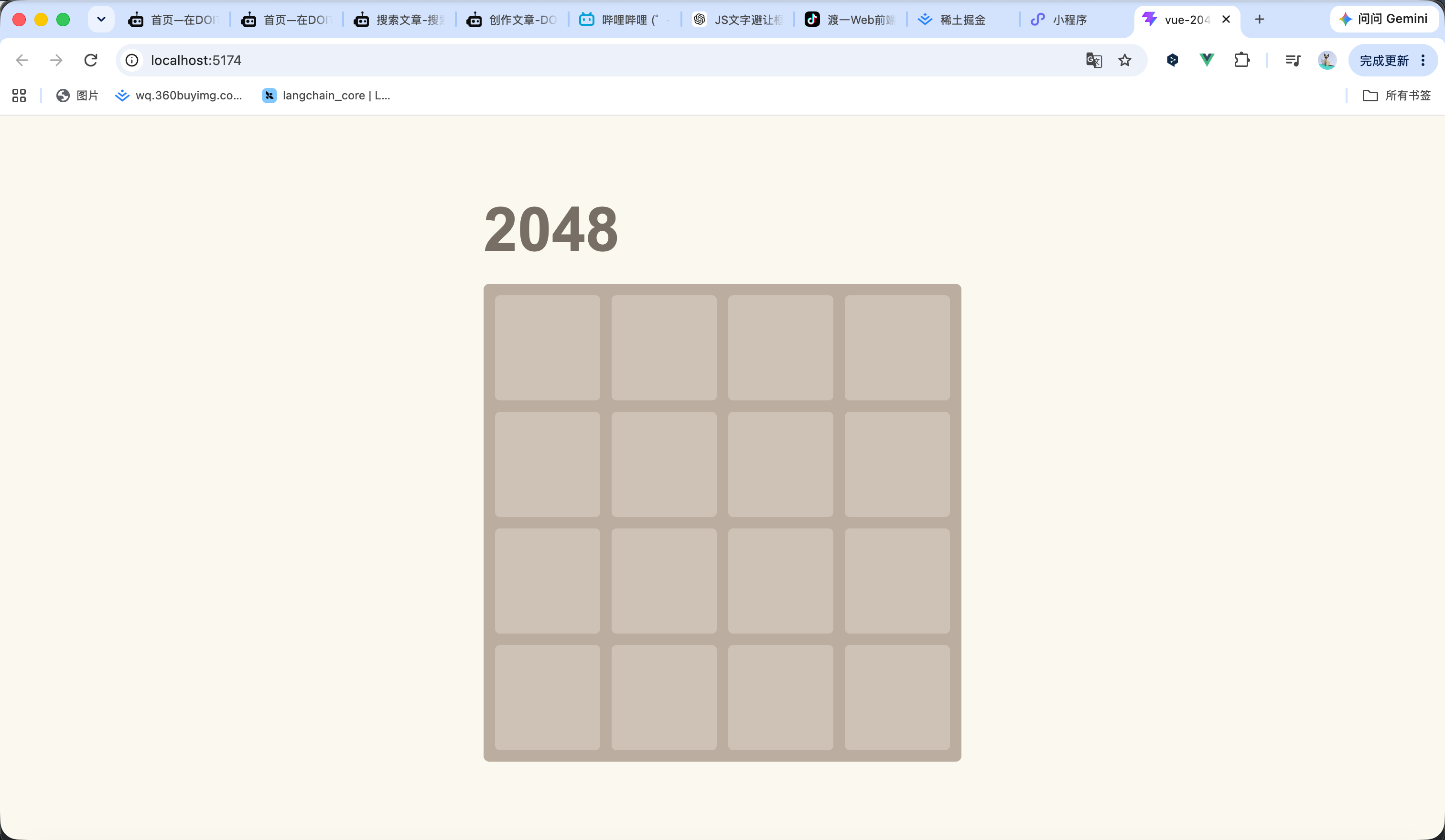
我们创建16个格子 每个格子都是一个div 进行for循环16次即可 效果如图1所示
<script setup lang="ts">
</script>
<template>
<div class="game">
<!-- 游戏标题 -->
<h1 class="title">
2048
</h1>
<!-- 游戏棋盘 -->
<div class="board">
<!-- 暂时创建 16 个格子 -->
<div
v-for="index in 16"
:key="index"
class="cell"
></div>
</div>
</div>
</template>
<style>
* {
box-sizing: border-box;
}
body {
margin: 0;
min-height: 100vh;
display: flex;
justify-content: center;
align-items: center;
background: #faf8ef;
font-family: Arial, Helvetica, sans-serif;
}
.game {
width: 500px;
max-width: calc(100vw - 30px);
}
.title {
margin: 0 0 20px;
color: #776e65;
font-size: 64px;
font-weight: bold;
}
.board {
display: grid;
/* 4 列 */
grid-template-columns: repeat(4, 1fr);
/* 格子之间的间距 */
gap: 12px;
/* 棋盘内边距 */
padding: 12px;
background: #bbada0;
border-radius: 6px;
}
.cell {
/* 保持格子宽高相等 */
aspect-ratio: 1;
display: flex;
justify-content: center;
align-items: center;
background: #cdc1b4;
border-radius: 5px;
}
</style>
2
随机生成
我们的棋盘是一个二维数组 然后我们把刚刚的方格循环改变一下 换成根据数组进行循环次数 然后我们开始生成随机数 我这边是先生成一个随机数字 然后循环获取所有没有数字的位置 最后 把随机数放到随机的位置 代码如下 效果看视频
<script setup lang="ts">
import { onMounted, ref } from 'vue'
/**
* 游戏棋盘
*/
const board = ref<number[][]>([
[0, 0, 0, 0],
[0, 0, 0, 0],
[0, 0, 0, 0],
[0, 0, 0, 0]
])
/**
* 随机生成一个数字
*/
function addRandomTile() {
const emptyCells: { row: number; col: number }[] = []
// 查找所有空格
for (let row = 0; row < board.value.length; row++) {
for (let col = 0; col < board.value[row].length; col++) {
if (board.value[row][col] === 0) {
emptyCells.push({
row,
col
})
}
}
}
// 没有空格时直接返回
if (emptyCells.length === 0) {
return
}
// 随机选择一个空格
const randomIndex = Math.floor(Math.random() * emptyCells.length)
const cell = emptyCells[randomIndex]
// 随机生成 2 或 4
board.value[cell.row][cell.col] =
Math.random() < 0.9 ? 2 : 4
}
/**
* 初始化游戏
*/
function initGame() {
// 清空棋盘
board.value = [
[0, 0, 0, 0],
[0, 0, 0, 0],
[0, 0, 0, 0],
[0, 0, 0, 0]
]
// 开始时生成两个数字
addRandomTile()
addRandomTile()
}
onMounted(() => {
initGame()
})
</script>
<template>
<div class="game">
<!-- 游戏标题 -->
<h1 class="title">
2048
</h1>
<!-- 游戏棋盘 -->
<div
class="board"
:style="{
gridTemplateColumns: `repeat(${board[0].length}, 1fr)`
}"
>
<!-- 根据二维数组生成棋盘 -->
<div
v-for="(value, index) in board.flat()"
:key="index"
class="cell"
>
{{ value}}
</div>
</div>
</div>
</template>
<style>
* {
box-sizing: border-box;
}
body {
margin: 0;
min-height: 100vh;
display: flex;
justify-content: center;
align-items: center;
background: #faf8ef;
font-family: Arial, Helvetica, sans-serif;
}
.game {
width: 500px;
max-width: calc(100vw - 30px);
}
.title {
margin: 0 0 20px;
color: #776e65;
font-size: 64px;
font-weight: bold;
}
.board {
display: grid;
/* 4 列 */
grid-template-columns: repeat(4, 1fr);
/* 格子之间的间距 */
gap: 12px;
/* 棋盘内边距 */
padding: 12px;
background: #bbada0;
border-radius: 6px;
}
.cell {
/* 保持格子宽高相等 */
aspect-ratio: 1;
display: flex;
justify-content: center;
align-items: center;
background: #cdc1b4;
border-radius: 5px;
}
</style>
3
样式调整
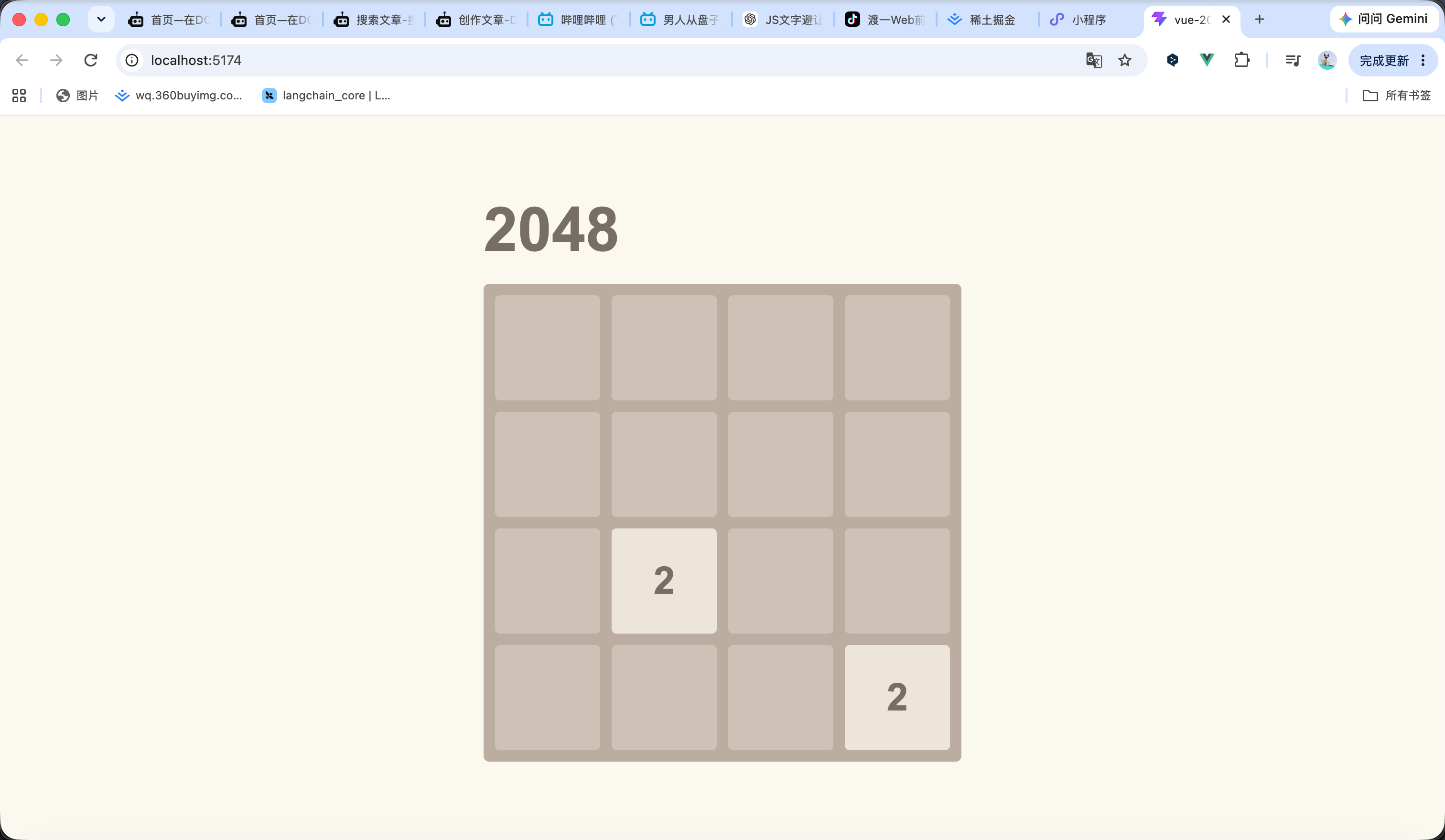
接下来我们来调整样式 我们需要让不同的数字变成不同颜色 再让 为0的数字进行隐藏
<script setup lang="ts">
import { onMounted, ref } from 'vue'
/**
* 游戏棋盘
*/
const board = ref<number[][]>([
[0, 0, 0, 0],
[0, 0, 0, 0],
[0, 0, 0, 0],
[0, 0, 0, 0]
])
/**
* 随机生成一个数字
*/
function addRandomTile() {
const emptyCells: { row: number; col: number }[] = []
// 查找所有空格
for (let row = 0; row < board.value.length; row++) {
for (let col = 0; col < board.value[row].length; col++) {
if (board.value[row][col] === 0) {
emptyCells.push({
row,
col
})
}
}
}
// 没有空格时直接返回
if (emptyCells.length === 0) {
return
}
// 随机选择一个空格
const randomIndex = Math.floor(Math.random() * emptyCells.length)
const cell = emptyCells[randomIndex]
// 随机生成 2 或 4
board.value[cell.row][cell.col] =
Math.random() < 0.9 ? 2 : 4
}
/**
* 初始化游戏
*/
function initGame() {
// 清空棋盘
board.value = [
[0, 0, 0, 0],
[0, 0, 0, 0],
[0, 0, 0, 0],
[0, 0, 0, 0]
]
// 开始时生成两个数字
addRandomTile()
addRandomTile()
}
onMounted(() => {
initGame()
})
</script>
<template>
<div class="game">
<!-- 游戏标题 -->
<h1 class="title">
2048
</h1>
<!-- 游戏棋盘 -->
<div
class="board"
:style="{
gridTemplateColumns: `repeat(${board[0].length}, 1fr)`
}"
>
<!-- 根据二维数组生成棋盘 -->
<div
v-for="(value, index) in board.flat()"
:key="index"
class="cell"
:class="`cell-${value}`"
>
{{ value || '' }}
</div>
</div>
</div>
</template>
<style>
* {
box-sizing: border-box;
}
body {
margin: 0;
min-height: 100vh;
display: flex;
justify-content: center;
align-items: center;
background: #faf8ef;
font-family: Arial, Helvetica, sans-serif;
}
.game {
width: 500px;
max-width: calc(100vw - 30px);
}
.title {
margin: 0 0 20px;
color: #776e65;
font-size: 64px;
font-weight: bold;
}
.board {
display: grid;
gap: 12px;
padding: 12px;
background: #bbada0;
border-radius: 6px;
}
.cell {
aspect-ratio: 1;
display: flex;
justify-content: center;
align-items: center;
background: #cdc1b4;
border-radius: 5px;
color: #776e65;
font-size: 40px;
font-weight: bold;
}
/* 2 */
.cell-2 {
background: #eee4da;
}
/* 4 */
.cell-4 {
background: #ede0c8;
}
/* 8 */
.cell-8 {
background: #f2b179;
color: #f9f6f2;
}
/* 16 */
.cell-16 {
background: #f59563;
color: #f9f6f2;
}
/* 32 */
.cell-32 {
background: #f67c5f;
color: #f9f6f2;
}
/* 64 */
.cell-64 {
background: #f65e3b;
color: #f9f6f2;
}
/* 128 */
.cell-128 {
background: #edcf72;
color: #f9f6f2;
font-size: 32px;
}
/* 256 */
.cell-256 {
background: #edcc61;
color: #f9f6f2;
font-size: 32px;
}
/* 512 */
.cell-512 {
background: #edc850;
color: #f9f6f2;
font-size: 32px;
}
/* 1024 */
.cell-1024 {
background: #edc53f;
color: #f9f6f2;
font-size: 26px;
}
/* 2048 */
.cell-2048 {
background: #edc22e;
color: #f9f6f2;
font-size: 26px;
}
</style>
4
移动&合并
接下来我们来写移动相关的代码 首先是监听你键盘的 上下左右按键 当出发的时候调用相对的方法 具体的方法就是 先计算下一行数字的位置 判断是否相同 如果相同就合并 如果为0就替换掉 如果不同就不更新 然后在键盘发送变化后都需要再次调用重新在为0的位置生成数字 效果看视频
<script setup lang="ts">
import {
onBeforeUnmount,
onMounted,
ref
} from 'vue'
/**
* 游戏棋盘
*/
const board = ref<number[][]>([
[0, 0, 0, 0],
[0, 0, 0, 0],
[0, 0, 0, 0],
[0, 0, 0, 0]
])
/**
* 随机生成一个数字
*/
function addRandomTile() {
const emptyCells: { row: number; col: number }[] = []
// 查找所有空格
for (let row = 0; row < board.value.length; row++) {
for (let col = 0; col < board.value[row].length; col++) {
if (board.value[row][col] === 0) {
emptyCells.push({
row,
col
})
}
}
}
// 没有空格时直接返回
if (emptyCells.length === 0) {
return
}
// 随机选择一个空格
const randomIndex = Math.floor(
Math.random() * emptyCells.length
)
const cell = emptyCells[randomIndex]
// 随机生成 2 或 4
board.value[cell.row][cell.col] =
Math.random() < 0.9 ? 2 : 4
}
/**
* 初始化游戏
*/
function initGame() {
// 清空棋盘
board.value = [
[0, 0, 0, 0],
[0, 0, 0, 0],
[0, 0, 0, 0],
[0, 0, 0, 0]
]
// 开始时生成两个数字
addRandomTile()
addRandomTile()
}
/**
* 移动一行数字
*/
function moveRow(row: number[]) {
// 去掉所有空格
const numbers = row.filter(value => value !== 0)
const result: number[] = []
for (let i = 0; i < numbers.length; i++) {
// 当前数字和下一个数字相同
if (
i < numbers.length - 1 &&
numbers[i] === numbers[i + 1]
) {
// 合并数字
result.push(numbers[i] * 2)
// 跳过已经合并的数字
i++
} else {
result.push(numbers[i])
}
}
// 补充空格
while (result.length < row.length) {
result.push(0)
}
return result
}
/**
* 向左移动
*/
function moveLeft() {
let moved = false
for (let row = 0; row < board.value.length; row++) {
const oldRow = [...board.value[row]]
const newRow = moveRow(oldRow)
// 判断当前行是否发生变化
if (
JSON.stringify(oldRow) !==
JSON.stringify(newRow)
) {
moved = true
}
board.value[row] = newRow
}
return moved
}
/**
* 向右移动
*/
function moveRight() {
let moved = false
for (let row = 0; row < board.value.length; row++) {
const oldRow = [...board.value[row]]
const reversedRow = [...oldRow].reverse()
const newRow = moveRow(reversedRow).reverse()
// 判断当前行是否发生变化
if (
JSON.stringify(oldRow) !==
JSON.stringify(newRow)
) {
moved = true
}
board.value[row] = newRow
}
return moved
}
/**
* 向上移动
*/
function moveUp() {
const rows = board.value.length
const cols = board.value[0].length
let moved = false
for (let col = 0; col < cols; col++) {
const column: number[] = []
// 获取当前列
for (let row = 0; row < rows; row++) {
column.push(board.value[row][col])
}
const oldColumn = [...column]
// 移动这一列
const newColumn = moveRow(column)
// 判断当前列是否发生变化
if (
JSON.stringify(oldColumn) !==
JSON.stringify(newColumn)
) {
moved = true
}
// 写回棋盘
for (let row = 0; row < rows; row++) {
board.value[row][col] = newColumn[row]
}
}
return moved
}
/**
* 向下移动
*/
function moveDown() {
const rows = board.value.length
const cols = board.value[0].length
let moved = false
for (let col = 0; col < cols; col++) {
const column: number[] = []
// 获取当前列
for (let row = 0; row < rows; row++) {
column.push(board.value[row][col])
}
const oldColumn = [...column]
// 反转后移动
const newColumn = moveRow(
[...column].reverse()
).reverse()
// 判断当前列是否发生变化
if (
JSON.stringify(oldColumn) !==
JSON.stringify(newColumn)
) {
moved = true
}
// 写回棋盘
for (let row = 0; row < rows; row++) {
board.value[row][col] = newColumn[row]
}
}
return moved
}
/**
* 执行移动
*/
function move(
direction: 'left' | 'right' | 'up' | 'down'
) {
let moved = false
switch (direction) {
case 'left':
moved = moveLeft()
break
case 'right':
moved = moveRight()
break
case 'up':
moved = moveUp()
break
case 'down':
moved = moveDown()
break
}
// 棋盘发生变化后生成一个新的数字
if (moved) {
addRandomTile()
}
}
/**
* 监听键盘
*/
function handleKeydown(event: KeyboardEvent) {
switch (event.key) {
case 'ArrowLeft':
case 'a':
case 'A':
event.preventDefault()
move('left')
break
case 'ArrowRight':
case 'd':
case 'D':
event.preventDefault()
move('right')
break
case 'ArrowUp':
case 'w':
case 'W':
event.preventDefault()
move('up')
break
case 'ArrowDown':
case 's':
case 'S':
event.preventDefault()
move('down')
break
}
}
onMounted(() => {
initGame()
window.addEventListener(
'keydown',
handleKeydown
)
})
onBeforeUnmount(() => {
window.removeEventListener(
'keydown',
handleKeydown
)
})
</script>
<template>
<div class="game">
<!-- 游戏标题 -->
<h1 class="title">
2048
</h1>
<!-- 游戏棋盘 -->
<div
class="board"
:style="{
gridTemplateColumns:
`repeat(${board[0].length}, 1fr)`
}"
>
<!-- 根据二维数组生成棋盘 -->
<div
v-for="(value, index) in board.flat()"
:key="index"
class="cell"
:class="`cell-${value}`"
>
{{ value || '' }}
</div>
</div>
</div>
</template>
<style>
* {
box-sizing: border-box;
}
body {
margin: 0;
min-height: 100vh;
display: flex;
justify-content: center;
align-items: center;
background: #faf8ef;
font-family: Arial, Helvetica, sans-serif;
}
.game {
width: 500px;
max-width: calc(100vw - 30px);
}
.title {
margin: 0 0 20px;
color: #776e65;
font-size: 64px;
font-weight: bold;
}
.board {
display: grid;
gap: 12px;
padding: 12px;
background: #bbada0;
border-radius: 6px;
}
.cell {
aspect-ratio: 1;
display: flex;
justify-content: center;
align-items: center;
background: #cdc1b4;
border-radius: 5px;
color: #776e65;
font-size: 40px;
font-weight: bold;
}
/* 2 */
.cell-2 {
background: #eee4da;
}
/* 4 */
.cell-4 {
background: #ede0c8;
}
/* 8 */
.cell-8 {
background: #f2b179;
color: #f9f6f2;
}
/* 16 */
.cell-16 {
background: #f59563;
color: #f9f6f2;
}
/* 32 */
.cell-32 {
background: #f67c5f;
color: #f9f6f2;
}
/* 64 */
.cell-64 {
background: #f65e3b;
color: #f9f6f2;
}
/* 128 */
.cell-128 {
background: #edcf72;
color: #f9f6f2;
font-size: 32px;
}
/* 256 */
.cell-256 {
background: #edcc61;
color: #f9f6f2;
font-size: 32px;
}
/* 512 */
.cell-512 {
background: #edc850;
color: #f9f6f2;
font-size: 32px;
}
/* 1024 */
.cell-1024 {
background: #edc53f;
color: #f9f6f2;
font-size: 26px;
}
/* 2048 */
.cell-2048 {
background: #edc22e;
color: #f9f6f2;
font-size: 26px;
}
</style>
5
分数&结束

12
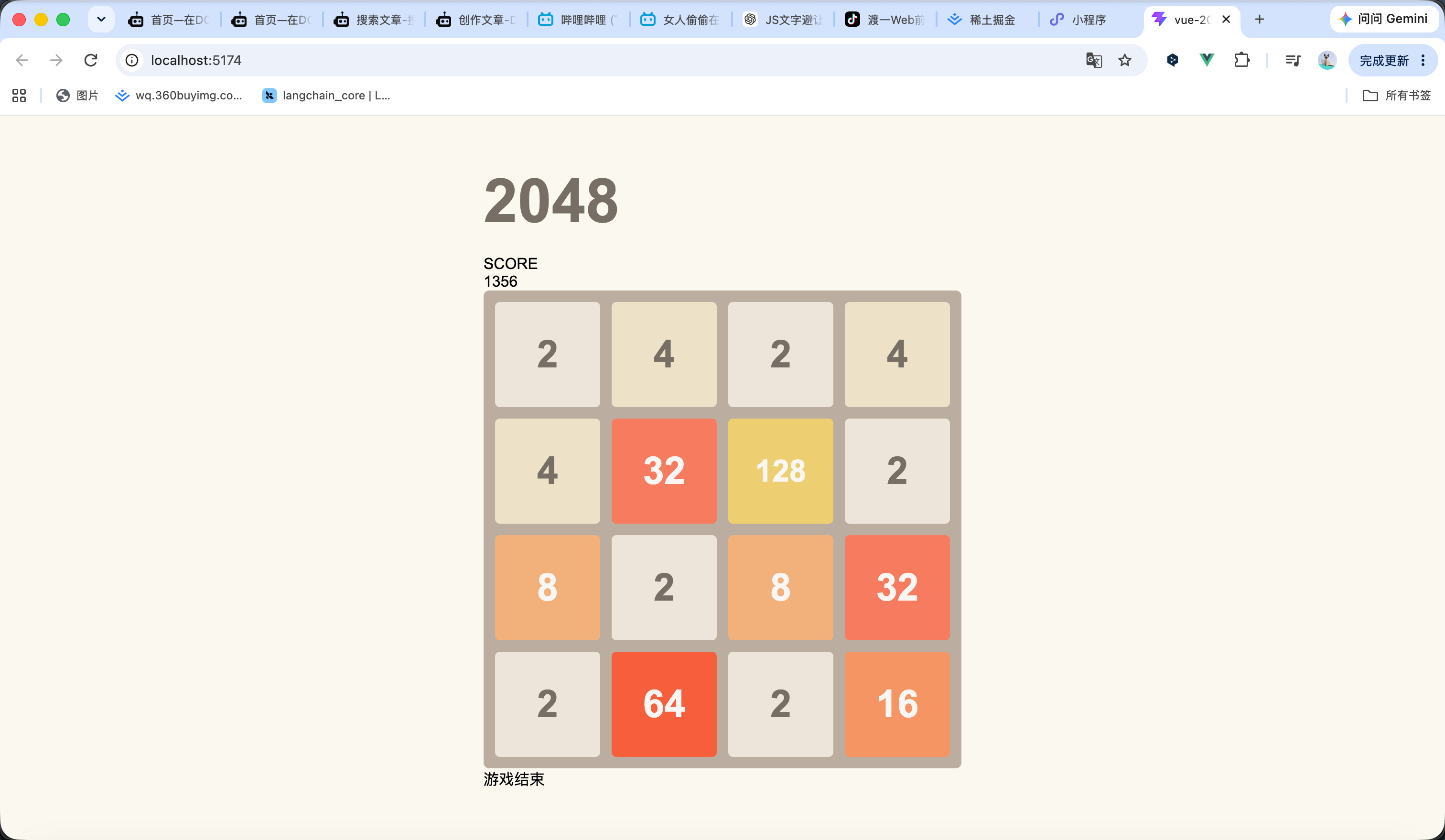
接下来就是进行分数的增加和游戏结束的判断 结束判断就是如果玩家按方向键后检查四个方向是否还可以进行合并 如果不能了那就属于游戏结束(预判四个方向合并后的下标进行判断是否相等) 分数增加就是合并后的数值进行叠加
<script setup lang="ts">
import {
onBeforeUnmount,
onMounted,
ref
} from 'vue'
/**
* 游戏棋盘
*/
const board = ref<number[][]>([
[0, 0, 0, 0],
[0, 0, 0, 0],
[0, 0, 0, 0],
[0, 0, 0, 0]
])
/**
* 游戏分数
*/
const score = ref(0)
/**
* 游戏是否结束
*/
const gameOver = ref(false)
/**
* 游戏是否胜利
*/
const gameWon = ref(false)
/**
* 随机生成一个数字
*/
function addRandomTile() {
const emptyCells: { row: number; col: number }[] = []
// 查找所有空格
for (let row = 0; row < board.value.length; row++) {
for (let col = 0; col < board.value[row].length; col++) {
if (board.value[row][col] === 0) {
emptyCells.push({
row,
col
})
}
}
}
// 没有空格时直接返回
if (emptyCells.length === 0) {
return
}
// 随机选择一个空格
const randomIndex = Math.floor(
Math.random() * emptyCells.length
)
const cell = emptyCells[randomIndex]
// 随机生成 2 或 4
board.value[cell.row][cell.col] =
Math.random() < 0.9 ? 2 : 4
}
/**
* 初始化游戏
*/
function initGame() {
// 清空棋盘
board.value = [
[0, 0, 0, 0],
[0, 0, 0, 0],
[0, 0, 0, 0],
[0, 0, 0, 0]
]
// 重置分数
score.value = 0
// 重置游戏状态
gameOver.value = false
gameWon.value = false
// 开始时生成两个数字
addRandomTile()
addRandomTile()
}
/**
* 移动一行数字
*/
function moveRow(row: number[]) {
// 去掉所有空格
const numbers = row.filter(value => value !== 0)
const result: number[] = []
for (let i = 0; i < numbers.length; i++) {
// 当前数字和下一个数字相同
if (
i < numbers.length - 1 &&
numbers[i] === numbers[i + 1]
) {
// 合并后的数字
const mergedValue = numbers[i] * 2
// 添加合并后的数字
result.push(mergedValue)
// 增加分数
score.value += mergedValue
// 判断是否达到 2048
if (mergedValue === 2048) {
gameWon.value = true
}
// 跳过已经合并的数字
i++
} else {
result.push(numbers[i])
}
}
// 补充空格
while (result.length < row.length) {
result.push(0)
}
return result
}
/**
* 向左移动
*/
function moveLeft() {
let moved = false
for (let row = 0; row < board.value.length; row++) {
const oldRow = [...board.value[row]]
const newRow = moveRow(oldRow)
// 判断当前行是否发生变化
if (
JSON.stringify(oldRow) !==
JSON.stringify(newRow)
) {
moved = true
}
board.value[row] = newRow
}
return moved
}
/**
* 向右移动
*/
function moveRight() {
let moved = false
for (let row = 0; row < board.value.length; row++) {
const oldRow = [...board.value[row]]
const reversedRow = [...oldRow].reverse()
const newRow = moveRow(reversedRow).reverse()
// 判断当前行是否发生变化
if (
JSON.stringify(oldRow) !==
JSON.stringify(newRow)
) {
moved = true
}
board.value[row] = newRow
}
return moved
}
/**
* 向上移动
*/
function moveUp() {
const rows = board.value.length
const cols = board.value[0].length
let moved = false
for (let col = 0; col < cols; col++) {
const column: number[] = []
// 获取当前列
for (let row = 0; row < rows; row++) {
column.push(board.value[row][col])
}
const oldColumn = [...column]
// 移动这一列
const newColumn = moveRow(column)
// 判断当前列是否发生变化
if (
JSON.stringify(oldColumn) !==
JSON.stringify(newColumn)
) {
moved = true
}
// 写回棋盘
for (let row = 0; row < rows; row++) {
board.value[row][col] = newColumn[row]
}
}
return moved
}
/**
* 向下移动
*/
function moveDown() {
const rows = board.value.length
const cols = board.value[0].length
let moved = false
for (let col = 0; col < cols; col++) {
const column: number[] = []
// 获取当前列
for (let row = 0; row < rows; row++) {
column.push(board.value[row][col])
}
const oldColumn = [...column]
// 反转后移动
const newColumn = moveRow(
[...column].reverse()
).reverse()
// 判断当前列是否发生变化
if (
JSON.stringify(oldColumn) !==
JSON.stringify(newColumn)
) {
moved = true
}
// 写回棋盘
for (let row = 0; row < rows; row++) {
board.value[row][col] = newColumn[row]
}
}
return moved
}
/**
* 判断是否还能移动
*/
function canMove() {
const rows = board.value.length
const cols = board.value[0].length
for (let row = 0; row < rows; row++) {
for (let col = 0; col < cols; col++) {
const value = board.value[row][col]
// 还有空格
if (value === 0) {
return true
}
// 检查右边是否可以合并
if (
col < cols - 1 &&
value === board.value[row][col + 1]
) {
return true
}
// 检查下面是否可以合并
if (
row < rows - 1 &&
value === board.value[row + 1][col]
) {
return true
}
}
}
return false
}
/**
* 执行移动
*/
function move(
direction: 'left' | 'right' | 'up' | 'down'
) {
// 游戏结束后不能继续操作
if (gameOver.value || gameWon.value) {
return
}
let moved = false
switch (direction) {
case 'left':
moved = moveLeft()
break
case 'right':
moved = moveRight()
break
case 'up':
moved = moveUp()
break
case 'down':
moved = moveDown()
break
}
// 棋盘没有发生变化
if (!moved) {
return
}
// 棋盘发生变化后生成一个新的数字
addRandomTile()
// 判断是否还能继续移动
if (!canMove()) {
gameOver.value = true
}
}
/**
* 监听键盘
*/
function handleKeydown(event: KeyboardEvent) {
switch (event.key) {
case 'ArrowLeft':
case 'a':
case 'A':
event.preventDefault()
move('left')
break
case 'ArrowRight':
case 'd':
case 'D':
event.preventDefault()
move('right')
break
case 'ArrowUp':
case 'w':
case 'W':
event.preventDefault()
move('up')
break
case 'ArrowDown':
case 's':
case 'S':
event.preventDefault()
move('down')
break
}
}
onMounted(() => {
initGame()
window.addEventListener(
'keydown',
handleKeydown
)
})
onBeforeUnmount(() => {
window.removeEventListener(
'keydown',
handleKeydown
)
})
</script>
<template>
<div class="game">
<!-- 游戏头部 -->
<div class="header">
<h1 class="title">
2048
</h1>
<div class="score">
<div class="score-label">
SCORE
</div>
<div class="score-value">
{{ score }}
</div>
</div>
</div>
<!-- 游戏棋盘 -->
<div
class="board"
:style="{
gridTemplateColumns:
`repeat(${board[0].length}, 1fr)`
}"
>
<!-- 根据二维数组生成棋盘 -->
<div
v-for="(value, index) in board.flat()"
:key="index"
class="cell"
:class="`cell-${value}`"
>
{{ value || '' }}
</div>
</div>
<!-- 游戏状态 -->
<div
v-if="gameOver || gameWon"
class="game-message"
>
<div v-if="gameWon">
你赢了!
</div>
<div v-else>
游戏结束
</div>
</div>
</div>
</template>
<style>
* {
box-sizing: border-box;
}
body {
margin: 0;
min-height: 100vh;
display: flex;
justify-content: center;
align-items: center;
background: #faf8ef;
font-family: Arial, Helvetica, sans-serif;
}
.game {
width: 500px;
max-width: calc(100vw - 30px);
}
.title {
margin: 0 0 20px;
color: #776e65;
font-size: 64px;
font-weight: bold;
}
.board {
display: grid;
gap: 12px;
padding: 12px;
background: #bbada0;
border-radius: 6px;
}
.cell {
aspect-ratio: 1;
display: flex;
justify-content: center;
align-items: center;
background: #cdc1b4;
border-radius: 5px;
color: #776e65;
font-size: 40px;
font-weight: bold;
}
/* 2 */
.cell-2 {
background: #eee4da;
}
/* 4 */
.cell-4 {
background: #ede0c8;
}
/* 8 */
.cell-8 {
background: #f2b179;
color: #f9f6f2;
}
/* 16 */
.cell-16 {
background: #f59563;
color: #f9f6f2;
}
/* 32 */
.cell-32 {
background: #f67c5f;
color: #f9f6f2;
}
/* 64 */
.cell-64 {
background: #f65e3b;
color: #f9f6f2;
}
/* 128 */
.cell-128 {
background: #edcf72;
color: #f9f6f2;
font-size: 32px;
}
/* 256 */
.cell-256 {
background: #edcc61;
color: #f9f6f2;
font-size: 32px;
}
/* 512 */
.cell-512 {
background: #edc850;
color: #f9f6f2;
font-size: 32px;
}
/* 1024 */
.cell-1024 {
background: #edc53f;
color: #f9f6f2;
font-size: 26px;
}
/* 2048 */
.cell-2048 {
background: #edc22e;
color: #f9f6f2;
font-size: 26px;
}
</style>
6
完整代码
完整代码如下 效果演示看视频
<script setup lang="ts">
import {
onBeforeUnmount,
onMounted,
ref
} from 'vue'
/**
* 游戏棋盘
*/
const board = ref<number[][]>([
[0, 0, 0, 0],
[0, 0, 0, 0],
[0, 0, 0, 0],
[0, 0, 0, 0]
])
/**
* 游戏分数
*/
const score = ref(0)
/**
* 游戏是否结束
*/
const gameOver = ref(false)
/**
* 游戏是否胜利
*/
const gameWon = ref(false)
/**
* 随机生成一个数字
*/
function addRandomTile() {
const emptyCells: { row: number; col: number }[] = []
// 查找所有空格
for (let row = 0; row < board.value.length; row++) {
for (let col = 0; col < board.value[row].length; col++) {
if (board.value[row][col] === 0) {
emptyCells.push({
row,
col
})
}
}
}
// 没有空格时直接返回
if (emptyCells.length === 0) {
return
}
// 随机选择一个空格
const randomIndex = Math.floor(
Math.random() * emptyCells.length
)
const cell = emptyCells[randomIndex]
// 随机生成 2 或 4
board.value[cell.row][cell.col] =
Math.random() < 0.9 ? 2 : 4
}
/**
* 初始化游戏
*/
function initGame() {
// 清空棋盘
board.value = [
[0, 0, 0, 0],
[0, 0, 0, 0],
[0, 0, 0, 0],
[0, 0, 0, 0]
]
// 重置分数
score.value = 0
// 重置游戏状态
gameOver.value = false
gameWon.value = false
// 开始时生成两个数字
addRandomTile()
addRandomTile()
}
/**
* 移动一行数字
*/
function moveRow(row: number[]) {
// 去掉所有空格
const numbers = row.filter(value => value !== 0)
const result: number[] = []
for (let i = 0; i < numbers.length; i++) {
// 当前数字和下一个数字相同
if (
i < numbers.length - 1 &&
numbers[i] === numbers[i + 1]
) {
// 合并后的数字
const mergedValue = numbers[i] * 2
// 添加合并后的数字
result.push(mergedValue)
// 增加分数
score.value += mergedValue
// 判断是否达到 2048
if (mergedValue === 2048) {
gameWon.value = true
}
// 跳过已经合并的数字
i++
} else {
result.push(numbers[i])
}
}
// 补充空格
while (result.length < row.length) {
result.push(0)
}
return result
}
/**
* 向左移动
*/
function moveLeft() {
let moved = false
for (let row = 0; row < board.value.length; row++) {
const oldRow = [...board.value[row]]
const newRow = moveRow(oldRow)
// 判断当前行是否发生变化
if (
JSON.stringify(oldRow) !==
JSON.stringify(newRow)
) {
moved = true
}
board.value[row] = newRow
}
return moved
}
/**
* 向右移动
*/
function moveRight() {
let moved = false
for (let row = 0; row < board.value.length; row++) {
const oldRow = [...board.value[row]]
const reversedRow = [...oldRow].reverse()
const newRow = moveRow(reversedRow).reverse()
// 判断当前行是否发生变化
if (
JSON.stringify(oldRow) !==
JSON.stringify(newRow)
) {
moved = true
}
board.value[row] = newRow
}
return moved
}
/**
* 向上移动
*/
function moveUp() {
const rows = board.value.length
const cols = board.value[0].length
let moved = false
for (let col = 0; col < cols; col++) {
const column: number[] = []
// 获取当前列
for (let row = 0; row < rows; row++) {
column.push(board.value[row][col])
}
const oldColumn = [...column]
// 移动这一列
const newColumn = moveRow(column)
// 判断当前列是否发生变化
if (
JSON.stringify(oldColumn) !==
JSON.stringify(newColumn)
) {
moved = true
}
// 写回棋盘
for (let row = 0; row < rows; row++) {
board.value[row][col] = newColumn[row]
}
}
return moved
}
/**
* 向下移动
*/
function moveDown() {
const rows = board.value.length
const cols = board.value[0].length
let moved = false
for (let col = 0; col < cols; col++) {
const column: number[] = []
// 获取当前列
for (let row = 0; row < rows; row++) {
column.push(board.value[row][col])
}
const oldColumn = [...column]
// 反转后移动
const newColumn = moveRow(
[...column].reverse()
).reverse()
// 判断当前列是否发生变化
if (
JSON.stringify(oldColumn) !==
JSON.stringify(newColumn)
) {
moved = true
}
// 写回棋盘
for (let row = 0; row < rows; row++) {
board.value[row][col] = newColumn[row]
}
}
return moved
}
/**
* 判断是否还能移动
*/
function canMove() {
const rows = board.value.length
const cols = board.value[0].length
for (let row = 0; row < rows; row++) {
for (let col = 0; col < cols; col++) {
const value = board.value[row][col]
// 还有空格
if (value === 0) {
return true
}
// 检查右边是否可以合并
if (
col < cols - 1 &&
value === board.value[row][col + 1]
) {
return true
}
// 检查下面是否可以合并
if (
row < rows - 1 &&
value === board.value[row + 1][col]
) {
return true
}
}
}
return false
}
/**
* 执行移动
*/
function move(
direction: 'left' | 'right' | 'up' | 'down'
) {
// 游戏结束后不能继续操作
if (gameOver.value || gameWon.value) {
return
}
let moved = false
switch (direction) {
case 'left':
moved = moveLeft()
break
case 'right':
moved = moveRight()
break
case 'up':
moved = moveUp()
break
case 'down':
moved = moveDown()
break
}
// 棋盘没有发生变化
if (!moved) {
return
}
// 棋盘发生变化后生成一个新的数字
addRandomTile()
// 判断是否还能继续移动
if (!canMove()) {
gameOver.value = true
}
}
/**
* 监听键盘
*/
function handleKeydown(event: KeyboardEvent) {
switch (event.key) {
case 'ArrowLeft':
case 'a':
case 'A':
event.preventDefault()
move('left')
break
case 'ArrowRight':
case 'd':
case 'D':
event.preventDefault()
move('right')
break
case 'ArrowUp':
case 'w':
case 'W':
event.preventDefault()
move('up')
break
case 'ArrowDown':
case 's':
case 'S':
event.preventDefault()
move('down')
break
}
}
onMounted(() => {
initGame()
window.addEventListener(
'keydown',
handleKeydown
)
})
onBeforeUnmount(() => {
window.removeEventListener(
'keydown',
handleKeydown
)
})
</script>
<template>
<div class="game">
<!-- 游戏头部 -->
<div class="header">
<h1 class="title">
2048
</h1>
<div class="score">
<div class="score-label">
SCORE
</div>
<div class="score-value">
{{ score }}
</div>
</div>
</div>
<!-- 游戏棋盘 -->
<div
class="board"
:style="{
gridTemplateColumns:
`repeat(${board[0].length}, 1fr)`
}"
>
<!-- 根据二维数组生成棋盘 -->
<div
v-for="(value, index) in board.flat()"
:key="index"
class="cell"
:class="`cell-${value}`"
>
{{ value || '' }}
</div>
</div>
<!-- 游戏状态 -->
<div
v-if="gameOver || gameWon"
class="game-message"
>
<div v-if="gameWon">
你赢了!
</div>
<div v-else>
游戏结束
</div>
</div>
</div>
</template>
<style>
* {
box-sizing: border-box;
}
body {
margin: 0;
min-height: 100vh;
display: flex;
justify-content: center;
align-items: center;
background: #faf8ef;
font-family: Arial, Helvetica, sans-serif;
}
.game {
width: 500px;
max-width: calc(100vw - 30px);
}
.title {
margin: 0 0 20px;
color: #776e65;
font-size: 64px;
font-weight: bold;
}
.board {
display: grid;
gap: 12px;
padding: 12px;
background: #bbada0;
border-radius: 6px;
}
.cell {
aspect-ratio: 1;
display: flex;
justify-content: center;
align-items: center;
background: #cdc1b4;
border-radius: 5px;
color: #776e65;
font-size: 40px;
font-weight: bold;
}
/* 2 */
.cell-2 {
background: #eee4da;
}
/* 4 */
.cell-4 {
background: #ede0c8;
}
/* 8 */
.cell-8 {
background: #f2b179;
color: #f9f6f2;
}
/* 16 */
.cell-16 {
background: #f59563;
color: #f9f6f2;
}
/* 32 */
.cell-32 {
background: #f67c5f;
color: #f9f6f2;
}
/* 64 */
.cell-64 {
background: #f65e3b;
color: #f9f6f2;
}
/* 128 */
.cell-128 {
background: #edcf72;
color: #f9f6f2;
font-size: 32px;
}
/* 256 */
.cell-256 {
background: #edcc61;
color: #f9f6f2;
font-size: 32px;
}
/* 512 */
.cell-512 {
background: #edc850;
color: #f9f6f2;
font-size: 32px;
}
/* 1024 */
.cell-1024 {
background: #edc53f;
color: #f9f6f2;
font-size: 26px;
}
/* 2048 */
.cell-2048 {
background: #edc22e;
color: #f9f6f2;
font-size: 26px;
}
</style>
 0
0 0
0 0
0 qq空间
qq空间  微博
微博  复制链接
复制链接  分享
分享  本文未经作者允许授权,禁止转载
 更多相关项目
猜你喜欢
评论/提问(已发布 0 条)

 评论
评论  收藏
收藏  分享
分享  下载
下载  举报
举报  回顶部
回顶部