Vue3实战:从零手写一个扫雷游戏

 0
0 0
0 0
0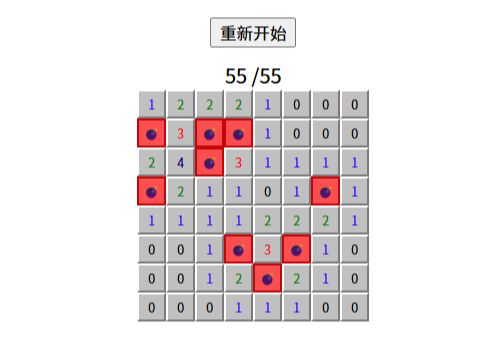
本文详解经典扫雷游戏的完整开发流程,包括棋盘绘制、布雷算法、空白区自动展开、计数统计及胜负判断等关键实现。
1
扫雷棋盘
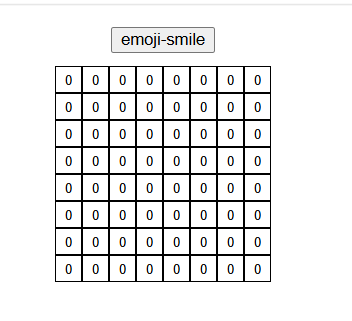
<script setup lang="js">
import {onMounted, reactive} from "vue";
const mines = reactive({
// 表格数组
minesArray: [],
// 行数
rowsNum: 8,
// 列数
colsNum: 8,
// 雷点数量
minesNUm: 9,
btnContent: '重新开始'
})
/**
* 初始化网格
*/
const initArray = () => {
mines.minesArray = Array.from(
{length: mines.rowsNum},
() => Array(mines.colsNum).fill(0)
)
}
onMounted(() => {
initArray()
})
</script>
<template>
<div class="main-area">
<button class="restart-btn">{{ mines.btnContent }}</button>
<div v-for="(row,m) in mines.minesArray" class="row-cells">
<div v-for="(cell,n) in row" class="cell">
{{ cell }}
</div>
</div>
</div>
</template>
<style scoped>
/**
重新开始按钮
*/
.restart-btn {
margin: 10px 0;
}
/**
主要区域
*/
.main-area {
display: flex;
flex-direction: column;
align-items: center;
justify-content: center;
}
/**
格子
*/
.cell {
display: inline-block;
width: 20px;
height: 20px;
line-height: 20px;
border: 1px solid;
text-align: center;
vertical-align: middle;
cursor: pointer;
}
/**
行格子
*/
.row-cells {
font-size: 10px;
}
</style>
2
添加雷点

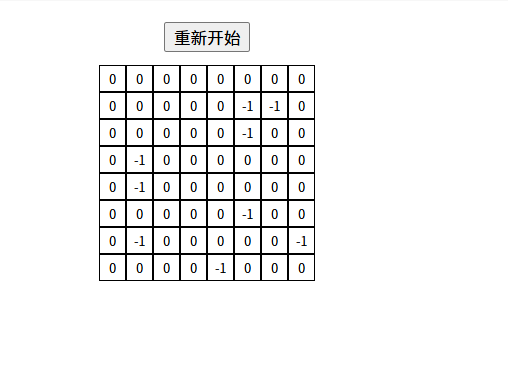
12
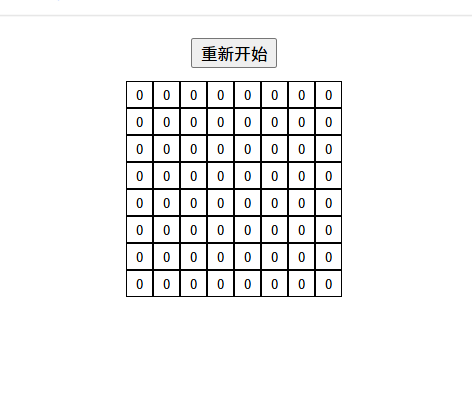
棋盘绘制好之后,仅在首次点击时触发雷区生成。
<script setup lang="js">
import {onMounted, reactive, ref} from "vue";
const mines = reactive({
// 表格数组
minesArray: [],
// 行数
rowsNum: 8,
// 列数
colsNum: 8,
// 雷点数量
minesNUm: 9,
btnContent: '重新开始'
})
/**
* 初始化网格
*/
const initArray = () => {
mines.minesArray = Array.from(
{length: mines.rowsNum},
() => Array(mines.colsNum).fill(0)
)
}
onMounted(() => {
initArray()
})
// 是否为第一次点击
const isFirstClick = ref(true)
/**
* 点击表格
* @param row 行的坐标
* @param col 列的坐标
*/
const clickCell = (row, col) => {
if (isFirstClick.value) {
// 点击后 开始绘制雷点
initMines(row, col);
isFirstClick.value = false
}
}
/**
* 绘制雷点
*/
const initMines = (row, col) => {
const {rowsNum, colsNum, minesArray, minesNUm} = mines
// 生成雷点
for (let i = 0; i < minesNUm; i++) {
let mineRow
let mineCol
do {
// 随机行
mineRow = Math.floor(Math.random() * rowsNum)
// 随机列
mineCol = Math.floor(Math.random() * colsNum)
} while ((mineRow === row && mineCol === col) || minesArray[mineRow][mineCol] === -1)
// 设置雷点
minesArray[mineRow][mineCol] = -1
}
}
</script>
<template>
<div class="main-area">
<button class="restart-btn">{{ mines.btnContent }}</button>
<div v-for="(row,m) in mines.minesArray" class="row-cells">
<div v-for="(cell,n) in row" class="cell" @click="clickCell(m,n)">
{{ cell }}
</div>
</div>
</div>
</template>
<style scoped>
/**
重新开始按钮
*/
.restart-btn {
margin: 10px 0;
}
/**
主要区域
*/
.main-area {
display: flex;
flex-direction: column;
align-items: center;
justify-content: center;
}
/**
格子
*/
.cell {
display: inline-block;
width: 20px;
height: 20px;
line-height: 20px;
border: 1px solid;
text-align: center;
vertical-align: middle;
cursor: pointer;
}
/**
行格子
*/
.row-cells {
font-size: 10px;
}
</style>
3
计算相邻雷数
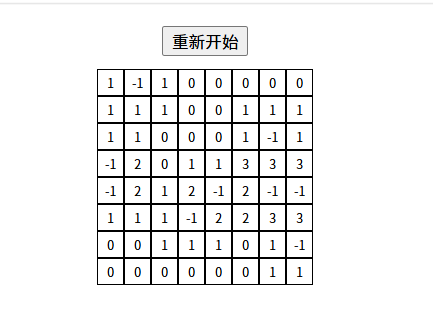
挨个找到棋盘上的每颗雷,检查它周围一圈的8个格子,只要没出界且不是雷,就给那个格子的数字加1。这样每个非雷格子上显示的数字,就是它旁边到底有几颗雷。
<script setup lang="js">
import {onMounted, reactive, ref} from "vue";
const mines = reactive({
minesArray: [],
rowsNum: 8,
colsNum: 8,
minesNUm: 9,
btnContent: 'emoji-smile'
})
const restart = () => {
}
/**
* 是否为第一个点击的内容
*/
const isFirstClick = ref(true)
/**
* 点击表格
* @param row 行
* @param col 列
*/
const clickCell = (row, col) => {
if (isFirstClick.value) {
console.log(111)
initMines(row, col)
isFirstClick.value = false
}
}
/**
* 初始化数组
*/
const initArray = () => {
mines.minesArray = Array.from(
{length: mines.rowsNum},
() => Array(mines.colsNum).fill(0)
)
}
/**
*
* @param row
* @param col
*/
const initMines = (row, col) => {
const {rowsNum, colsNum, minesArray, minesNUm} = mines
// 生成雷点
for (let i = 0; i < minesNUm; i++) {
let mineRow
let mineCol
do {
mineRow = Math.floor(Math.random() * rowsNum)
mineCol = Math.floor(Math.random() * colsNum)
} while ((mineRow === row && mineCol === col) || minesArray[mineRow][mineCol] === -1)
minesArray[mineRow][mineCol] = -1
}
initNum()
}
// 雷点的八个方位
const directions = [
[-1, -1],
[-1, 0],
[-1, 1],
[0, 1],
[1, 1],
[1, 0],
[1, -1],
[0, -1]
]
/**
* 初始化数字
*/
const initNum = () => {
const {minesArray, rowsNum, colsNum} = mines
for (let i = 0; i < rowsNum; i++) {
for (let j = 0; j < colsNum; j++) {
// 不是雷直接跳过
if (minesArray[i][j] !== -1) {
continue
}
// 遍历雷点周围8个方向
for (const [offsetX, offsetY] of directions) {
// x坐标(行)
const x = i + offsetX
// y坐标(列)
const y = j + offsetY
// 判断是否越界
if (x < 0 || x >= rowsNum || y < 0 || y >= colsNum) {
continue
}
// 周围不是雷 数量+1
if (minesArray[x][y] !== -1) {
minesArray[x][y]++
}
}
}
}
}
onMounted(() => {
initArray()
})
</script>
<template>
<div class="main-area">
<button class="restart-btn" @click="restart">{{ mines.btnContent }}</button>
<div v-for="(row,m) in mines.minesArray" class="row-cells">
<div v-for="(cell,n) in row" class="cell" @click="clickCell(m,n)">
{{ cell }}
</div>
</div>
</div>
</template>
<style scoped>
.restart-btn {
margin: 10px 0;
}
/**
主要区域
*/
.main-area {
display: flex;
flex-direction: column;
align-items: center;
justify-content: center;
}
/**
格子
*/
.cell {
display: inline-block;
width: 20px;
height: 20px;
line-height: 20px;
border: 1px solid;
text-align: center;
vertical-align: middle;
cursor: pointer;
}
/**
行格子
*/
.row-cells {
font-size: 10px;
}
</style>
4
统计点开数量
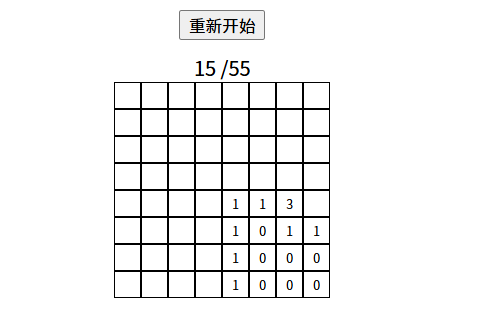
<script setup lang="js">
import {onMounted, reactive, ref} from "vue";
const mines = reactive({
// 表格数组
minesArray: [],
// 行数
rowsNum: 8,
// 列数
colsNum: 8,
// 雷点数量
minesNUm: 9,
btnContent: '重新开始',
// 是否打开
opened: [],
// 已打开数量
openedCount: 0,
})
/**
* 初始化网格
*/
const initArray = () => {
mines.minesArray = Array.from(
{length: mines.rowsNum},
() => Array(mines.colsNum).fill(0)
)
}
/**
* 初始化翻开状态
*/
const initOpened = () => {
mines.opened = Array.from(
{
length: mines.rowsNum
},
() => Array(mines.colsNum).fill(false)
)
}
onMounted(() => {
initArray()
initOpened()
})
// 是否为第一次点击
const isFirstClick = ref(true)
/**
* 点击表格
* @param row 行的坐标
* @param col 列的坐标
*/
const clickCell = (row, col) => {
if (isFirstClick.value) {
// 点击后 开始绘制雷点
initMines(row, col);
isFirstClick.value = false
}
// 已经打开,不处理
if (mines.opened[row][col]) {
return
}
// 打开当前格子
mines.opened[row][col] = true
const value = mines.minesArray[row][col]
// 已打开数量++
mines.openedCount++;
// 空白区域
if (value === 0) {
expandEmpty(row, col)
}
}
/**
* 打开空白区域
* @param row
* @param col
*/
const expandEmpty = (row, col) => {
for (const [dx, dy] of directions) {
const x = row + dx
const y = col + dy
// 越界
if (x < 0 || x >= mines.rowsNum || y < 0 || y >= mines.colsNum) {
continue
}
// 已经打开
if (mines.opened[x][y]) {
continue
}
// 雷不展开
if (mines.minesArray[x][y] === -1) {
continue
}
// 打开
mines.opened[x][y] = true
// 增加打开数量
mines.openedCount++
// 如果还是空白,继续扩散
if (mines.minesArray[x][y] === 0) {
expandEmpty(x, y)
}
}
}
/**
* 绘制雷点
*/
const initMines = (row, col) => {
const {rowsNum, colsNum, minesArray, minesNUm} = mines
// 生成雷点
for (let i = 0; i < minesNUm; i++) {
let mineRow
let mineCol
do {
// 随机行
mineRow = Math.floor(Math.random() * rowsNum)
// 随机列
mineCol = Math.floor(Math.random() * colsNum)
} while ((mineRow === row && mineCol === col) || minesArray[mineRow][mineCol] === -1)
// 设置雷点
minesArray[mineRow][mineCol] = -1
}
calcAdjacentMines()
}
// 雷点的八个方位
const directions = [
[-1, -1],
[-1, 0],
[-1, 1],
[0, 1],
[1, 1],
[1, 0],
[1, -1],
[0, -1]
]
/**
* 计算相邻雷数
*/
const calcAdjacentMines = () => {
const {minesArray, rowsNum, colsNum} = mines
for (let i = 0; i < rowsNum; i++) {
for (let j = 0; j < colsNum; j++) {
// 不是雷直接跳过
if (minesArray[i][j] !== -1) {
continue
}
// 遍历雷点周围8个方向
for (const [offsetX, offsetY] of directions) {
// x坐标(行)
const x = i + offsetX
// y坐标(列)
const y = j + offsetY
// 判断是否越界
if (x < 0 || x >= rowsNum || y < 0 || y >= colsNum) {
continue
}
// 周围不是雷 数量+1
if (minesArray[x][y] !== -1) {
minesArray[x][y]++
}
}
}
}
}
</script>
<template>
<div class="main-area">
<button class="restart-btn">{{ mines.btnContent }}</button>
<div>{{ mines.openedCount }} /{{ mines.colsNum * mines.rowsNum - mines.minesNUm }}</div>
<div v-for="(row,m) in mines.minesArray" class="row-cells">
<div v-for="(cell,n) in row" class="cell" @click="clickCell(m,n)">
<span v-if="mines.opened[m][n]">
{{ cell === -1 ? '💣' : cell || '0' }}
</span>
</div>
</div>
</div>
</template>
<style scoped>
/**
重新开始按钮
*/
.restart-btn {
margin: 10px 0;
}
/**
主要区域
*/
.main-area {
display: flex;
flex-direction: column;
align-items: center;
justify-content: center;
}
/**
格子
*/
.cell {
display: inline-block;
width: 20px;
height: 20px;
line-height: 20px;
border: 1px solid;
text-align: center;
vertical-align: middle;
cursor: pointer;
}
/**
行格子
*/
.row-cells {
font-size: 10px;
}
</style>
5
判断胜负
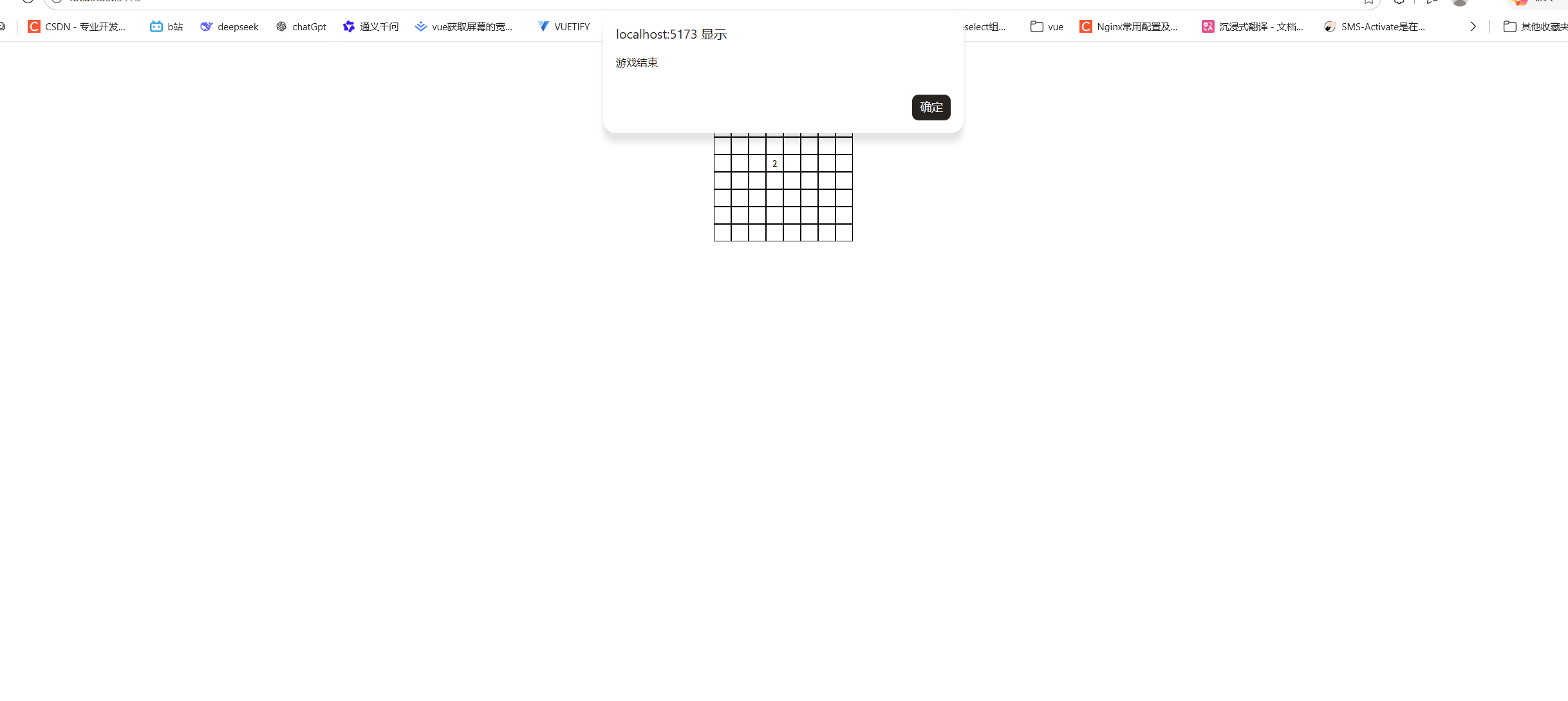
<script setup lang="js">
import {onMounted, reactive, ref} from "vue";
const mines = reactive({
// 表格数组
minesArray: [],
// 行数
rowsNum: 8,
// 列数
colsNum: 8,
// 雷点数量
minesNUm: 9,
btnContent: '重新开始',
// 是否打开
opened: [],
// 已打开数量
openedCount: 0,
// 游戏状态
status: 'playing'
})
/**
* 初始化网格
*/
const initArray = () => {
mines.minesArray = Array.from(
{length: mines.rowsNum},
() => Array(mines.colsNum).fill(0)
)
}
/**
* 初始化翻开状态
*/
const initOpened = () => {
mines.opened = Array.from(
{
length: mines.rowsNum
},
() => Array(mines.colsNum).fill(false)
)
}
onMounted(() => {
initArray()
initOpened()
})
// 是否为第一次点击
const isFirstClick = ref(true)
/**
* 点击表格
* @param row 行的坐标
* @param col 列的坐标
*/
const clickCell = (row, col) => {
// 游戏结束 禁止点击
if (mines.status !== 'playing') {
return;
}
if (isFirstClick.value) {
// 点击后 开始绘制雷点
initMines(row, col);
isFirstClick.value = false
}
// 已经打开,不处理
if (mines.opened[row][col]) {
return
}
// 打开当前格子
mines.opened[row][col] = true
const value = mines.minesArray[row][col]
// 踩雷
if (value === -1) {
mines.status = "lose"
alert("游戏结束")
return
}
// 已打开数量++
mines.openedCount++;
// 空白区域
if (value === 0) {
expandEmpty(row, col)
}
checkWin()
}
/**
* 打开空白区域
* @param row
* @param col
*/
const expandEmpty = (row, col) => {
for (const [dx, dy] of directions) {
const x = row + dx
const y = col + dy
// 越界
if (x < 0 || x >= mines.rowsNum || y < 0 || y >= mines.colsNum) {
continue
}
// 已经打开
if (mines.opened[x][y]) {
continue
}
// 雷不展开
if (mines.minesArray[x][y] === -1) {
continue
}
// 打开
mines.opened[x][y] = true
// 增加打开数量
mines.openedCount++
// 如果还是空白,继续扩散
if (mines.minesArray[x][y] === 0) {
expandEmpty(x, y)
}
}
}
/**
* 绘制雷点
*/
const initMines = (row, col) => {
const {rowsNum, colsNum, minesArray, minesNUm} = mines
// 生成雷点
for (let i = 0; i < minesNUm; i++) {
let mineRow
let mineCol
do {
// 随机行
mineRow = Math.floor(Math.random() * rowsNum)
// 随机列
mineCol = Math.floor(Math.random() * colsNum)
} while ((mineRow === row && mineCol === col) || minesArray[mineRow][mineCol] === -1)
// 设置雷点
minesArray[mineRow][mineCol] = -1
}
calcAdjacentMines()
}
// 雷点的八个方位
const directions = [
[-1, -1],
[-1, 0],
[-1, 1],
[0, 1],
[1, 1],
[1, 0],
[1, -1],
[0, -1]
]
/**
* 计算相邻雷数
*/
const calcAdjacentMines = () => {
const {minesArray, rowsNum, colsNum} = mines
for (let i = 0; i < rowsNum; i++) {
for (let j = 0; j < colsNum; j++) {
// 不是雷直接跳过
if (minesArray[i][j] !== -1) {
continue
}
// 遍历雷点周围8个方向
for (const [offsetX, offsetY] of directions) {
// x坐标(行)
const x = i + offsetX
// y坐标(列)
const y = j + offsetY
// 判断是否越界
if (x < 0 || x >= rowsNum || y < 0 || y >= colsNum) {
continue
}
// 周围不是雷 数量+1
if (minesArray[x][y] !== -1) {
minesArray[x][y]++
}
}
}
}
}
/**
* 检查是否胜利
*/
const checkWin=()=>{
const safeCount = mines.rowsNum * mines.colsNum - mines.minesNUm
if (mines.openedCount === safeCount) {
mines.status = 'win'
}
}
</script>
<template>
<div class="main-area">
<button class="restart-btn">{{ mines.btnContent }}</button>
<div>{{ mines.openedCount }} /{{ mines.colsNum * mines.rowsNum - mines.minesNUm }}</div>
<div v-for="(row,m) in mines.minesArray" class="row-cells">
<div v-for="(cell,n) in row" class="cell" @click="clickCell(m,n)">
<span v-if="mines.opened[m][n]">
{{ cell === -1 ? '💣' : cell || '0' }}
</span>
</div>
</div>
</div>
</template>
<style scoped>
/**
重新开始按钮
*/
.restart-btn {
margin: 10px 0;
}
/**
主要区域
*/
.main-area {
display: flex;
flex-direction: column;
align-items: center;
justify-content: center;
}
/**
格子
*/
.cell {
display: inline-block;
width: 20px;
height: 20px;
line-height: 20px;
border: 1px solid;
text-align: center;
vertical-align: middle;
cursor: pointer;
}
/**
行格子
*/
.row-cells {
font-size: 10px;
}
</style>
6
展示所有雷点
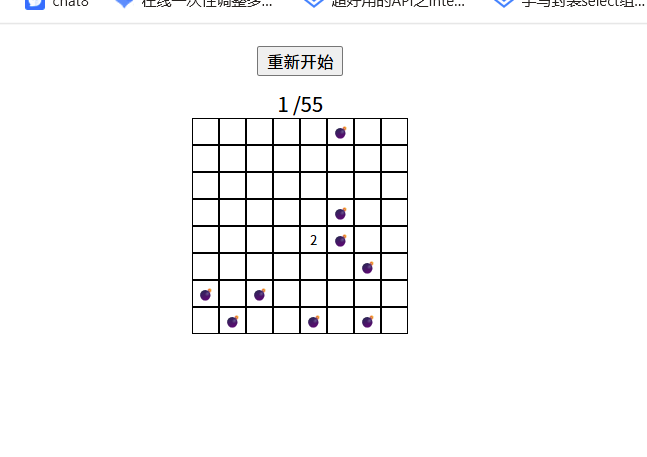
<script setup lang="js">
import {onMounted, reactive, ref} from "vue";
const mines = reactive({
// 表格数组
minesArray: [],
// 行数
rowsNum: 8,
// 列数
colsNum: 8,
// 雷点数量
minesNUm: 9,
btnContent: '重新开始',
// 是否打开
opened: [],
// 已打开数量
openedCount: 0,
// 游戏状态
status: 'playing'
})
/**
* 初始化网格
*/
const initArray = () => {
mines.minesArray = Array.from(
{length: mines.rowsNum},
() => Array(mines.colsNum).fill(0)
)
}
/**
* 初始化翻开状态
*/
const initOpened = () => {
mines.opened = Array.from(
{
length: mines.rowsNum
},
() => Array(mines.colsNum).fill(false)
)
}
onMounted(() => {
initArray()
initOpened()
})
// 是否为第一次点击
const isFirstClick = ref(true)
/**
* 点击表格
* @param row 行的坐标
* @param col 列的坐标
*/
const clickCell = (row, col) => {
// 游戏结束 禁止点击
if (mines.status !== 'playing') {
return;
}
if (isFirstClick.value) {
// 点击后 开始绘制雷点
initMines(row, col);
isFirstClick.value = false
}
// 已经打开,不处理
if (mines.opened[row][col]) {
return
}
// 打开当前格子
mines.opened[row][col] = true
const value = mines.minesArray[row][col]
// 踩雷
if (value === -1) {
mines.status = "lose"
showAllMines()
alert("游戏结束")
return
}
// 已打开数量++
mines.openedCount++;
// 空白区域
if (value === 0) {
expandEmpty(row, col)
}
checkWin()
}
/**
* 打开空白区域
* @param row
* @param col
*/
const expandEmpty = (row, col) => {
for (const [dx, dy] of directions) {
const x = row + dx
const y = col + dy
// 越界
if (x < 0 || x >= mines.rowsNum || y < 0 || y >= mines.colsNum) {
continue
}
// 已经打开
if (mines.opened[x][y]) {
continue
}
// 雷不展开
if (mines.minesArray[x][y] === -1) {
continue
}
// 打开
mines.opened[x][y] = true
// 增加打开数量
mines.openedCount++
// 如果还是空白,继续扩散
if (mines.minesArray[x][y] === 0) {
expandEmpty(x, y)
}
}
}
/**
* 绘制雷点
*/
const initMines = (row, col) => {
const {rowsNum, colsNum, minesArray, minesNUm} = mines
// 生成雷点
for (let i = 0; i < minesNUm; i++) {
let mineRow
let mineCol
do {
// 随机行
mineRow = Math.floor(Math.random() * rowsNum)
// 随机列
mineCol = Math.floor(Math.random() * colsNum)
} while ((mineRow === row && mineCol === col) || minesArray[mineRow][mineCol] === -1)
// 设置雷点
minesArray[mineRow][mineCol] = -1
}
calcAdjacentMines()
}
// 雷点的八个方位
const directions = [
[-1, -1],
[-1, 0],
[-1, 1],
[0, 1],
[1, 1],
[1, 0],
[1, -1],
[0, -1]
]
/**
* 计算相邻雷数
*/
const calcAdjacentMines = () => {
const {minesArray, rowsNum, colsNum} = mines
for (let i = 0; i < rowsNum; i++) {
for (let j = 0; j < colsNum; j++) {
// 不是雷直接跳过
if (minesArray[i][j] !== -1) {
continue
}
// 遍历雷点周围8个方向
for (const [offsetX, offsetY] of directions) {
// x坐标(行)
const x = i + offsetX
// y坐标(列)
const y = j + offsetY
// 判断是否越界
if (x < 0 || x >= rowsNum || y < 0 || y >= colsNum) {
continue
}
// 周围不是雷 数量+1
if (minesArray[x][y] !== -1) {
minesArray[x][y]++
}
}
}
}
}
/**
* 检查是否胜利
*/
const checkWin=()=>{
const safeCount = mines.rowsNum * mines.colsNum - mines.minesNUm
// 判断点开数量是否和安全网格数量一致
if (mines.openedCount === safeCount) {
mines.status = 'win'
showAllMines()
alert("恭喜你,胜利了🎆")
}
}
/**
* 展示所有雷
*/
const showAllMines = () => {
for (let row = 0; row < mines.rowsNum; row++) {
for (let col = 0; col < mines.colsNum; col++) {
if (mines.minesArray[row][col] === -1) {
mines.opened[row][col] = true
}
}
}
}
</script>
<template>
<div class="main-area">
<button class="restart-btn">{{ mines.btnContent }}</button>
<div>{{ mines.openedCount }} /{{ mines.colsNum * mines.rowsNum - mines.minesNUm }}</div>
<div v-for="(row,m) in mines.minesArray" class="row-cells">
<div v-for="(cell,n) in row" class="cell" @click="clickCell(m,n)">
<span v-if="mines.opened[m][n]">
{{ cell === -1 ? '💣' : cell || '0' }}
</span>
</div>
</div>
</div>
</template>
<style scoped>
/**
重新开始按钮
*/
.restart-btn {
margin: 10px 0;
}
/**
主要区域
*/
.main-area {
display: flex;
flex-direction: column;
align-items: center;
justify-content: center;
}
/**
格子
*/
.cell {
display: inline-block;
width: 20px;
height: 20px;
line-height: 20px;
border: 1px solid;
text-align: center;
vertical-align: middle;
cursor: pointer;
}
/**
行格子
*/
.row-cells {
font-size: 10px;
}
</style>
7
添加重新开始
在button按钮添加一个点击事件。
<button class="restart-btn" @click="restartGame">{{ mines.btnContent }}</button>
/**
* 重新开始游戏
*/
const restartGame=()=>{
initArray()
initOpened()
isFirstClick.value = true
// 重置游戏状态
mines.status='playing'
// 已点击数量重置
mines.openedCount = 0
}
8
优化页面样式
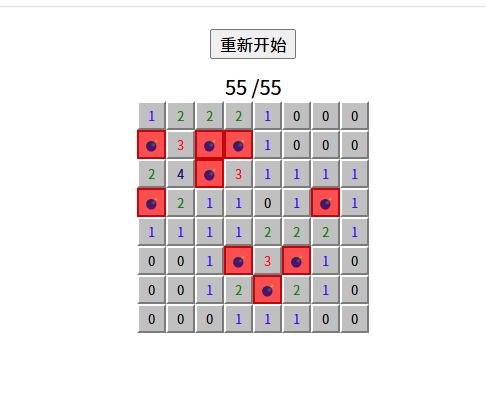
<template>
<div class="main-area">
<button class="restart-btn" @click="restartGame">{{ mines.btnContent }}</button>
<div>{{ mines.openedCount }} /{{ mines.colsNum * mines.rowsNum - mines.minesNUm }}</div>
<div v-for="(row,m) in mines.minesArray" class="row-cells">
<div v-for="(cell,n) in row" class="cell"
:class="{
'cell--opened': mines.opened[m][n],
'cell--mine': mines.opened[m][n] && cell === -1,
[`cell--num-${cell}`]: mines.opened[m][n] && cell > 0}"
@click="clickCell(m,n)">
<span v-if="mines.opened[m][n]">
{{ cell === -1 ? '💣' : cell || '0' }}
</span>
</div>
</div>
</div>
</template>
<style scoped>
/* 已揭开状态:凹陷/平坦效果 */
.cell--opened {
background: #dcdcdc;
border: 1px solid #999;
cursor: default;
}
/* 踩雷高亮 */
.cell--mine {
background: #ff4d4d !important;
border: 2px solid #cc0000 !important;
}
.cell--num-1 {
color: #0000ff;
}
.cell--num-2 {
color: #008000;
}
.cell--num-3 {
color: #ff0000;
}
.cell--num-4 {
color: #000080;
}
/**
重新开始按钮
*/
.restart-btn {
margin: 10px 0;
}
/**
主要区域
*/
.main-area {
display: flex;
flex-direction: column;
align-items: center;
justify-content: center;
}
/**
格子
*/
.cell {
display: inline-block;
width: 20px;
height: 20px;
line-height: 20px;
text-align: center;
vertical-align: middle;
cursor: pointer;
background: #c0c0c0;
border-top: 2px solid #fff;
border-left: 2px solid #fff;
border-right: 2px solid #7b7b7b;
border-bottom: 2px solid #7b7b7b;
}
/**
行格子
*/
.row-cells {
font-size: 10px;
}
</style>
 0
0 0
0 0
0 qq空间
qq空间  微博
微博  复制链接
复制链接  分享
分享  本文未经作者允许授权,禁止转载
 更多相关项目
猜你喜欢
评论/提问(已发布 0 条)

 评论
评论  收藏
收藏  分享
分享  下载
下载  举报
举报  回顶部
回顶部