用 HTML + CSS + JavaScript 做一个五子棋
 0
0 0
0 0
0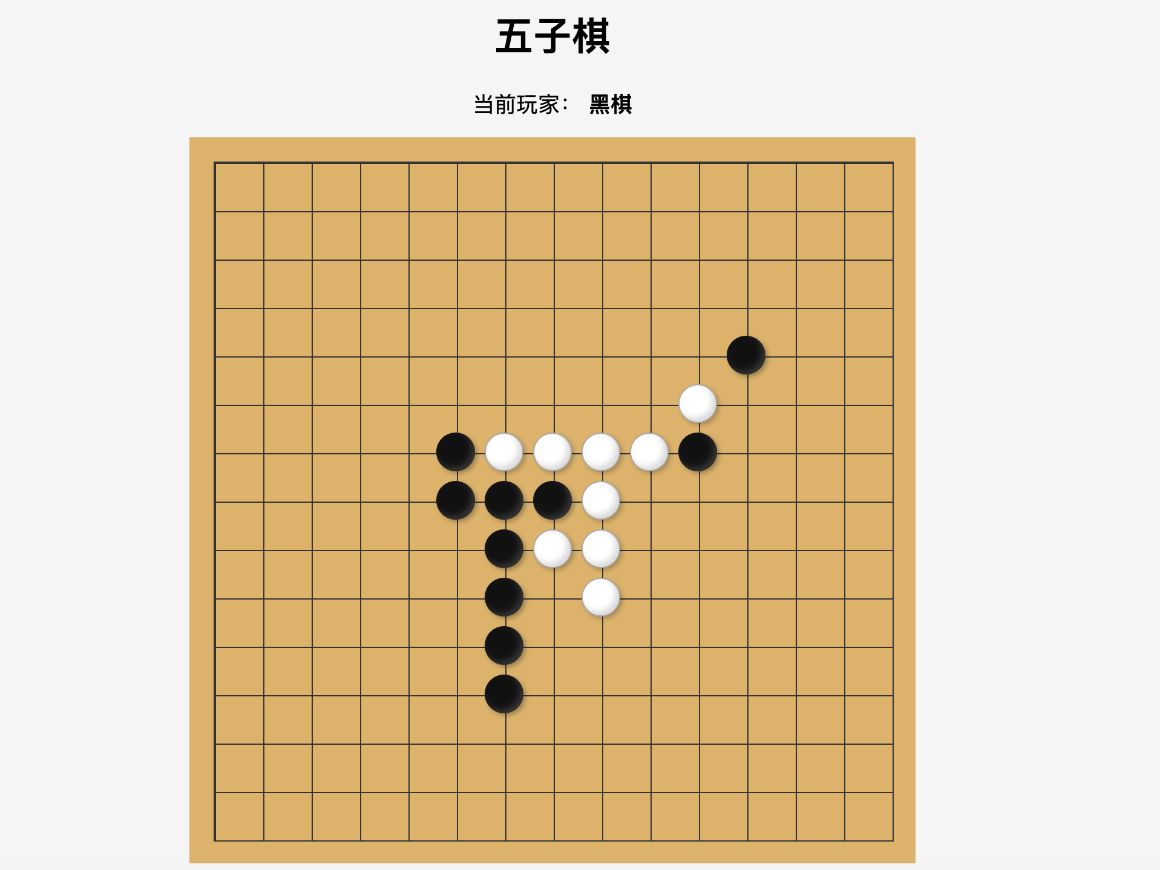
本文将从零开始,使用原生 HTML、CSS 和 JavaScript 实现一个简单的五子棋小游戏。不使用任何框架,按照绘制棋盘、实现棋子落点、黑白棋轮流落子、记录棋盘数据、判断五子连珠以及判断平局等步骤,逐步完成一个可以直接在浏览器运行的五子棋。通过这个小项目,可以更加直观地理解 JavaScript 中的 DOM 操作、二维数组、事件监听和游戏逻辑判断。
1
棋盘样式
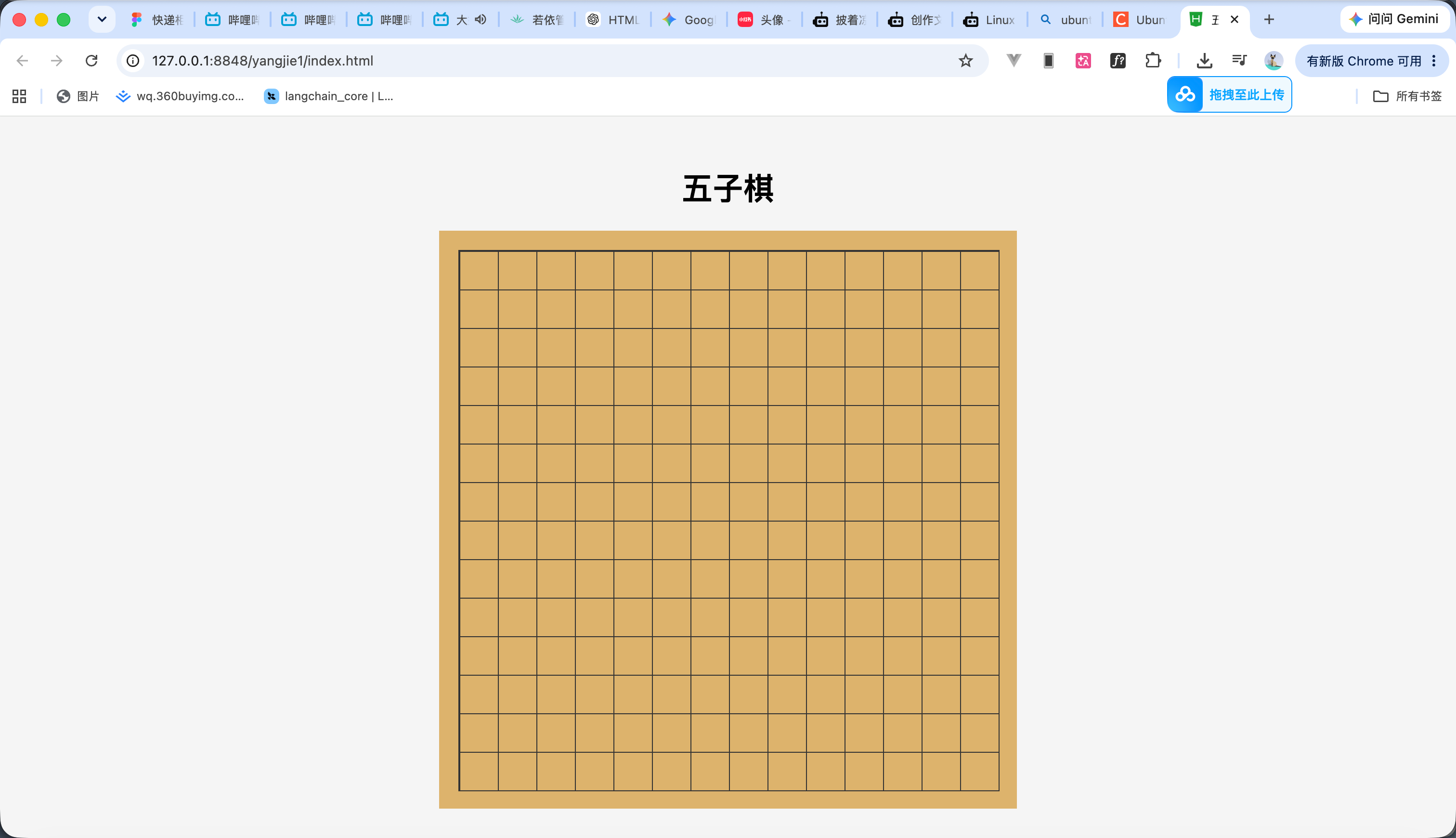
效果如图所示
我们这个代码就是一个棕色的北京在这个上面通过div 画上棋盘的线
<!DOCTYPE html>
<html lang="zh-CN">
<head>
<meta charset="UTF-8">
<meta name="viewport" content="width=device-width, initial-scale=1.0">
<title>五子棋</title>
<style>
* {
box-sizing: border-box;
}
body {
margin: 0;
min-height: 100vh;
display: flex;
justify-content: center;
align-items: center;
background: #f5f5f5;
}
.game {
text-align: center;
}
.board {
position: relative;
width: 600px;
height: 600px;
padding: 20px;
background: #dcb36c;
}
/* 棋盘线 */
.board::before {
content: "";
position: absolute;
left: 20px;
top: 20px;
width: 560px;
height: 560px;
background:
linear-gradient(to right,
#333 1px,
transparent 1px),
linear-gradient(to bottom,
#333 1px,
transparent 1px);
background-size: 40px 40px;
border: 1px solid #333;
}
</style>
</head>
<body>
<div class="game">
<h1>五子棋</h1>
<div class="board">
<div class="cells" id="cells"></div>
</div>
</div>
</body>
</html>
2
落子点
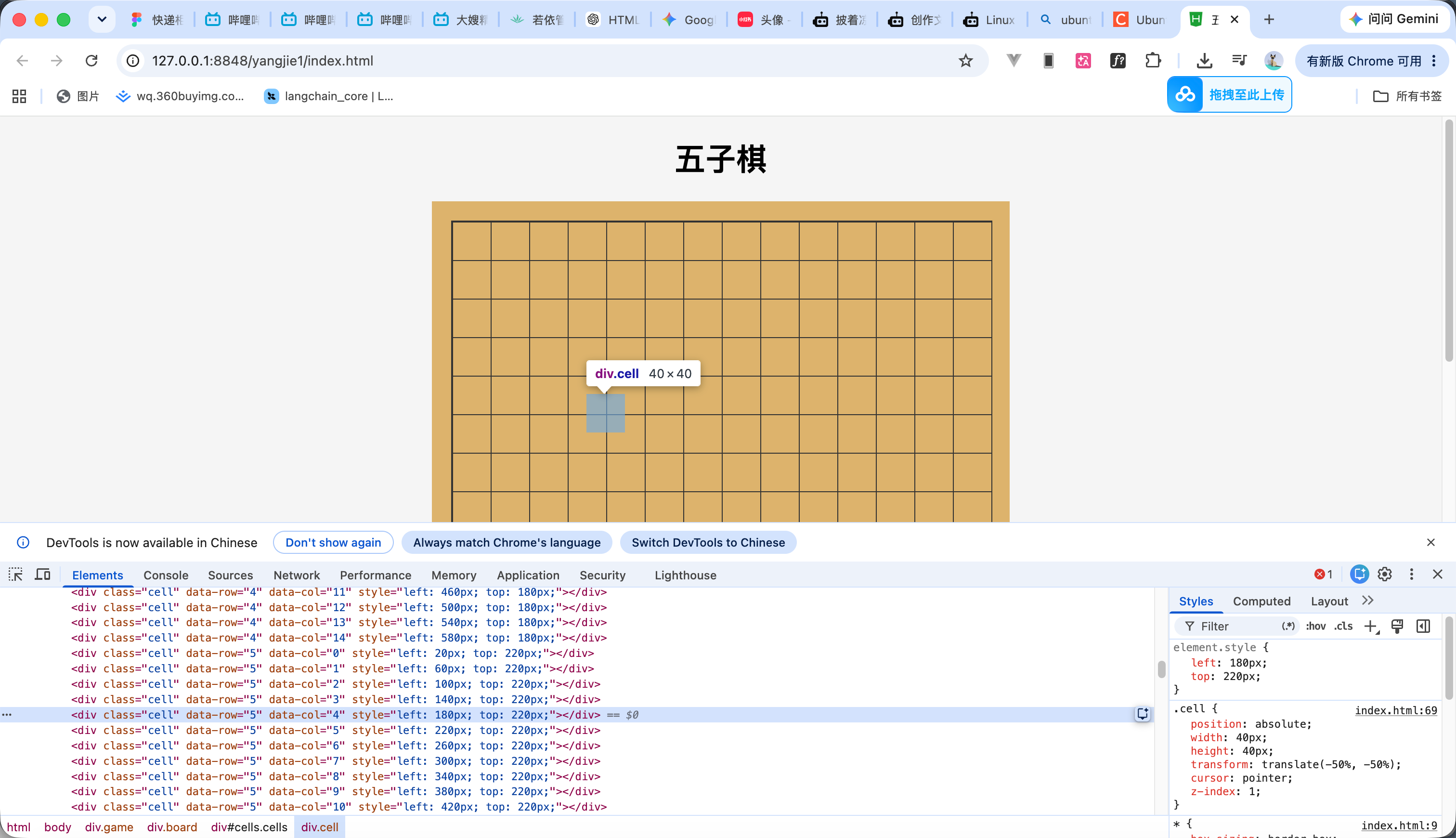
然后添加以下js代码创建落子点
这个代码就是循环创建div 然后通过css的样式把div偏移到交叉点的位置上效果如图
<script>
const cells = document.getElementById("cells");
const SIZE = 15;
const CELL_SIZE = 40;
// 创建 15 × 15 个棋盘交叉点
for (let row = 0; row < SIZE; row++) {
for (let col = 0; col < SIZE; col++) {
const cell = document.createElement("div");
cell.className = "cell";
cell.dataset.row = row;
cell.dataset.col = col;
// 计算交叉点的位置
cell.style.left = `${20 + col * CELL_SIZE}px`;
cell.style.top = `${20 + row * CELL_SIZE}px`;
cells.appendChild(cell);
}
}
</script>
添加css
/* 棋盘交叉点 */
.cell {
position: absolute;
width: 40px;
height: 40px;
transform: translate(-50%, -50%);
cursor: pointer;
z-index: 1;
}
3
黑子落子
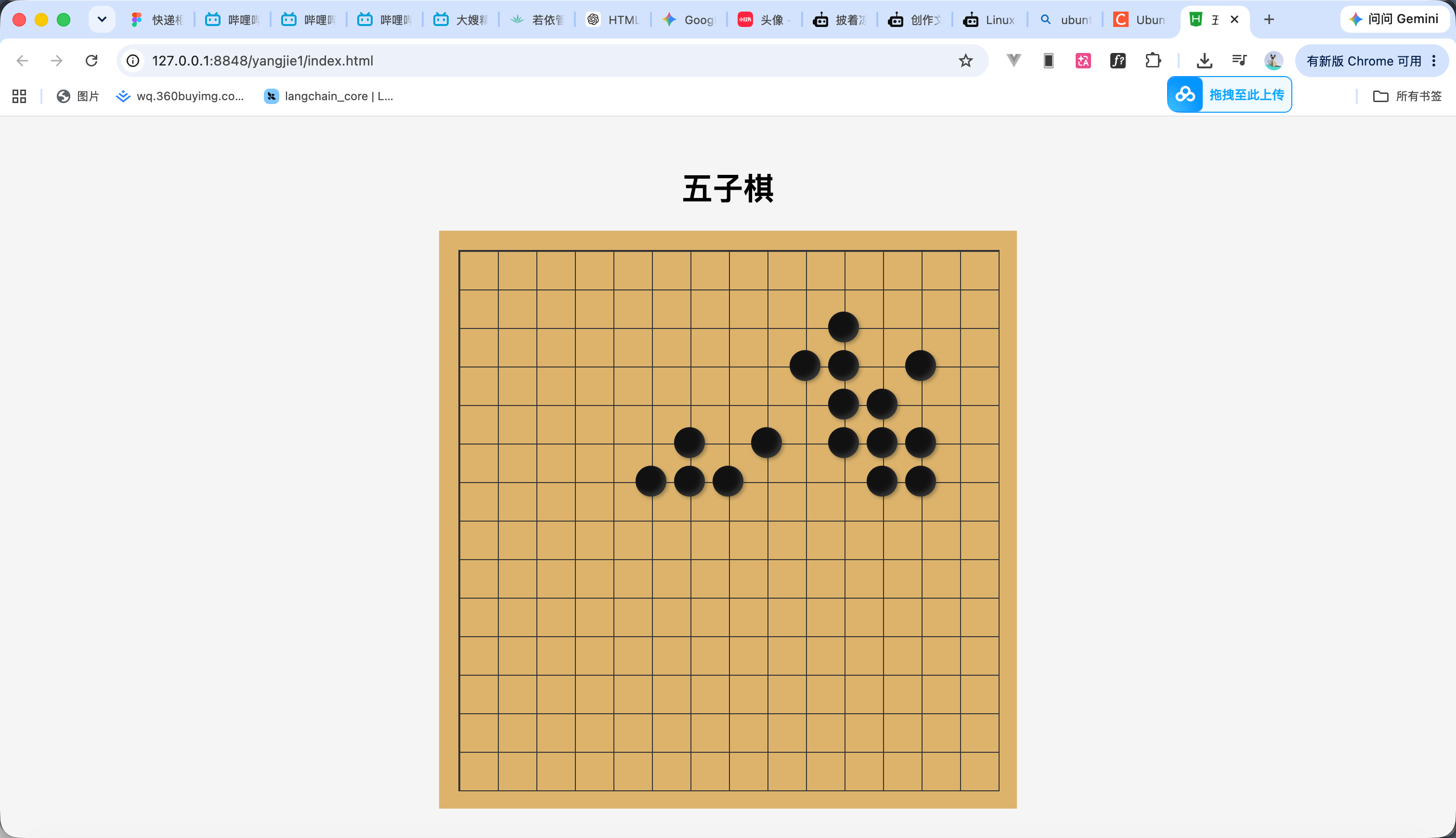
落子功能其实很简单 就是在原本的交叉点div 绑定一个点击事件 然后点击的时候在里面再创建一个div 并给里div绑定黑子的css样式即可 代码如下 效果如图
<!DOCTYPE html>
<html lang="zh-CN">
<head>
<meta charset="UTF-8">
<meta name="viewport" content="width=device-width, initial-scale=1.0">
<title>五子棋</title>
<style>
* {
box-sizing: border-box;
}
body {
margin: 0;
min-height: 100vh;
display: flex;
justify-content: center;
align-items: center;
background: #f5f5f5;
}
.game {
text-align: center;
}
.board {
position: relative;
width: 600px;
height: 600px;
padding: 20px;
background: #dcb36c;
}
/* 棋盘线 */
.board::before {
content: "";
position: absolute;
left: 20px;
top: 20px;
width: 560px;
height: 560px;
background:
linear-gradient(
to right,
#333 1px,
transparent 1px
),
linear-gradient(
to bottom,
#333 1px,
transparent 1px
);
background-size: 40px 40px;
border: 1px solid #333;
}
/* 棋盘交叉点 */
.cell {
position: absolute;
width: 40px;
height: 40px;
transform: translate(-50%, -50%);
cursor: pointer;
z-index: 1;
}
/* 棋子 */
.piece {
position: absolute;
width: 32px;
height: 32px;
left: 50%;
top: 50%;
transform: translate(-50%, -50%);
border-radius: 50%;
z-index: 2;
}
/* 黑棋 */
.black {
background: #111;
box-shadow:
inset -3px -3px 5px rgba(255, 255, 255, 0.15),
2px 2px 4px rgba(0, 0, 0, 0.3);
}
</style>
</head>
<body>
<div class="game">
<h1>五子棋</h1>
<div class="board">
<div class="cells" id="cells"></div>
</div>
</div>
<script>
const cells = document.getElementById("cells");
const SIZE = 15;
const CELL_SIZE = 40;
// 创建 15 × 15 个棋盘交叉点
for (let row = 0; row < SIZE; row++) {
for (let col = 0; col < SIZE; col++) {
const cell = document.createElement("div");
cell.className = "cell";
cell.dataset.row = row;
cell.dataset.col = col;
// 计算交叉点的位置
cell.style.left = `${20 + col * CELL_SIZE}px`;
cell.style.top = `${20 + row * CELL_SIZE}px`;
// 点击棋盘
cell.addEventListener("click", () => {
play(row, col);
});
cells.appendChild(cell);
}
}
/**
* 落子
*/
function play(row, col) {
const cell = document.querySelector(
`.cell[data-row="${row}"][data-col="${col}"]`
);
// 当前位置已经有棋子
if (cell.querySelector(".piece")) {
return;
}
// 创建黑棋
const piece = document.createElement("div");
piece.className = "piece black";
// 添加棋子
cell.appendChild(piece);
}
</script>
</body>
</html>
4
轮流落子
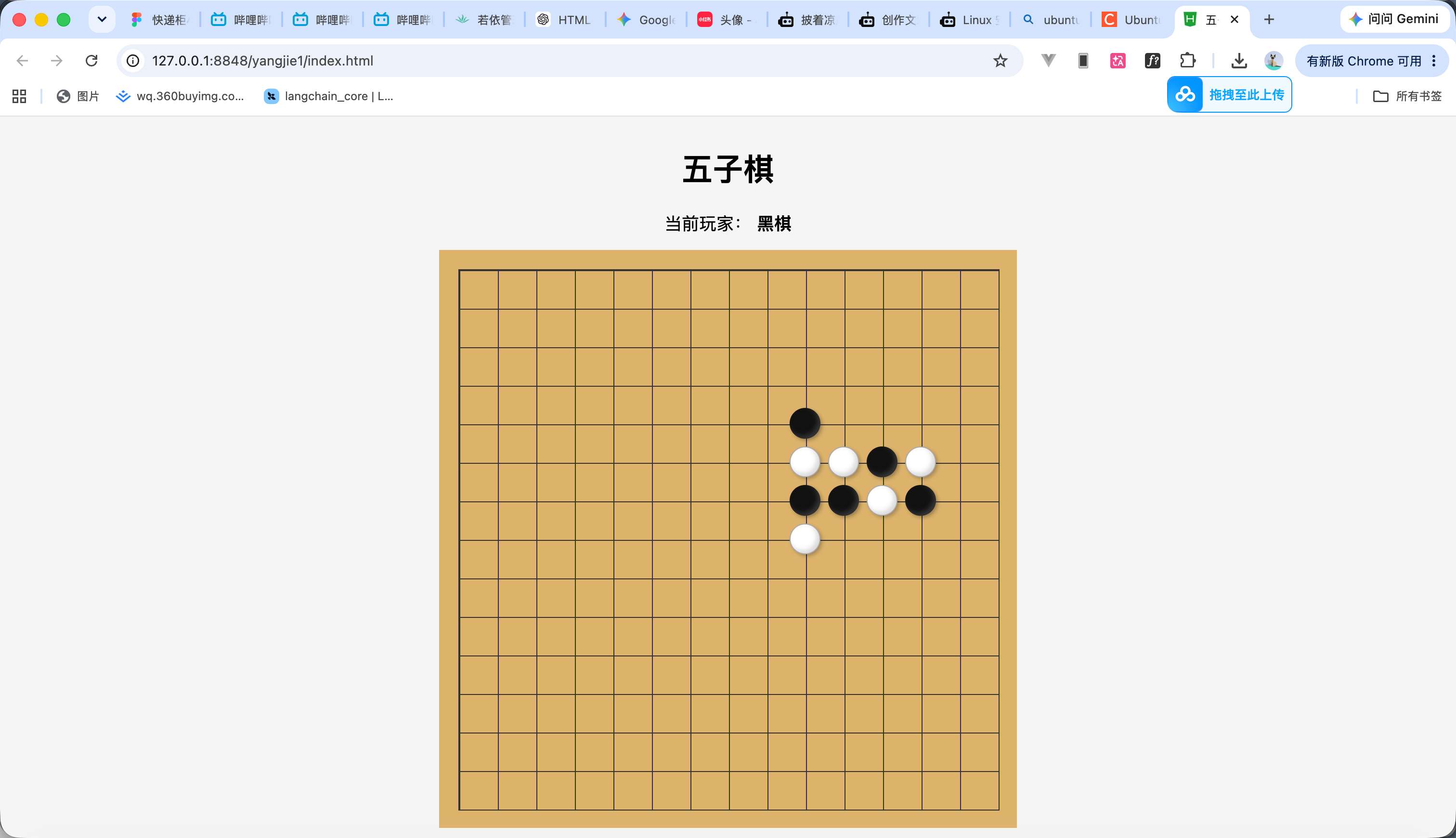
轮流落子就简单子 再写一个css是白子的 然后写一个变量 每次落子后修改这个变量 根据不同的变量绑定不同的css 完整代码如下
<!DOCTYPE html>
<html lang="zh-CN">
<head>
<meta charset="UTF-8">
<meta name="viewport" content="width=device-width, initial-scale=1.0">
<title>五子棋</title>
<style>
* {
box-sizing: border-box;
}
body {
margin: 0;
min-height: 100vh;
display: flex;
justify-content: center;
align-items: center;
background: #f5f5f5;
}
.game {
text-align: center;
}
.info {
margin-bottom: 15px;
font-size: 18px;
}
.board {
position: relative;
width: 600px;
height: 600px;
padding: 20px;
background: #dcb36c;
}
/* 棋盘线 */
.board::before {
content: "";
position: absolute;
left: 20px;
top: 20px;
width: 560px;
height: 560px;
background:
linear-gradient(
to right,
#333 1px,
transparent 1px
),
linear-gradient(
to bottom,
#333 1px,
transparent 1px
);
background-size: 40px 40px;
border: 1px solid #333;
}
/* 棋盘交叉点 */
.cell {
position: absolute;
width: 40px;
height: 40px;
transform: translate(-50%, -50%);
cursor: pointer;
z-index: 1;
}
/* 棋子 */
.piece {
position: absolute;
width: 32px;
height: 32px;
left: 50%;
top: 50%;
transform: translate(-50%, -50%);
border-radius: 50%;
z-index: 2;
}
/* 黑棋 */
.black {
background: #111;
box-shadow:
inset -3px -3px 5px rgba(255, 255, 255, 0.15),
2px 2px 4px rgba(0, 0, 0, 0.3);
}
/* 白棋 */
.white {
background: #fff;
border: 1px solid #aaa;
box-shadow:
inset -3px -3px 5px rgba(0, 0, 0, 0.15),
2px 2px 4px rgba(0, 0, 0, 0.25);
}
</style>
</head>
<body>
<div class="game">
<h1>五子棋</h1>
<div class="info">
当前玩家:
<strong id="currentPlayer">黑棋</strong>
</div>
<div class="board">
<div class="cells" id="cells"></div>
</div>
</div>
<script>
const cells = document.getElementById("cells");
const currentPlayerElement =
document.getElementById("currentPlayer");
const SIZE = 15;
const CELL_SIZE = 40;
// 当前玩家
// 1 = 黑棋
// 2 = 白棋
let currentPlayer = 1;
// 创建棋盘
for (let row = 0; row < SIZE; row++) {
for (let col = 0; col < SIZE; col++) {
const cell = document.createElement("div");
cell.className = "cell";
cell.dataset.row = row;
cell.dataset.col = col;
// 定位到棋盘交叉点
cell.style.left =
`${20 + col * CELL_SIZE}px`;
cell.style.top =
`${20 + row * CELL_SIZE}px`;
// 点击棋盘
cell.addEventListener("click", () => {
play(row, col);
});
cells.appendChild(cell);
}
}
/**
* 落子
*/
function play(row, col) {
const cell = document.querySelector(
`.cell[data-row="${row}"][data-col="${col}"]`
);
// 当前已经有棋子
if (cell.querySelector(".piece")) {
return;
}
// 创建棋子
const piece = document.createElement("div");
piece.className =
currentPlayer === 1
? "piece black"
: "piece white";
cell.appendChild(piece);
// 切换玩家
currentPlayer =
currentPlayer === 1
? 2
: 1;
// 更新提示
updateCurrentPlayer();
}
/**
* 更新当前玩家
*/
function updateCurrentPlayer() {
currentPlayerElement.textContent =
currentPlayer === 1
? "黑棋"
: "白棋";
}
</script>
</body>
</html>
5
数据存储
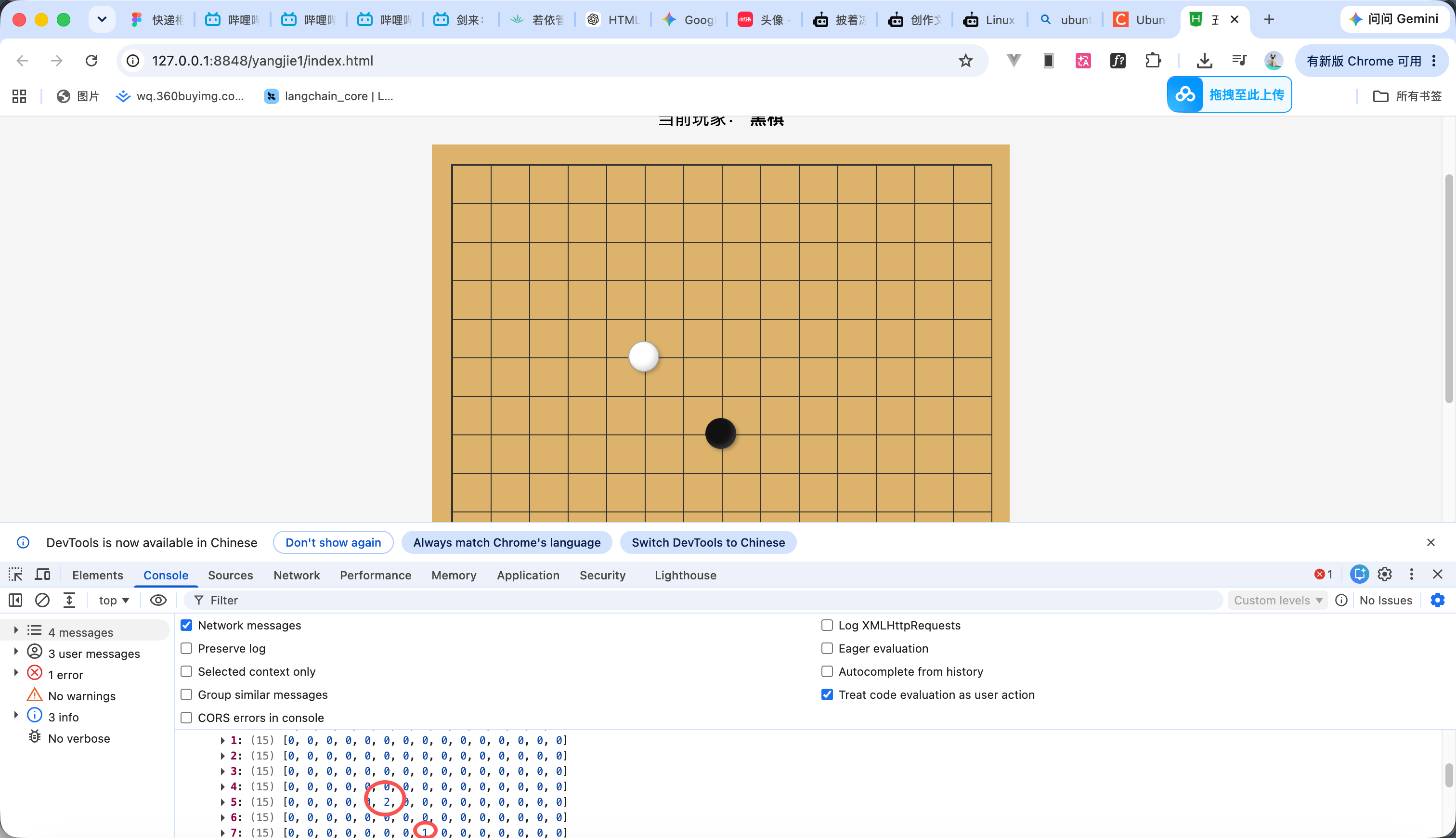
接下来我们需要知道哪里是黑棋哪里是白棋 然后我们就创建了一个二维数组 把棋子落下的位置存入进去
效果看打印的日志 代码如下
<!DOCTYPE html>
<html lang="zh-CN">
<head>
<meta charset="UTF-8">
<meta name="viewport" content="width=device-width, initial-scale=1.0">
<title>五子棋</title>
<style>
* {
box-sizing: border-box;
}
body {
margin: 0;
min-height: 100vh;
display: flex;
justify-content: center;
align-items: center;
background: #f5f5f5;
}
.game {
text-align: center;
}
.info {
margin-bottom: 15px;
font-size: 18px;
}
.board {
position: relative;
width: 600px;
height: 600px;
padding: 20px;
background: #dcb36c;
}
/* 棋盘线 */
.board::before {
content: "";
position: absolute;
left: 20px;
top: 20px;
width: 560px;
height: 560px;
background:
linear-gradient(
to right,
#333 1px,
transparent 1px
),
linear-gradient(
to bottom,
#333 1px,
transparent 1px
);
background-size: 40px 40px;
border: 1px solid #333;
}
/* 棋盘交叉点 */
.cell {
position: absolute;
width: 40px;
height: 40px;
transform: translate(-50%, -50%);
cursor: pointer;
z-index: 1;
}
/* 棋子 */
.piece {
position: absolute;
width: 32px;
height: 32px;
left: 50%;
top: 50%;
transform: translate(-50%, -50%);
border-radius: 50%;
z-index: 2;
}
/* 黑棋 */
.black {
background: #111;
box-shadow:
inset -3px -3px 5px rgba(255, 255, 255, 0.15),
2px 2px 4px rgba(0, 0, 0, 0.3);
}
/* 白棋 */
.white {
background: #fff;
border: 1px solid #aaa;
box-shadow:
inset -3px -3px 5px rgba(0, 0, 0, 0.15),
2px 2px 4px rgba(0, 0, 0, 0.25);
}
</style>
</head>
<body>
<div class="game">
<h1>五子棋</h1>
<div class="info">
当前玩家:
<strong id="currentPlayer">黑棋</strong>
</div>
<div class="board">
<div class="cells" id="cells"></div>
</div>
</div>
<script>
const cells = document.getElementById("cells");
const currentPlayerElement =
document.getElementById("currentPlayer");
const SIZE = 15;
const CELL_SIZE = 40;
/*
* 棋盘数据
*
* 0 = 空
* 1 = 黑棋
* 2 = 白棋
*/
const board = Array.from(
{ length: SIZE },
() => Array(SIZE).fill(0)
);
// 当前玩家
// 1 = 黑棋
// 2 = 白棋
let currentPlayer = 1;
/**
* 创建棋盘
*/
for (let row = 0; row < SIZE; row++) {
for (let col = 0; col < SIZE; col++) {
const cell = document.createElement("div");
cell.className = "cell";
cell.dataset.row = row;
cell.dataset.col = col;
// 定位到棋盘交叉点
cell.style.left =
`${20 + col * CELL_SIZE}px`;
cell.style.top =
`${20 + row * CELL_SIZE}px`;
// 点击棋盘
cell.addEventListener("click", () => {
play(row, col);
});
cells.appendChild(cell);
}
}
/**
* 落子
*/
function play(row, col) {
/*
* 通过棋盘数据判断当前位置
* 是否已经有棋子
*/
if (board[row][col] !== 0) {
return;
}
/*
* 记录棋盘数据
*
* 黑棋:1
* 白棋:2
*/
board[row][col] = currentPlayer;
/*
* 找到页面上对应的棋盘位置
*/
const cell = document.querySelector(
`.cell[data-row="${row}"][data-col="${col}"]`
);
/*
* 创建棋子
*/
const piece = document.createElement("div");
/*
* 根据当前玩家决定棋子颜色
*/
piece.className =
currentPlayer === 1
? "piece black"
: "piece white";
/*
* 将棋子添加到棋盘
*/
cell.appendChild(piece);
/*
* 切换玩家
*/
currentPlayer =
currentPlayer === 1
? 2
: 1;
/*
* 更新当前玩家提示
*/
updateCurrentPlayer();
console.log(board);
}
/**
* 更新当前玩家
*/
function updateCurrentPlayer() {
currentPlayerElement.textContent =
currentPlayer === 1
? "黑棋"
: "白棋";
}
</script>
</body>
</html>
6
胜利判断
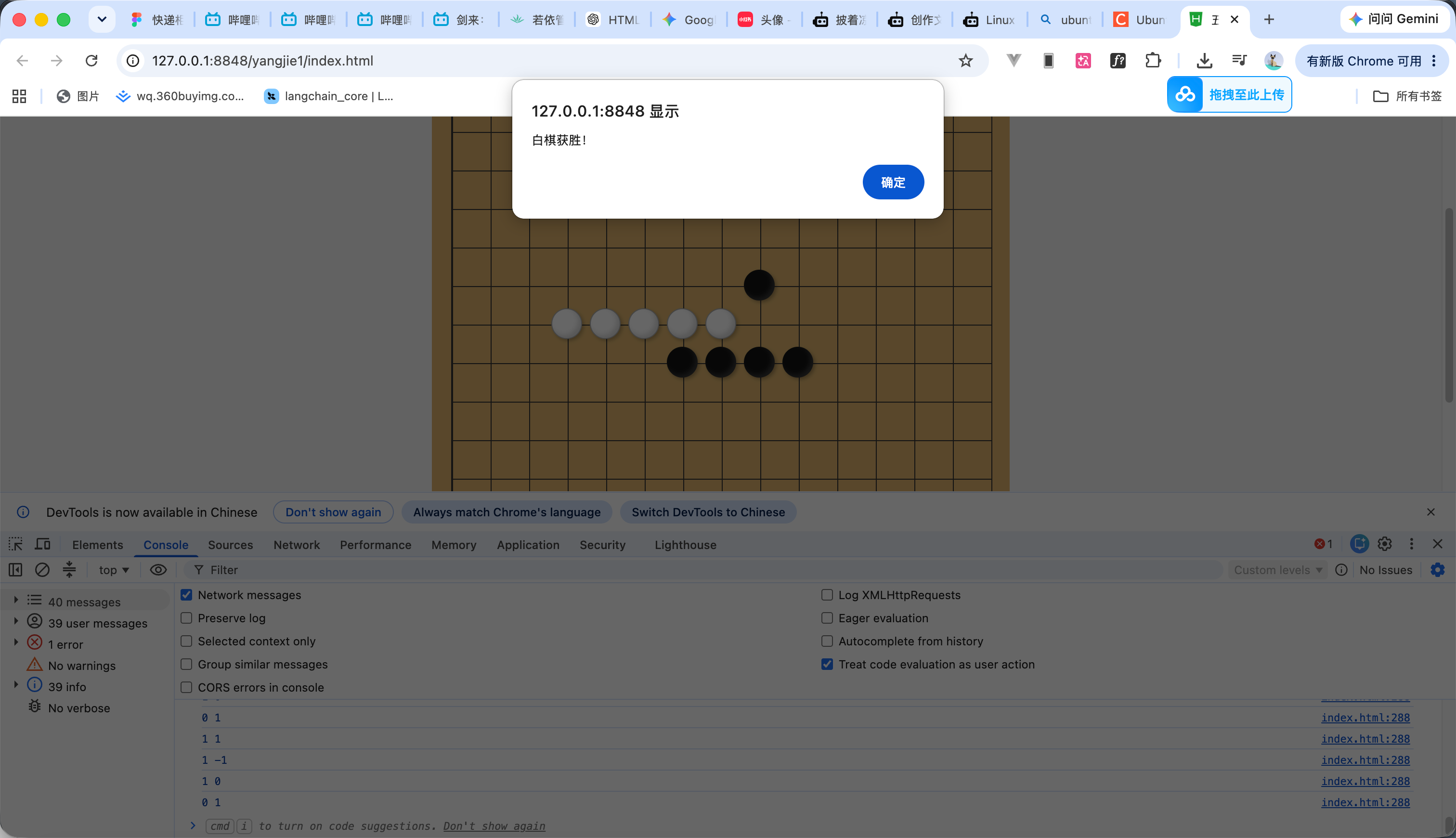
判断的方法其实很简单:以刚刚落下的这颗棋子为中心,分别检查四个方向。
这四个方向分别是横向、纵向以及两条斜线。
因为一条线有两个方向,所以检查横向时,既要看棋子左边,也要看右边;检查纵向时,要看上面和下面;斜线也是一样。 斜线其实就是在下一行进行++
完整代码如下
<!DOCTYPE html>
<html lang="zh-CN">
<head>
<meta charset="UTF-8">
<meta name="viewport" content="width=device-width, initial-scale=1.0">
<title>五子棋</title>
<style>
* {
box-sizing: border-box;
}
body {
margin: 0;
min-height: 100vh;
display: flex;
justify-content: center;
align-items: center;
background: #f5f5f5;
}
.game {
text-align: center;
}
.info {
margin-bottom: 15px;
font-size: 18px;
}
.board {
position: relative;
width: 600px;
height: 600px;
padding: 20px;
background: #dcb36c;
}
/* 棋盘线 */
.board::before {
content: "";
position: absolute;
left: 20px;
top: 20px;
width: 560px;
height: 560px;
background:
linear-gradient(
to right,
#333 1px,
transparent 1px
),
linear-gradient(
to bottom,
#333 1px,
transparent 1px
);
background-size: 40px 40px;
border: 1px solid #333;
}
/* 棋盘交叉点 */
.cell {
position: absolute;
width: 40px;
height: 40px;
transform: translate(-50%, -50%);
cursor: pointer;
z-index: 1;
}
/* 棋子 */
.piece {
position: absolute;
width: 32px;
height: 32px;
left: 50%;
top: 50%;
transform: translate(-50%, -50%);
border-radius: 50%;
z-index: 2;
}
/* 黑棋 */
.black {
background: #111;
box-shadow:
inset -3px -3px 5px rgba(255, 255, 255, 0.15),
2px 2px 4px rgba(0, 0, 0, 0.3);
}
/* 白棋 */
.white {
background: #fff;
border: 1px solid #aaa;
box-shadow:
inset -3px -3px 5px rgba(0, 0, 0, 0.15),
2px 2px 4px rgba(0, 0, 0, 0.25);
}
</style>
</head>
<body>
<div class="game">
<h1>五子棋</h1>
<div class="info">
当前玩家:
<strong id="currentPlayer">黑棋</strong>
</div>
<div class="board">
<div class="cells" id="cells"></div>
</div>
</div>
<script>
const cells = document.getElementById("cells");
const currentPlayerElement =
document.getElementById("currentPlayer");
const SIZE = 15;
const CELL_SIZE = 40;
/*
* 棋盘数据
*
* 0 = 空
* 1 = 黑棋
* 2 = 白棋
*/
const board = Array.from(
{ length: SIZE },
() => Array(SIZE).fill(0)
);
// 当前玩家
let currentPlayer = 1;
/**
* 创建棋盘
*/
for (let row = 0; row < SIZE; row++) {
for (let col = 0; col < SIZE; col++) {
const cell = document.createElement("div");
cell.className = "cell";
cell.dataset.row = row;
cell.dataset.col = col;
// 定位到棋盘交叉点
cell.style.left =
`${20 + col * CELL_SIZE}px`;
cell.style.top =
`${20 + row * CELL_SIZE}px`;
// 点击棋盘
cell.addEventListener("click", () => {
play(row, col);
});
cells.appendChild(cell);
}
}
/**
* 落子
*/
function play(row, col) {
// 当前已经有棋子
if (board[row][col] !== 0) {
return;
}
// 记录棋盘数据
board[row][col] = currentPlayer;
// 找到对应棋盘位置
const cell = document.querySelector(
`.cell[data-row="${row}"][data-col="${col}"]`
);
// 创建棋子
const piece = document.createElement("div");
piece.className =
currentPlayer === 1
? "piece black"
: "piece white";
cell.appendChild(piece);
/*
* 判断当前玩家是否获胜
*
* 注意:
* 要在切换玩家之前判断
*/
if (checkWin(row, col)) {
const playerName =
currentPlayer === 1
? "黑棋"
: "白棋";
setTimeout(() => {
alert(playerName + "获胜!");
}, 100);
return;
}
// 切换玩家
currentPlayer =
currentPlayer === 1
? 2
: 1;
updateCurrentPlayer();
}
/**
* 判断是否五子连珠
*/
function checkWin(row, col) {
/*
* 四个需要判断的方向:
*
* [1, 0] → 竖
* [0, 1] → 横
* [1, 1] → 右下斜线
* [1, -1] → 左下斜线
*/
const directions = [
[1, 0],
[0, 1],
[1, 1],
[1, -1]
];
/*
* 分别检查四个方向
*/
for (const [dx, dy] of directions) {
/*
* 当前落下的棋子本身算一个
*/
let count = 1;
/*
* 检查正方向
*/
count += countDirection(
row,
col,
dx,
dy
);
/*
* 检查反方向
*/
count += countDirection(
row,
col,
-dx,
-dy
);
/*
* 连续五个棋子
*/
if (count >= 5) {
return true;
}
}
return false;
}
/**
* 沿指定方向寻找相同棋子
*/
function countDirection(
row,
col,
dx,
dy
) {
let count = 0;
let currentRow = row + dx;
let currentCol = col + dy;
/*
* 一直向指定方向寻找
*/
while (
currentRow >= 0 &&
currentRow < SIZE &&
currentCol >= 0 &&
currentCol < SIZE &&
board[currentRow][currentCol] === currentPlayer
) {
count++;
currentRow += dx;
currentCol += dy;
}
return count;
}
/**
* 更新当前玩家
*/
function updateCurrentPlayer() {
currentPlayerElement.textContent =
currentPlayer === 1
? "黑棋"
: "白棋";
}
</script>
</body>
</html>
7
演示
完整代码如下 效果看视频
<!DOCTYPE html>
<html lang="zh-CN">
<head>
<meta charset="UTF-8">
<meta name="viewport" content="width=device-width, initial-scale=1.0">
<title>五子棋</title>
<style>
* {
box-sizing: border-box;
}
body {
margin: 0;
min-height: 100vh;
display: flex;
justify-content: center;
align-items: center;
background: #f5f5f5;
}
.game {
text-align: center;
}
.info {
margin-bottom: 15px;
font-size: 18px;
}
.board {
position: relative;
width: 600px;
height: 600px;
padding: 20px;
background: #dcb36c;
}
/* 棋盘线 */
.board::before {
content: "";
position: absolute;
left: 20px;
top: 20px;
width: 560px;
height: 560px;
background:
linear-gradient(
to right,
#333 1px,
transparent 1px
),
linear-gradient(
to bottom,
#333 1px,
transparent 1px
);
background-size: 40px 40px;
border: 1px solid #333;
}
/* 棋盘交叉点 */
.cell {
position: absolute;
width: 40px;
height: 40px;
transform: translate(-50%, -50%);
cursor: pointer;
z-index: 1;
}
/* 棋子 */
.piece {
position: absolute;
width: 32px;
height: 32px;
left: 50%;
top: 50%;
transform: translate(-50%, -50%);
border-radius: 50%;
z-index: 2;
}
/* 黑棋 */
.black {
background: #111;
box-shadow:
inset -3px -3px 5px rgba(255, 255, 255, 0.15),
2px 2px 4px rgba(0, 0, 0, 0.3);
}
/* 白棋 */
.white {
background: #fff;
border: 1px solid #aaa;
box-shadow:
inset -3px -3px 5px rgba(0, 0, 0, 0.15),
2px 2px 4px rgba(0, 0, 0, 0.25);
}
</style>
</head>
<body>
<div class="game">
<h1>五子棋</h1>
<div class="info">
当前玩家:
<strong id="currentPlayer">黑棋</strong>
</div>
<div class="board">
<div class="cells" id="cells"></div>
</div>
</div>
<script>
const cells = document.getElementById("cells");
const currentPlayerElement =
document.getElementById("currentPlayer");
const SIZE = 15;
const CELL_SIZE = 40;
/*
* 棋盘数据
*
* 0 = 空
* 1 = 黑棋
* 2 = 白棋
*/
const board = Array.from(
{ length: SIZE },
() => Array(SIZE).fill(0)
);
// 当前玩家
let currentPlayer = 1;
/**
* 创建棋盘
*/
for (let row = 0; row < SIZE; row++) {
for (let col = 0; col < SIZE; col++) {
const cell = document.createElement("div");
cell.className = "cell";
cell.dataset.row = row;
cell.dataset.col = col;
// 定位到棋盘交叉点
cell.style.left =
`${20 + col * CELL_SIZE}px`;
cell.style.top =
`${20 + row * CELL_SIZE}px`;
// 点击棋盘
cell.addEventListener("click", () => {
play(row, col);
});
cells.appendChild(cell);
}
}
/**
* 落子
*/
function play(row, col) {
// 当前已经有棋子
if (board[row][col] !== 0) {
return;
}
// 记录棋盘数据
board[row][col] = currentPlayer;
// 找到对应棋盘位置
const cell = document.querySelector(
`.cell[data-row="${row}"][data-col="${col}"]`
);
// 创建棋子
const piece = document.createElement("div");
piece.className =
currentPlayer === 1
? "piece black"
: "piece white";
cell.appendChild(piece);
/*
* 判断当前玩家是否获胜
*
* 注意:
* 要在切换玩家之前判断
*/
if (checkWin(row, col)) {
const playerName =
currentPlayer === 1
? "黑棋"
: "白棋";
setTimeout(() => {
alert(playerName + "获胜!");
}, 100);
return;
}
// 切换玩家
currentPlayer =
currentPlayer === 1
? 2
: 1;
updateCurrentPlayer();
}
/**
* 判断是否五子连珠
*/
function checkWin(row, col) {
/*
* 四个需要判断的方向:
*
* [1, 0] → 竖
* [0, 1] → 横
* [1, 1] → 右下斜线
* [1, -1] → 左下斜线
*/
const directions = [
[1, 0],
[0, 1],
[1, 1],
[1, -1]
];
/*
* 分别检查四个方向
*/
for (const [dx, dy] of directions) {
/*
* 当前落下的棋子本身算一个
*/
let count = 1;
/*
* 检查正方向
*/
count += countDirection(
row,
col,
dx,
dy
);
/*
* 检查反方向
*/
count += countDirection(
row,
col,
-dx,
-dy
);
/*
* 连续五个棋子
*/
if (count >= 5) {
return true;
}
}
return false;
}
/**
* 沿指定方向寻找相同棋子
*/
function countDirection(
row,
col,
dx,
dy
) {
let count = 0;
let currentRow = row + dx;
let currentCol = col + dy;
/*
* 一直向指定方向寻找
*/
while (
currentRow >= 0 &&
currentRow < SIZE &&
currentCol >= 0 &&
currentCol < SIZE &&
board[currentRow][currentCol] === currentPlayer
) {
count++;
currentRow += dx;
currentCol += dy;
}
return count;
}
/**
* 更新当前玩家
*/
function updateCurrentPlayer() {
currentPlayerElement.textContent =
currentPlayer === 1
? "黑棋"
: "白棋";
}
</script>
</body>
</html>
 0
0 0
0 0
0 qq空间
qq空间  微博
微博  复制链接
复制链接  分享
分享  本文未经作者允许授权,禁止转载
 更多相关项目
猜你喜欢
评论/提问(已发布 0 条)

 评论
评论  收藏
收藏  分享
分享  下载
下载  举报
举报  回顶部
回顶部