用Python+Pygame制作节奏点击器
 0
0 0
0 0
0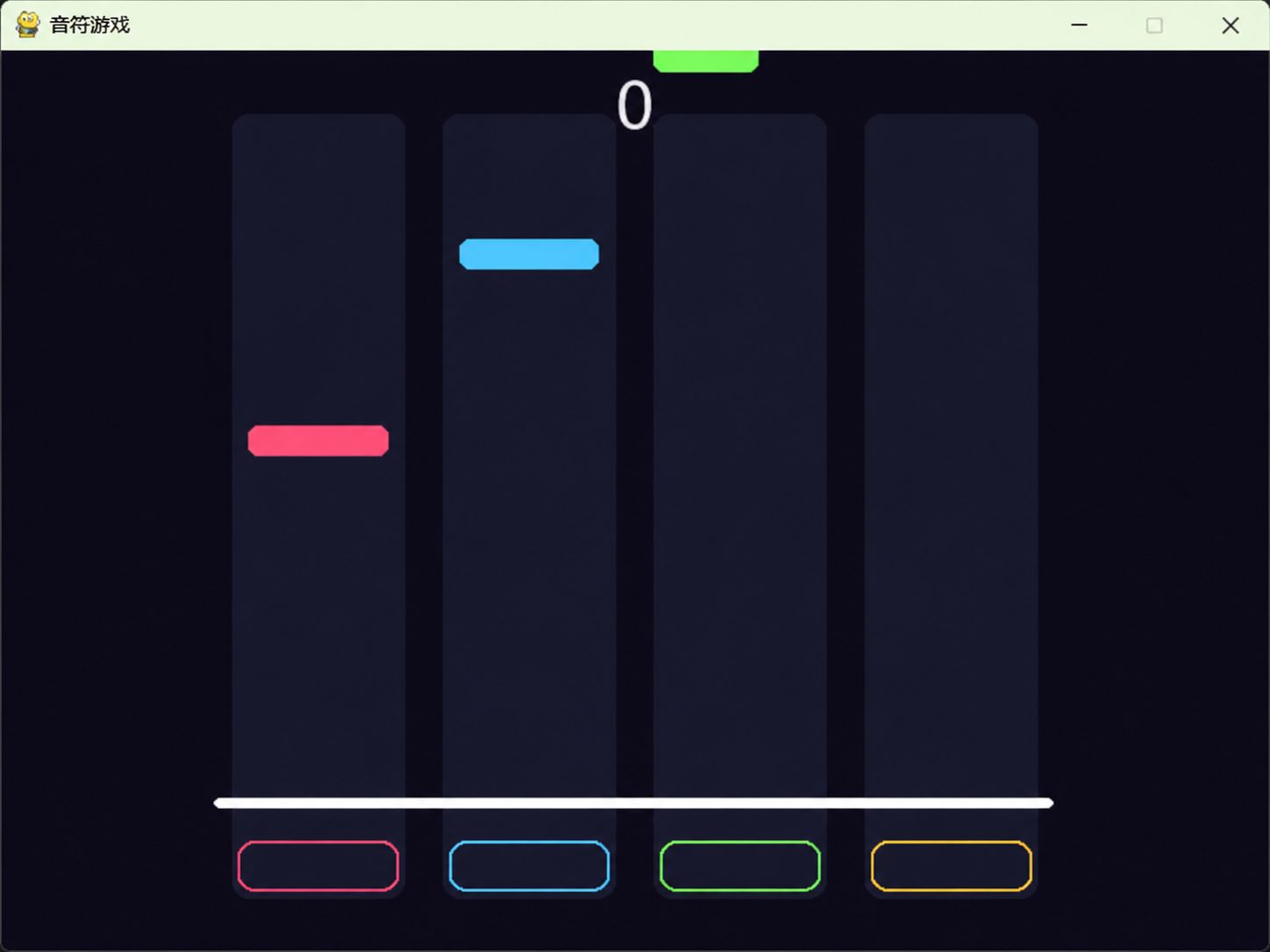
学Python总觉得枯燥没意思?不如亲手写个节奏点击器小游戏!从画轨道、让音符卡点下落,到打出Perfect时的粒子特效,咱们一步步搭起来。核心代码都整理好了,不用自己瞎想,跟着敲就能跑,今晚就能玩上自己做的节奏点击器小游戏!
1
创建Python项目
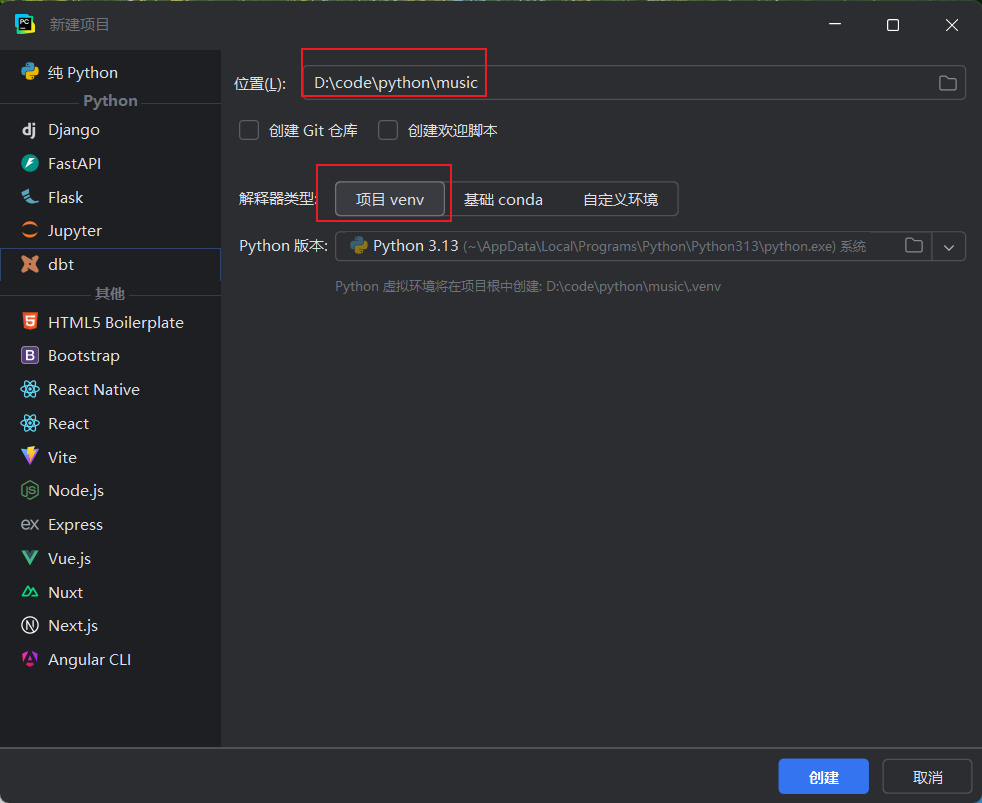
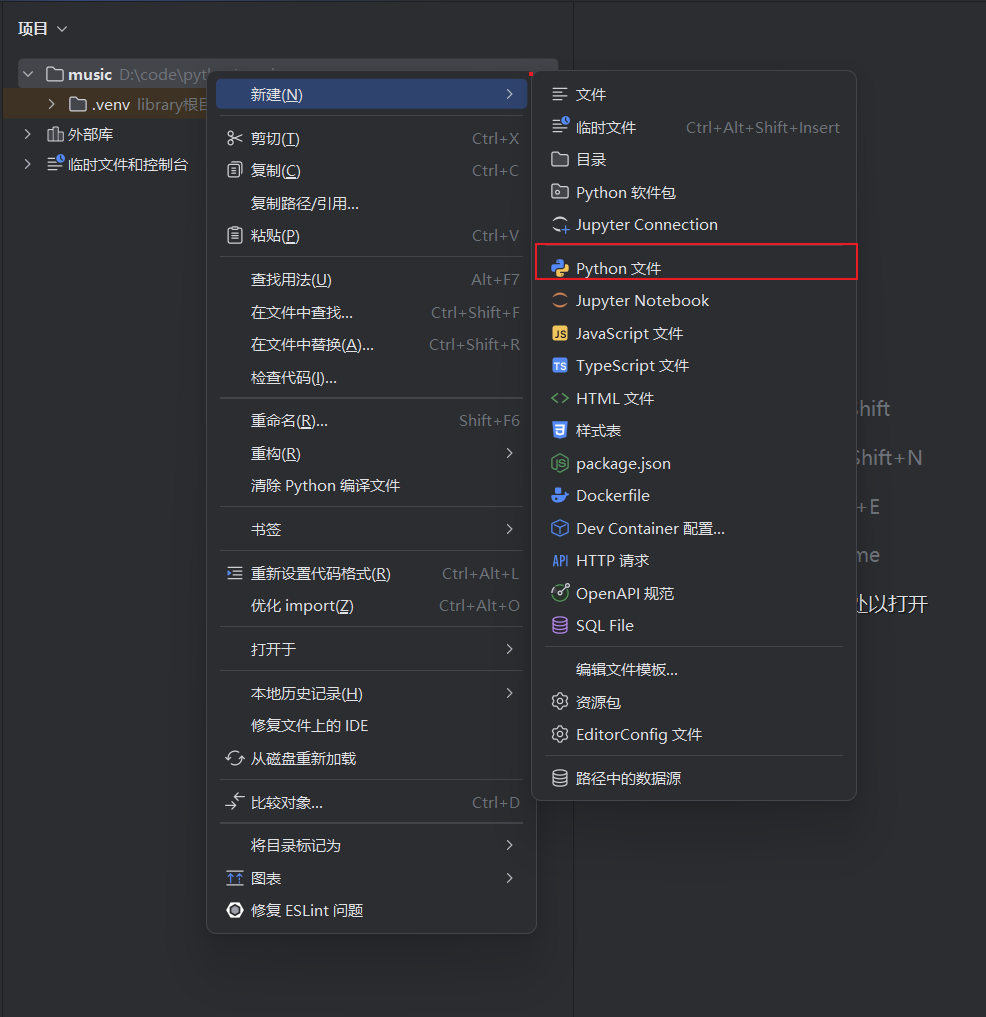
123
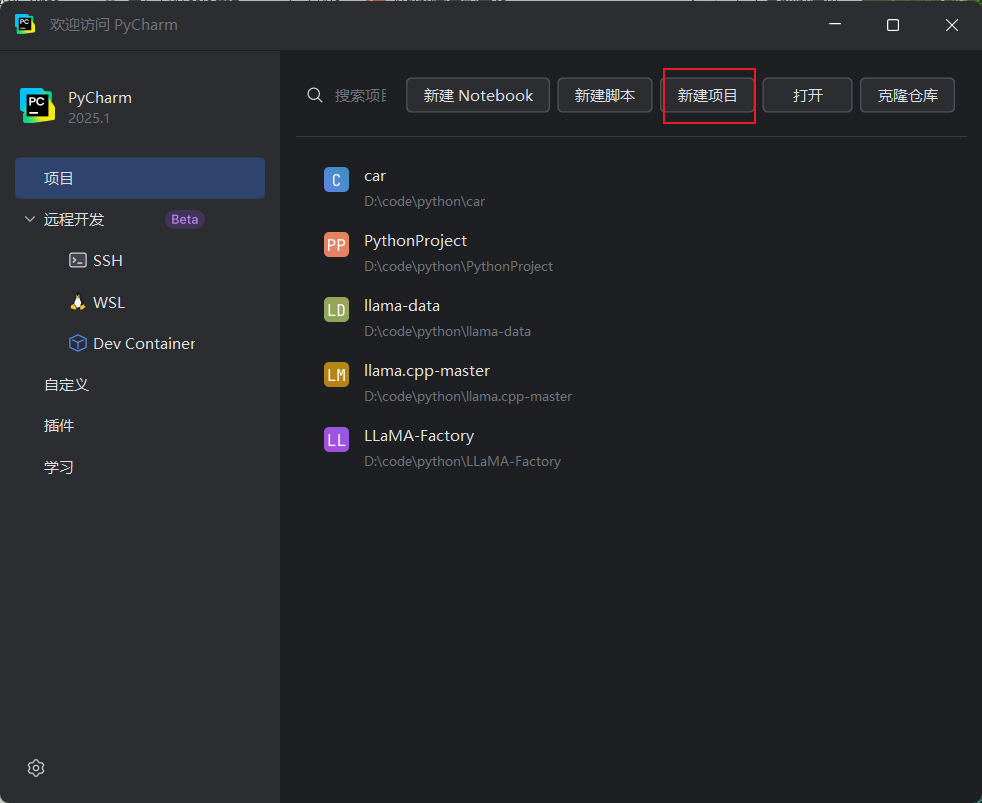
启动 PyCharm,点击 New Project,配置项目路径与 Python 解释器后完成创建。随后在项目中新建一个名为 main.py 的 Python 文件。
2
绘制轨道
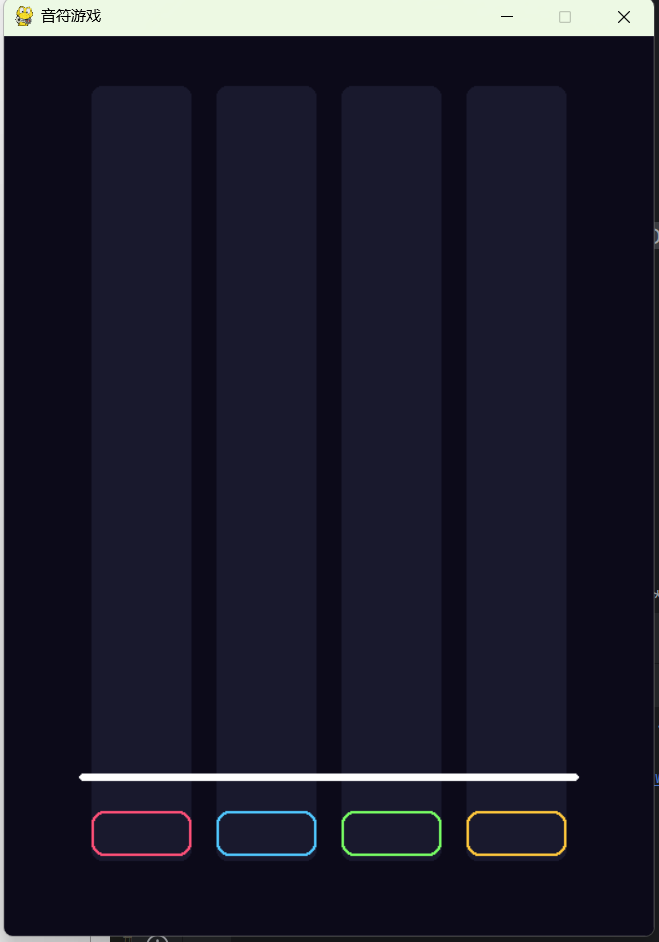
import pygame
import sys
# 初始化pygame
pygame.init()
# 设置宽高
W, H = 520, 720
FPS = 60
screen = pygame.display.set_mode((W, H))
# 设置标题
pygame.display.set_caption("音符游戏")
# 创建时钟 用于控制FPS帧率
clock = pygame.time.Clock()
# 轨道数
LANES = 4
# 轨道宽度
LANE_W = 80
# 轨道间距 px
LANE_GAP = 20
# 总宽度 (轨道数*宽度+间距数量*间距宽度)
TOTAL_W = LANES * LANE_W + (LANES - 1) * LANE_GAP
# 放在屏幕居中位置
OFFSET_X = (W - TOTAL_W) // 2
# 判定线Y坐标 音符到这个位置进行判定
JUDGE_Y = H - 130
# 背景颜色
C_BG = (12, 10, 25)
# 轨道颜色
C_LANE = (25, 25, 45)
# 音符颜色
C_NOTE_COLORS = [
(255, 80, 120), # 轨道0: 粉红色
(80, 200, 255), # 轨道1: 天蓝色
(120, 255, 100), # 轨道2: 绿色
(255, 200, 60) # 轨道3: 金黄色
]
running = True
while running:
# 设置游戏帧率
clock.tick(FPS)
# 获取所有事件
for event in pygame.event.get():
# 是否有关闭有“关闭窗口事“件
if event.type == pygame.QUIT:
running = False
# 设置窗口背景颜色
screen.fill(C_BG)
# 绘制轨道
for i in range(LANES):
# 计算每条轨道起始位置
lx = OFFSET_X + i * (LANE_W + LANE_GAP)
# 绘制长条
pygame.draw.rect(screen, C_LANE, (lx, 40, LANE_W, H - 100), border_radius=8)
# 判断线下的按键指示器
ky = JUDGE_Y + 30 # 判定线下方30px位置
# width大于0 只画边框不填充内部
pygame.draw.rect(screen, C_NOTE_COLORS[i], (lx, ky, LANE_W, 36), border_radius=10, width=2)
# 判断线
pygame.draw.rect(screen, (255, 255, 255, 180), (OFFSET_X - 10, JUDGE_Y, TOTAL_W + 20, 6), border_radius=3)
pygame.display.flip()
# 释放显示设备
pygame.quit()
# 退出程序
sys.exit()
3
掉落音符
运行程序后会有窗口弹出,并不停掉落音符。
import pygame
import sys
import random
# 初始化pygame
pygame.init()
# 设置宽高
W, H = 520, 720
FPS = 60
screen = pygame.display.set_mode((W, H))
# 设置标题
pygame.display.set_caption("音符游戏")
# 创建时钟 用于控制FPS帧率
clock = pygame.time.Clock()
# 轨道数
LANES = 4
# 轨道宽度
LANE_W = 80
# 轨道间距 px
LANE_GAP = 20
# 总宽度 (轨道数*宽度+间距数量*间距宽度)
TOTAL_W = LANES * LANE_W + (LANES - 1) * LANE_GAP
# 放在屏幕居中位置
OFFSET_X = (W - TOTAL_W) // 2
# 判定线Y坐标 音符到这个位置进行判定
JUDGE_Y = H - 130
# 背景颜色
C_BG = (12, 10, 25)
# 轨道颜色
C_LANE = (25, 25, 45)
# 音符颜色
C_NOTE_COLORS = [
(255, 80, 120), # 轨道0: 粉红色
(80, 200, 255), # 轨道1: 天蓝色
(120, 255, 100), # 轨道2: 绿色
(255, 200, 60) # 轨道3: 金黄色
]
# 屏幕存活音符列表
notes = []
# 计时器累加值
spawn_timer = 0.0
# 音符0.5生成一个
spawn_interval = 0.5
# 滑动宽度
NOTE_H = 20
# 下落速度
base_speed = 4.5
running = True
while running:
# 获取上一帧耗时
dt = clock.tick(FPS) / 1000.0
# 获取所有事件
for event in pygame.event.get():
# 是否有关闭有“关闭窗口事“件
if event.type == pygame.QUIT:
running = False
# 设置窗口背景颜色
screen.fill(C_BG)
# 绘制轨道
for i in range(LANES):
# 计算每条轨道起始位置
lx = OFFSET_X + i * (LANE_W + LANE_GAP)
# 绘制长条
pygame.draw.rect(screen, C_LANE, (lx, 40, LANE_W, H - 100), border_radius=8)
# 判断线下的按键指示器
ky = JUDGE_Y + 30 # 判定线下方30px位置
# width大于0 只画边框不填充内部
pygame.draw.rect(screen, C_NOTE_COLORS[i], (lx, ky, LANE_W, 36), border_radius=10, width=2)
# 判断线
pygame.draw.rect(screen, (255, 255, 255, 180), (OFFSET_X - 10, JUDGE_Y, TOTAL_W + 20, 6), border_radius=3)
# 生成音符
spawn_timer += dt
if spawn_timer >= spawn_interval:
spawn_timer = 0
# 随机选择轨道
lane = random.randint(0, 3)
# 在屏幕上方不可见处生成
notes.append({"lane": lane, "y": -NOTE_H})
# 更新音符位置
for n in notes[:]:
n["y"] += base_speed
if n["y"] > H:
# 超出高度后删除
notes.remove(n)
# 音符绘制
for n in notes:
# 根据轨道算x坐标
lx = OFFSET_X + n["lane"] * (LANE_W + LANE_GAP)
# 选取对应轨道颜色
color = C_NOTE_COLORS[n["lane"]]
# 绘制音符
pygame.draw.rect(screen, color,
(lx + 4, n["y"], LANE_W - 8, NOTE_H), border_radius=6)
pygame.display.flip()
# 释放显示设备
pygame.quit()
# 退出程序
sys.exit()
4
判定系统
音符不断掉落,以判定线为基础,音符离判定线越近判定越好,超过判定线为miss。
import pygame
import sys
import random
# 初始化pygame
pygame.init()
# 设置宽高
W, H = 520, 720
FPS = 60
# 按键判定 d f j k
KEYS = [pygame.K_d, pygame.K_f, pygame.K_j, pygame.K_k]
WINDOW_PERFECT = 25
WINDOW_GOOD = 55
WINDOW_MISS = 80
screen = pygame.display.set_mode((W, H))
# 设置标题
pygame.display.set_caption("音符游戏")
# 创建时钟 用于控制FPS帧率
clock = pygame.time.Clock()
# 轨道数
LANES = 4
# 轨道宽度
LANE_W = 80
# 轨道间距 px
LANE_GAP = 20
# 总宽度 (轨道数*宽度+间距数量*间距宽度)
TOTAL_W = LANES * LANE_W + (LANES - 1) * LANE_GAP
# 放在屏幕居中位置
OFFSET_X = (W - TOTAL_W) // 2
# 判定线Y坐标 音符到这个位置进行判定
JUDGE_Y = H - 130
# 背景颜色
C_BG = (12, 10, 25)
# 轨道颜色
C_LANE = (25, 25, 45)
# 音符颜色
C_NOTE_COLORS = [
(255, 80, 120), # 轨道0: 粉红色
(80, 200, 255), # 轨道1: 天蓝色
(120, 255, 100), # 轨道2: 绿色
(255, 200, 60) # 轨道3: 金黄色
]
# 屏幕存活音符列表
notes = []
# 计时器累加值
spawn_timer = 0.0
# 音符0.5生成一个
spawn_interval = 0.5
# 滑动宽度
NOTE_H = 20
# 下落速度
base_speed = 4.5
running = True
while running:
# 获取上一帧耗时
dt = clock.tick(FPS) / 1000.0
# 获取所有事件
for event in pygame.event.get():
# 是否有关闭有“关闭窗口事“件
if event.type == pygame.QUIT:
running = False
# 事件为键盘按下时
if event.type == pygame.KEYDOWN:
for li, key in enumerate(KEYS):
if event.key == key:
# 查询轨道未集中音符
hit_note = None
min_dist = float('inf')
for n in notes:
if n["lane"] == li and not n.get("hit"):
dist = abs(n["y"] - JUDGE_Y)
if dist<WINDOW_MISS and dist < min_dist:
min_dist = dist
hit_note = n
if hit_note:
hit_note["hit"] = True
if min_dist <= WINDOW_PERFECT:
print(f"完美!距离={min_dist:1f}px")
elif min_dist <= WINDOW_GOOD:
print(f"良好! 距离={min_dist:1f}px")
else:
print(f"勉强! 距离={min_dist:1f}px")
else:
print("空击")
# 设置窗口背景颜色
screen.fill(C_BG)
# 绘制轨道
for i in range(LANES):
# 计算每条轨道起始位置
lx = OFFSET_X + i * (LANE_W + LANE_GAP)
# 绘制长条
pygame.draw.rect(screen, C_LANE, (lx, 40, LANE_W, H - 100), border_radius=8)
# 判断线下的按键指示器
ky = JUDGE_Y + 30 # 判定线下方30px位置
# width大于0 只画边框不填充内部
pygame.draw.rect(screen, C_NOTE_COLORS[i], (lx, ky, LANE_W, 36), border_radius=10, width=2)
# 判断线
pygame.draw.rect(screen, (255, 255, 255, 180), (OFFSET_X - 10, JUDGE_Y, TOTAL_W + 20, 6), border_radius=3)
# 生成音符
spawn_timer += dt
if spawn_timer >= spawn_interval:
spawn_timer = 0
# 随机选择轨道
lane = random.randint(0, 3)
# 在屏幕上方不可见处生成
notes.append({"lane": lane, "y": -NOTE_H})
# 更新音符位置
for n in notes[:]:
if n.get("hit"):
notes.remove(n)
continue
n["y"] += base_speed
if n["y"] > JUDGE_Y+WINDOW_MISS:
print("MISS")
# 超出高度后删除
notes.remove(n)
# 音符绘制
for n in notes:
# 根据轨道算x坐标
lx = OFFSET_X + n["lane"] * (LANE_W + LANE_GAP)
# 选取对应轨道颜色
color = C_NOTE_COLORS[n["lane"]]
# 绘制音符
pygame.draw.rect(screen, color,
(lx + 4, n["y"], LANE_W - 8, NOTE_H), border_radius=6)
pygame.display.flip()
# 释放显示设备
pygame.quit()
# 退出程序
sys.exit()
5
计分
根据点击的效果在屏幕上展示分数。
import pygame
import sys
import random
# 初始化pygame
pygame.init()
# 设置宽高
W, H = 520, 720
FPS = 60
# 按键判定 d f j k
KEYS = [pygame.K_d, pygame.K_f, pygame.K_j, pygame.K_k]
WINDOW_PERFECT = 25
WINDOW_GOOD = 55
WINDOW_MISS = 80
screen = pygame.display.set_mode((W, H))
# 设置标题
pygame.display.set_caption("音符游戏")
# 创建时钟 用于控制FPS帧率
clock = pygame.time.Clock()
# 轨道数
LANES = 4
# 轨道宽度
LANE_W = 80
# 轨道间距 px
LANE_GAP = 20
# 总宽度 (轨道数*宽度+间距数量*间距宽度)
TOTAL_W = LANES * LANE_W + (LANES - 1) * LANE_GAP
# 放在屏幕居中位置
OFFSET_X = (W - TOTAL_W) // 2
# 判定线Y坐标 音符到这个位置进行判定
JUDGE_Y = H - 130
# 背景颜色
C_BG = (12, 10, 25)
# 轨道颜色
C_LANE = (25, 25, 45)
# 音符颜色
C_NOTE_COLORS = [
(255, 80, 120), # 轨道0: 粉红色
(80, 200, 255), # 轨道1: 天蓝色
(120, 255, 100), # 轨道2: 绿色
(255, 200, 60) # 轨道3: 金黄色
]
# 屏幕存活音符列表
notes = []
# 计时器累加值
spawn_timer = 0.0
# 音符0.5生成一个
spawn_interval = 0.5
# 滑动宽度
NOTE_H = 20
# 下落速度
base_speed = 4.5
# 设置字体样式以及大小
def load_font(size):
candidates = [
r"C:/Windows/Fonts/msyh.ttc",
r"/System/Library/Fonts/PingFang.ttc",
r"/usr/share/fonts/truetype/wqy/wqy-microhei.ttc"
]
for path in candidates:
try:
return pygame.font.Font(path, size)
except:
continue
return pygame.font.SysFont("simhei", size)
FONT_LG = load_font(42)
FONT_MD = load_font(24)
# 当前得分
score = 0
# 连击数
combo = 0
judge_display = {"text": "", "color": (255, 255, 255), "timer": 0}
running = True
while running:
# 获取上一帧耗时
dt = clock.tick(FPS) / 1000.0
# 获取所有事件
for event in pygame.event.get():
# 是否有关闭有“关闭窗口事“件
if event.type == pygame.QUIT:
running = False
# 事件为键盘按下时
if event.type == pygame.KEYDOWN:
for li, key in enumerate(KEYS):
if event.key == key:
# 查询轨道未集中音符
hit_note = None
min_dist = float('inf')
for n in notes:
if n["lane"] == li and not n.get("hit"):
dist = abs(n["y"] - JUDGE_Y)
if dist < WINDOW_MISS and dist < min_dist:
min_dist = dist
hit_note = n
if hit_note:
hit_note["hit"] = True
if min_dist <= WINDOW_PERFECT:
rating, pts, col = "完美", 300, (255, 230, 50)
elif min_dist <= WINDOW_GOOD:
rating, pts, col = "良好", 100, (100, 220, 255)
else:
# 不加分
continue
# 连击数++
combo += 1
# 连击分数追加
score += pts * (1 + combo // 15)
judge_display = {"text": rating, "color": col, "timer": 30}
else:
# 清空连接数
combo=0
judge_display = {"text": "失误", "color": (200, 60, 60), "timer": 25}
# 设置窗口背景颜色
screen.fill(C_BG)
# 绘制轨道
for i in range(LANES):
# 计算每条轨道起始位置
lx = OFFSET_X + i * (LANE_W + LANE_GAP)
# 绘制长条
pygame.draw.rect(screen, C_LANE, (lx, 40, LANE_W, H - 100), border_radius=8)
# 判断线下的按键指示器
ky = JUDGE_Y + 30 # 判定线下方30px位置
# width大于0 只画边框不填充内部
pygame.draw.rect(screen, C_NOTE_COLORS[i], (lx, ky, LANE_W, 36), border_radius=10, width=2)
# 判断线
pygame.draw.rect(screen, (255, 255, 255, 180), (OFFSET_X - 10, JUDGE_Y, TOTAL_W + 20, 6), border_radius=3)
# 生成音符
spawn_timer += dt
if spawn_timer >= spawn_interval:
spawn_timer = 0
# 随机选择轨道
lane = random.randint(0, 3)
# 在屏幕上方不可见处生成
notes.append({"lane": lane, "y": -NOTE_H})
# 更新音符位置
for n in notes[:]:
if n.get("hit"):
notes.remove(n)
continue
n["y"] += base_speed
if n["y"] > JUDGE_Y + WINDOW_MISS:
print("MISS")
# 超出高度后删除
notes.remove(n)
# 音符绘制
for n in notes:
# 根据轨道算x坐标
lx = OFFSET_X + n["lane"] * (LANE_W + LANE_GAP)
# 选取对应轨道颜色
color = C_NOTE_COLORS[n["lane"]]
# 绘制音符
pygame.draw.rect(screen, color,
(lx + 4, n["y"], LANE_W - 8, NOTE_H), border_radius=6)
# 分数显示
sc_text = FONT_LG.render(f"{score:,}", True, (230, 230, 240))
# 居中显示分数
screen.blit(sc_text, sc_text.get_rect(centerx=W // 2, y=6))
# 连击
if combo > 2:
cb_text = FONT_MD.render(f"{combo} 连击", True, (255, 230, 50))
screen.blit(cb_text, cb_text.get_rect(centerx=W // 2, y=JUDGE_Y - 90))
# 判定文字(带淡出效果)
if judge_display["timer"] > 0:
jt = FONT_LG.render(judge_display["text"], True, judge_display["color"])
screen.blit(jt, jt.get_rect(centerx=W // 2, y=JUDGE_Y - 55))
judge_display["timer"] -= 1
pygame.display.flip()
# 释放显示设备
pygame.quit()
# 退出程序
sys.exit()
6
音符打击效果
在判定线部分击中是会有粒子爆炸的效果。
import pygame
import sys
import random
import math,struct
# 初始化pygame
pygame.init()
# 设置宽高
W, H = 520, 720
FPS = 60
# 按键判定 d f j k
KEYS = [pygame.K_d, pygame.K_f, pygame.K_j, pygame.K_k]
WINDOW_PERFECT = 25
WINDOW_GOOD = 55
WINDOW_MISS = 80
screen = pygame.display.set_mode((W, H))
# 设置标题
pygame.display.set_caption("音符游戏")
# 创建时钟 用于控制FPS帧率
clock = pygame.time.Clock()
# 轨道数
LANES = 4
# 轨道宽度
LANE_W = 80
# 轨道间距 px
LANE_GAP = 20
# 总宽度 (轨道数*宽度+间距数量*间距宽度)
TOTAL_W = LANES * LANE_W + (LANES - 1) * LANE_GAP
# 放在屏幕居中位置
OFFSET_X = (W - TOTAL_W) // 2
# 判定线Y坐标 音符到这个位置进行判定
JUDGE_Y = H - 130
# 背景颜色
C_BG = (12, 10, 25)
# 轨道颜色
C_LANE = (25, 25, 45)
# 音符颜色
C_NOTE_COLORS = [
(255, 80, 120), # 轨道0: 粉红色
(80, 200, 255), # 轨道1: 天蓝色
(120, 255, 100), # 轨道2: 绿色
(255, 200, 60) # 轨道3: 金黄色
]
# 屏幕存活音符列表
notes = []
# 计时器累加值
spawn_timer = 0.0
# 音符0.5生成一个
spawn_interval = 0.5
# 滑动宽度
NOTE_H = 20
# 下落速度
base_speed = 4.5
# 设置字体样式以及大小
def load_font(size):
candidates = [
r"C:/Windows/Fonts/msyh.ttc",
r"/System/Library/Fonts/PingFang.ttc",
r"/usr/share/fonts/truetype/wqy/wqy-microhei.ttc"
]
for path in candidates:
try:
return pygame.font.Font(path, size)
except:
continue
return pygame.font.SysFont("simhei", size)
# 程序化生成音效(💡 重点讲解正弦波+包络线)
def create_beep(freq=440, duration=0.08, vol=0.3):
sr = 44100
n_samples = int(sr * duration)
buf = bytearray(n_samples * 4)
for i in range(n_samples):
t = i / sr
envelope = max(0, 1.0 - (i / n_samples) ** 0.5) # 快速衰减
val = int(math.sin(2 * math.pi * freq * t) * vol * envelope * 32767)
val = max(-32768, min(32767, val))
buf[i*4:i*4+4] = struct.pack('<hh', val, val)
sound = pygame.mixer.Sound(buffer=bytes(buf))
sound.set_volume(vol)
return sound
HIT_SOUNDS = [create_beep(f) for f in [330, 392, 440, 523]]
# 粒子类
class Particle:
def __init__(self, x, y, color):
self.x, self.y = x, y
angle = random.uniform(0, math.pi * 2)
speed = random.uniform(2, 6)
self.vx = math.cos(angle) * speed
self.vy = math.sin(angle) * speed - 2
self.life = 1.0
self.color = color
self.size = random.randint(3, 6)
def update(self):
self.x += self.vx
self.y += self.vy
self.vy += 0.15 # 重力
self.life -= 0.035
self.size *= 0.96
return self.life > 0 and self.size > 0.5
def draw(self, surf):
alpha = int(self.life * 255)
s = pygame.Surface((int(self.size*2)+2, int(self.size*2)+2), pygame.SRCALPHA)
pygame.draw.circle(s, (*self.color, alpha),
(int(self.size)+1, int(self.size)+1), int(self.size))
surf.blit(s, (int(self.x-self.size), int(self.y-self.size)))
# 在主循环外部初始化
particles = []
FONT_LG = load_font(42)
FONT_MD = load_font(24)
# 当前得分
score = 0
# 连击数
combo = 0
particles = []
judge_display = {"text": "", "color": (255, 255, 255), "timer": 0}
running = True
while running:
# 获取上一帧耗时
dt = clock.tick(FPS) / 1000.0
# 及时清理死亡粒子
particles = [p for p in particles if p.update()]
# 获取所有事件
for event in pygame.event.get():
# 是否有关闭有“关闭窗口事“件
if event.type == pygame.QUIT:
running = False
# 事件为键盘按下时
if event.type == pygame.KEYDOWN:
for li, key in enumerate(KEYS):
if event.key == key:
# 查询轨道未集中音符
hit_note = None
min_dist = float('inf')
for n in notes:
if n["lane"] == li and not n.get("hit"):
dist = abs(n["y"] - JUDGE_Y)
if dist < WINDOW_MISS and dist < min_dist:
min_dist = dist
hit_note = n
if hit_note:
hit_note["hit"] = True
if min_dist <= WINDOW_PERFECT:
rating, pts, col = "完美", 300, (255, 230, 50)
elif min_dist <= WINDOW_GOOD:
rating, pts, col = "良好", 100, (100, 220, 255)
else:
# 不加分
continue
# 连击数++
combo += 1
# 连击分数追加
score += pts * (1 + combo // 15)
judge_display = {"text": rating, "color": col, "timer": 30}
for _ in range(10):
lx = OFFSET_X + li * (LANE_W + LANE_GAP) + LANE_W // 2
particles.append(Particle(lx, JUDGE_Y, C_NOTE_COLORS[li]))
HIT_SOUNDS[li].play()
else:
# 清空连接数
combo=0
judge_display = {"text": "失误", "color": (200, 60, 60), "timer": 25}
# 设置窗口背景颜色
screen.fill(C_BG)
# 绘制轨道
for i in range(LANES):
# 计算每条轨道起始位置
lx = OFFSET_X + i * (LANE_W + LANE_GAP)
# 绘制长条
pygame.draw.rect(screen, C_LANE, (lx, 40, LANE_W, H - 100), border_radius=8)
# 判断线下的按键指示器
ky = JUDGE_Y + 30 # 判定线下方30px位置
# width大于0 只画边框不填充内部
pygame.draw.rect(screen, C_NOTE_COLORS[i], (lx, ky, LANE_W, 36), border_radius=10, width=2)
# 判断线
pygame.draw.rect(screen, (255, 255, 255, 180), (OFFSET_X - 10, JUDGE_Y, TOTAL_W + 20, 6), border_radius=3)
# 生成音符
spawn_timer += dt
if spawn_timer >= spawn_interval:
spawn_timer = 0
# 随机选择轨道
lane = random.randint(0, 3)
# 在屏幕上方不可见处生成
notes.append({"lane": lane, "y": -NOTE_H})
# 更新音符位置
for n in notes[:]:
if n.get("hit"):
notes.remove(n)
continue
n["y"] += base_speed
if n["y"] > JUDGE_Y + WINDOW_MISS:
print("MISS")
# 超出高度后删除
notes.remove(n)
# 在绘制阶段添加(在音符之后):
for p in particles:
p.draw(screen)
# 音符绘制
for n in notes:
# 根据轨道算x坐标
lx = OFFSET_X + n["lane"] * (LANE_W + LANE_GAP)
# 选取对应轨道颜色
color = C_NOTE_COLORS[n["lane"]]
# 绘制音符
pygame.draw.rect(screen, color,
(lx + 4, n["y"], LANE_W - 8, NOTE_H), border_radius=6)
# 分数显示
sc_text = FONT_LG.render(f"{score:,}", True, (230, 230, 240))
# 居中显示分数
screen.blit(sc_text, sc_text.get_rect(centerx=W // 2, y=6))
# 连击
if combo > 2:
cb_text = FONT_MD.render(f"{combo} 连击", True, (255, 230, 50))
screen.blit(cb_text, cb_text.get_rect(centerx=W // 2, y=JUDGE_Y - 90))
# 判定文字(带淡出效果)
if judge_display["timer"] > 0:
jt = FONT_LG.render(judge_display["text"], True, judge_display["color"])
screen.blit(jt, jt.get_rect(centerx=W // 2, y=JUDGE_Y - 55))
judge_display["timer"] -= 1
pygame.display.flip()
# 释放显示设备
pygame.quit()
# 退出程序
sys.exit()
7
完整实现
在最后加入了血条机制以及结束后的菜单页面。
import pygame
import sys
import random
import math, struct
# 初始化pygame
pygame.init()
# 设置宽高
W, H = 520, 720
FPS = 60
# 按键判定 d f j k
KEYS = [pygame.K_d, pygame.K_f, pygame.K_j, pygame.K_k]
WINDOW_PERFECT = 25
WINDOW_GOOD = 55
WINDOW_MISS = 80
screen = pygame.display.set_mode((W, H))
# 设置标题
pygame.display.set_caption("音符游戏")
# 创建时钟 用于控制FPS帧率
clock = pygame.time.Clock()
# 轨道数
LANES = 4
# 轨道宽度
LANE_W = 80
# 轨道间距 px
LANE_GAP = 20
# 总宽度 (轨道数*宽度+间距数量*间距宽度)
TOTAL_W = LANES * LANE_W + (LANES - 1) * LANE_GAP
# 放在屏幕居中位置
OFFSET_X = (W - TOTAL_W) // 2
# 判定线Y坐标 音符到这个位置进行判定
JUDGE_Y = H - 130
# 背景颜色
C_BG = (12, 10, 25)
# 轨道颜色
C_LANE = (25, 25, 45)
# 音符颜色
C_NOTE_COLORS = [
(255, 80, 120), # 轨道0: 粉红色
(80, 200, 255), # 轨道1: 天蓝色
(120, 255, 100), # 轨道2: 绿色
(255, 200, 60) # 轨道3: 金黄色
]
# 屏幕存活音符列表
notes = []
# 计时器累加值
spawn_timer = 0.0
# 音符0.5生成一个
spawn_interval = 0.5
# 滑动宽度
NOTE_H = 20
# 下落速度
base_speed = 4.5
# 添加节奏模板与过热变量
bpm = 125
beat_timer = 0.0
beat_pattern_idx = 0
patterns = [
[0, 2, 1, 3], # 基础交替
[0, 1, 2, 3], # 上行阶梯
[-1, 0, -1, 3], # 切分节奏 (-1=休息拍)
[0, 0, 3, 3, 1, 1, 2, 2] # 双押练习
]
current_pattern = random.choice(patterns)
heat = 0.0 # 过热值 0~100
game_over = False
# 设置字体样式以及大小
def load_font(size):
candidates = [
r"C:/Windows/Fonts/msyh.ttc",
r"/System/Library/Fonts/PingFang.ttc",
r"/usr/share/fonts/truetype/wqy/wqy-microhei.ttc"
]
for path in candidates:
try:
return pygame.font.Font(path, size)
except:
continue
return pygame.font.SysFont("simhei", size)
# 程序化生成音效
def create_beep(freq=440, duration=0.08, vol=0.3):
sr = 44100
n_samples = int(sr * duration)
buf = bytearray(n_samples * 4)
for i in range(n_samples):
t = i / sr
envelope = max(0, 1.0 - (i / n_samples) ** 0.5) # 快速衰减
val = int(math.sin(2 * math.pi * freq * t) * vol * envelope * 32767)
val = max(-32768, min(32767, val))
buf[i * 4:i * 4 + 4] = struct.pack('<hh', val, val)
sound = pygame.mixer.Sound(buffer=bytes(buf))
sound.set_volume(vol)
return sound
# 重新开始游戏
def reset_game():
"""重置所有运行时状态到初始值"""
global notes, particles, score, combo, heat, game_over
global beat_timer, beat_pattern_idx, current_pattern, judge_display
notes = []
particles = []
score = 0
combo = 0
heat = 0.0
game_over = False
# 节奏生成器归位
beat_timer = 0.0
beat_pattern_idx = 0
current_pattern = random.choice(patterns)
# UI显示清空
judge_display = {"text": "", "color": (255, 255, 255), "timer": 0}
HIT_SOUNDS = [create_beep(f) for f in [330, 392, 440, 523]]
# 粒子类
class Particle:
def __init__(self, x, y, color):
self.x, self.y = x, y
angle = random.uniform(0, math.pi * 2)
speed = random.uniform(2, 6)
self.vx = math.cos(angle) * speed
self.vy = math.sin(angle) * speed - 2
self.life = 1.0
self.color = color
self.size = random.randint(3, 6)
def update(self):
self.x += self.vx
self.y += self.vy
self.vy += 0.15 # 重力
self.life -= 0.035
self.size *= 0.96
return self.life > 0 and self.size > 0.5
def draw(self, surf):
alpha = int(self.life * 255)
s = pygame.Surface((int(self.size * 2) + 2, int(self.size * 2) + 2), pygame.SRCALPHA)
pygame.draw.circle(s, (*self.color, alpha),
(int(self.size) + 1, int(self.size) + 1), int(self.size))
surf.blit(s, (int(self.x - self.size), int(self.y - self.size)))
# 在主循环外部初始化
particles = []
FONT_LG = load_font(42)
FONT_MD = load_font(24)
# 当前得分
score = 0
# 连击数
combo = 0
particles = []
judge_display = {"text": "", "color": (255, 255, 255), "timer": 0}
running = True
while running:
# 获取上一帧耗时
dt = clock.tick(FPS) / 1000.0
# 及时清理死亡粒子
particles = [p for p in particles if p.update()]
# 获取所有事件
for event in pygame.event.get():
# 是否有关闭有“关闭窗口事“件
if event.type == pygame.QUIT:
running = False
# 事件为键盘按下时
if event.type == pygame.KEYDOWN:
# 摁下r重新开始游戏
if event.key == pygame.K_r:
reset_game()
# esc退出游戏
elif event.key == pygame.K_ESCAPE:
running = False
for li, key in enumerate(KEYS):
if event.key == key:
# 查询轨道未集中音符
hit_note = None
min_dist = float('inf')
for n in notes:
if n["lane"] == li and not n.get("hit"):
dist = abs(n["y"] - JUDGE_Y)
if dist < WINDOW_MISS and dist < min_dist:
min_dist = dist
hit_note = n
if hit_note:
hit_note["hit"] = True
if min_dist <= WINDOW_PERFECT:
rating, pts, col = "完美", 300, (255, 230, 50)
heat = max(0, heat - 3) # Perfect 大幅降温
elif min_dist <= WINDOW_GOOD:
rating, pts, col = "良好", 100, (100, 220, 255)
heat = max(0, heat - 1) # Good 轻微降温
else:
# 不加分
heat = min(100, heat + 12) # 失误快速升温
if heat >= 100:
game_over = True # 触发游戏结束状态
continue
# 统一处理:加分连击、粒子、音效
if pts > 0:
# 连击数++
combo += 1
# 连击分数追加
score += pts * (1 + combo // 15)
judge_display = {"text": rating, "color": col, "timer": 30}
for _ in range(10):
lx = OFFSET_X + li * (LANE_W + LANE_GAP) + LANE_W // 2
particles.append(Particle(lx, JUDGE_Y, C_NOTE_COLORS[li]))
HIT_SOUNDS[li].play()
else:
# 空击 无音符可打
combo = 0
judge_display = {"text": "失败", "color": (200, 60, 60), "timer": 25}
heat = min(100, heat + 12) # 失误快速升温
if heat >= 100:
game_over = True # 触发游戏结束状态
# 设置窗口背景颜色
screen.fill(C_BG)
# 绘制轨道
for i in range(LANES):
# 计算每条轨道起始位置
lx = OFFSET_X + i * (LANE_W + LANE_GAP)
# 绘制长条
pygame.draw.rect(screen, C_LANE, (lx, 40, LANE_W, H - 100), border_radius=8)
# 判断线下的按键指示器
ky = JUDGE_Y + 30 # 判定线下方30px位置
# width大于0 只画边框不填充内部
pygame.draw.rect(screen, C_NOTE_COLORS[i], (lx, ky, LANE_W, 36), border_radius=10, width=2)
# 判断线
pygame.draw.rect(screen, (255, 255, 255, 180), (OFFSET_X - 10, JUDGE_Y, TOTAL_W + 20, 6), border_radius=3)
# bpm节奏生成
beat_interval = 60.0 / bpm
beat_timer += dt
if beat_timer >= beat_interval:
beat_timer -= beat_interval
lane = current_pattern[beat_pattern_idx % len(current_pattern)]
if lane != -1: # 遇到休息拍不生成音符
notes.append({"lane": lane, "y": -NOTE_H})
beat_pattern_idx += 1
# 当前pattern播完,随机换下一个
if beat_pattern_idx >= len(current_pattern):
current_pattern = random.choice(patterns)
beat_pattern_idx = 0
# 更新音符位置
for n in notes[:]:
if n.get("hit"):
notes.remove(n)
continue
n["y"] += base_speed
if n["y"] > JUDGE_Y + WINDOW_MISS:
print("MISS")
heat = min(100, heat + 12)
if heat >= 100:
game_over = True
# 超出高度后删除
notes.remove(n)
if not game_over:
heat = max(0, heat - 4 * dt)
# 在绘制阶段添加(在音符之后):
for p in particles:
p.draw(screen)
# 音符绘制
for n in notes:
# 根据轨道算x坐标
lx = OFFSET_X + n["lane"] * (LANE_W + LANE_GAP)
# 选取对应轨道颜色
color = C_NOTE_COLORS[n["lane"]]
# 绘制音符
pygame.draw.rect(screen, color,
(lx + 4, n["y"], LANE_W - 8, NOTE_H), border_radius=6)
# 分数显示
sc_text = FONT_LG.render(f"{score:,}", True, (230, 230, 240))
# 居中显示分数
screen.blit(sc_text, sc_text.get_rect(centerx=W // 2, y=6))
# 连击
if combo > 2:
cb_text = FONT_MD.render(f"{combo} 连击", True, (255, 230, 50))
screen.blit(cb_text, cb_text.get_rect(centerx=W // 2, y=JUDGE_Y - 90))
# 判定文字(带淡出效果)
if judge_display["timer"] > 0:
jt = FONT_LG.render(judge_display["text"], True, judge_display["color"])
screen.blit(jt, jt.get_rect(centerx=W // 2, y=JUDGE_Y - 55))
judge_display["timer"] -= 1
# 正常游戏中的过热条 UI
bar_w = int((TOTAL_W + 20) * (heat / 100))
bar_color = (255, 80, 80) if heat > 70 else (255, 180, 50)
pygame.draw.rect(screen, bar_color,
(OFFSET_X - 10, JUDGE_Y + 70, bar_w, 8), border_radius=4)
# 游戏结束结算层
if game_over:
overlay = pygame.Surface((W, H), pygame.SRCALPHA)
overlay.fill((0, 0, 0, 180))
screen.blit(overlay, (0, 0))
title = FONT_LG.render("系统过载!", True, (255, 80, 80))
final_score = FONT_MD.render(f"最终得分: {score:,}", True, (230, 230, 240))
hint = FONT_MD.render("按 R 重试 | 按 ESC 退出", True, (180, 180, 200))
screen.blit(title, title.get_rect(center=(W // 2, H // 2 - 40)))
screen.blit(final_score, final_score.get_rect(center=(W // 2, H // 2 + 10)))
screen.blit(hint, hint.get_rect(center=(W // 2, H // 2 + 60)))
pygame.display.flip()
# 释放显示设备
pygame.quit()
# 退出程序
sys.exit()
main.py
11.17KB
 0
0 0
0 0
0 qq空间
qq空间  微博
微博  复制链接
复制链接  分享
分享  本文未经作者允许授权,禁止转载
 更多相关项目
猜你喜欢
评论/提问(已发布 0 条)

 评论
评论  收藏
收藏  分享
分享  下载
下载  举报
举报  回顶部
回顶部