碰一碰就上网!手机贴NFC卡片秒连WiFi

 0
0 0
0 0
0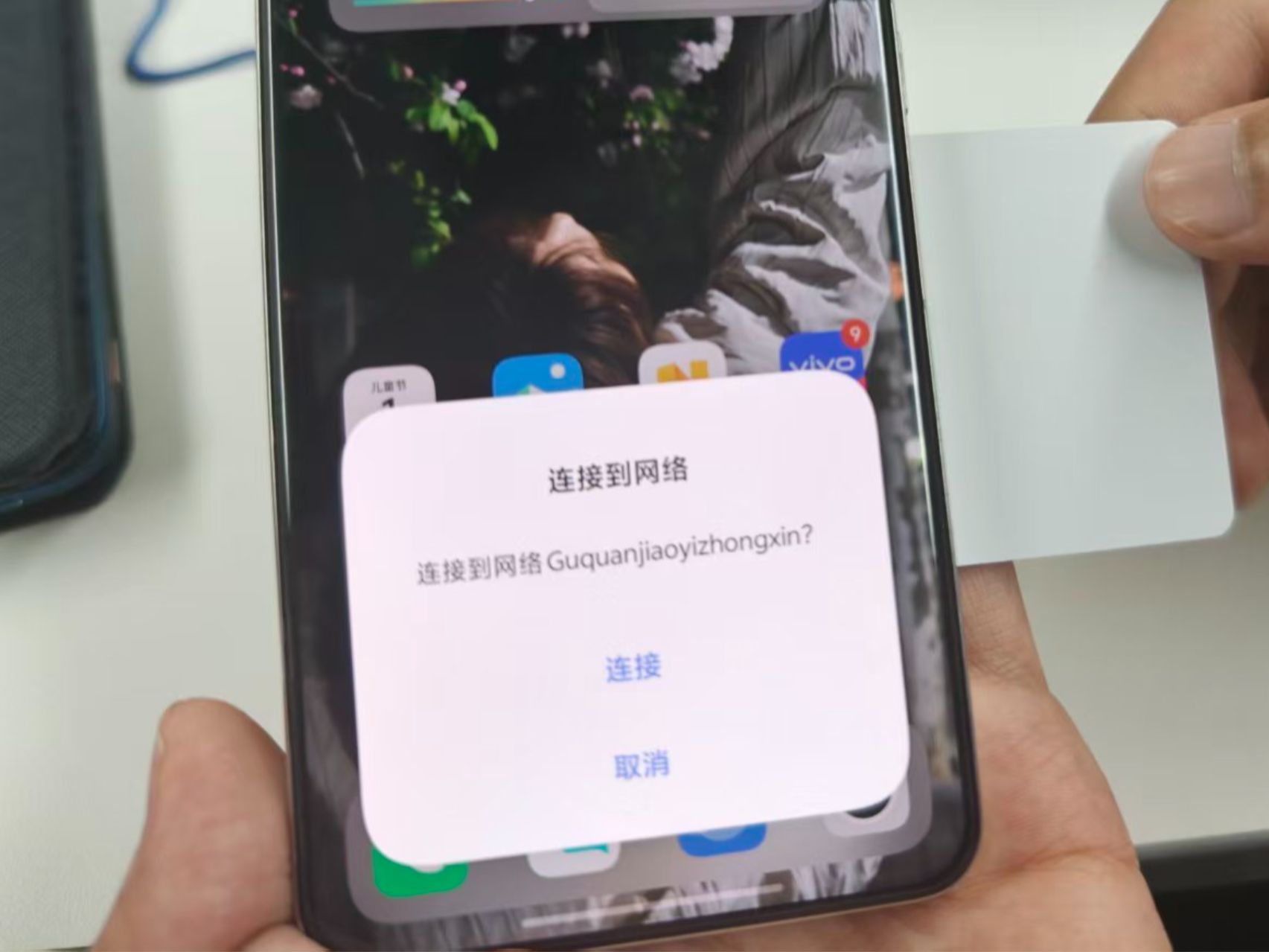
从零打造 NFC WiFi 写入工具,贴卡秒连网络。客人到家不必再报密码,手机碰一碰标签就能自动接入 WiFi,告别繁琐的手动输入,真正实现一键连接、解放双手。
2
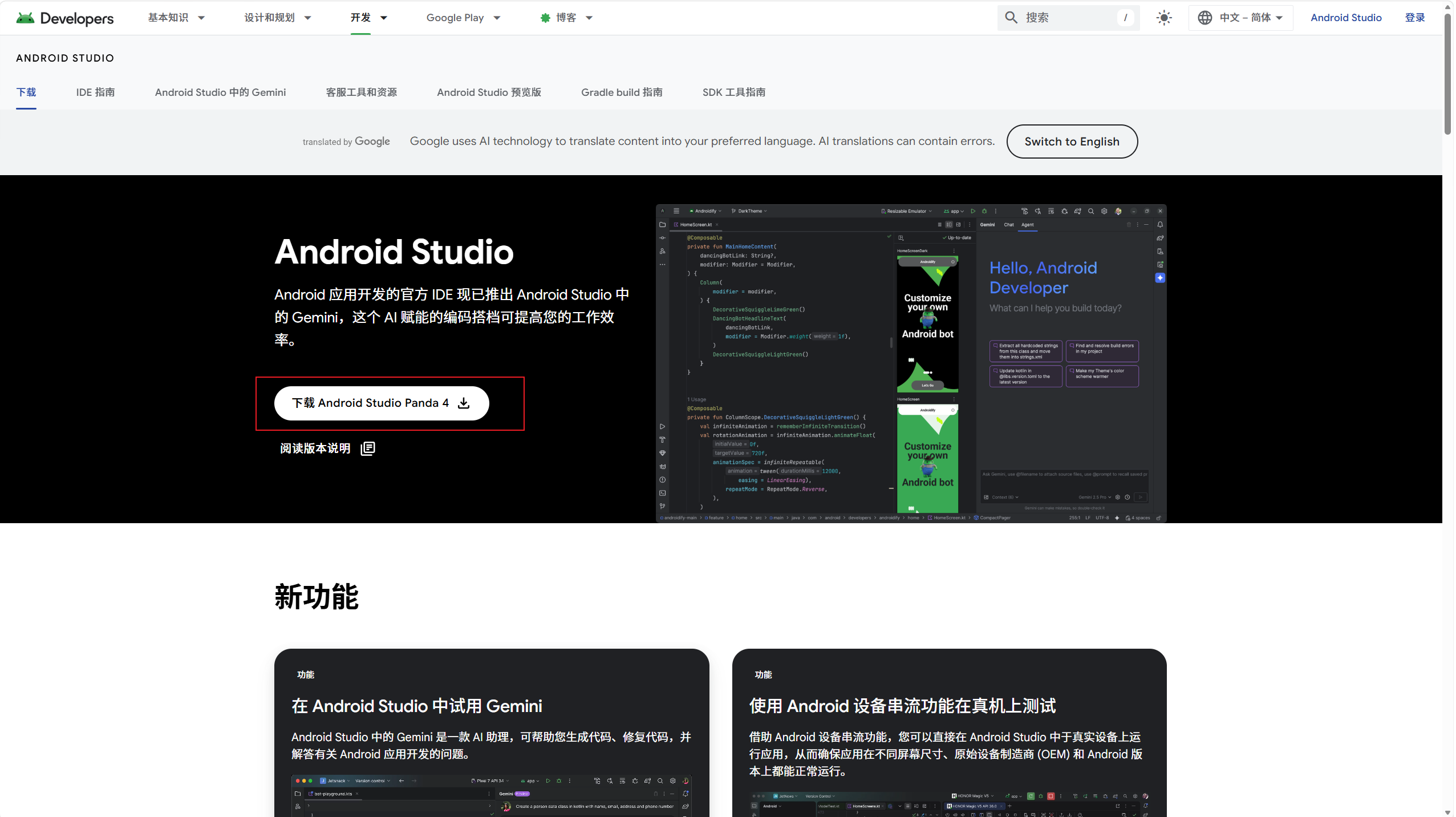
创建项目


123
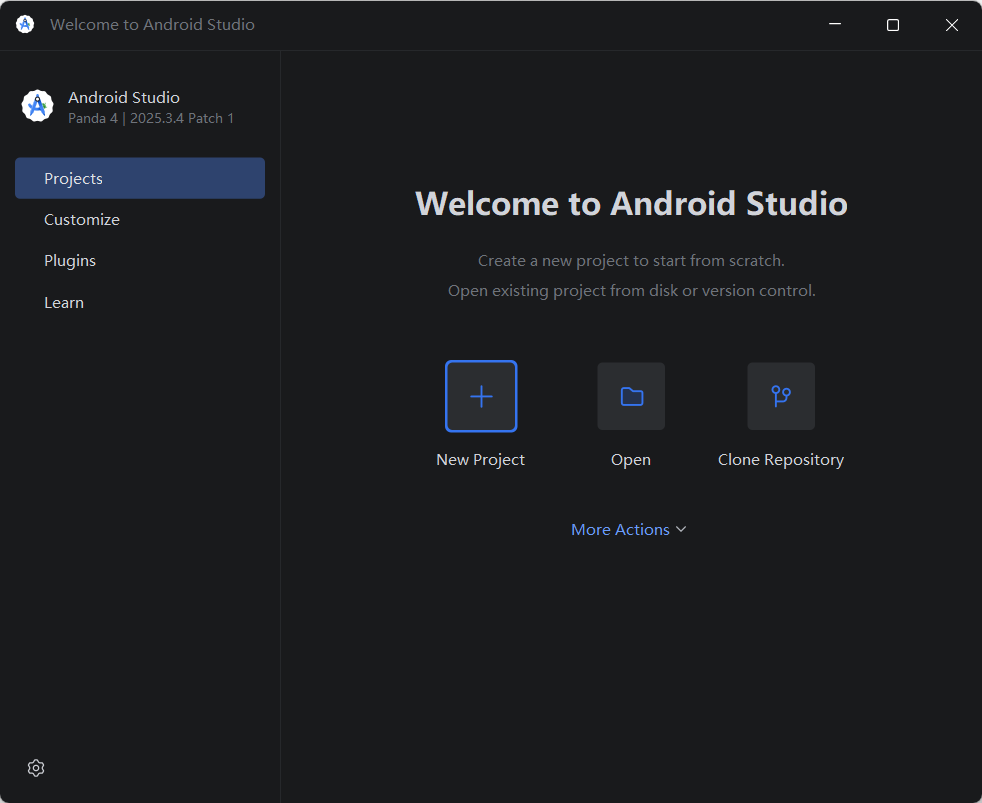
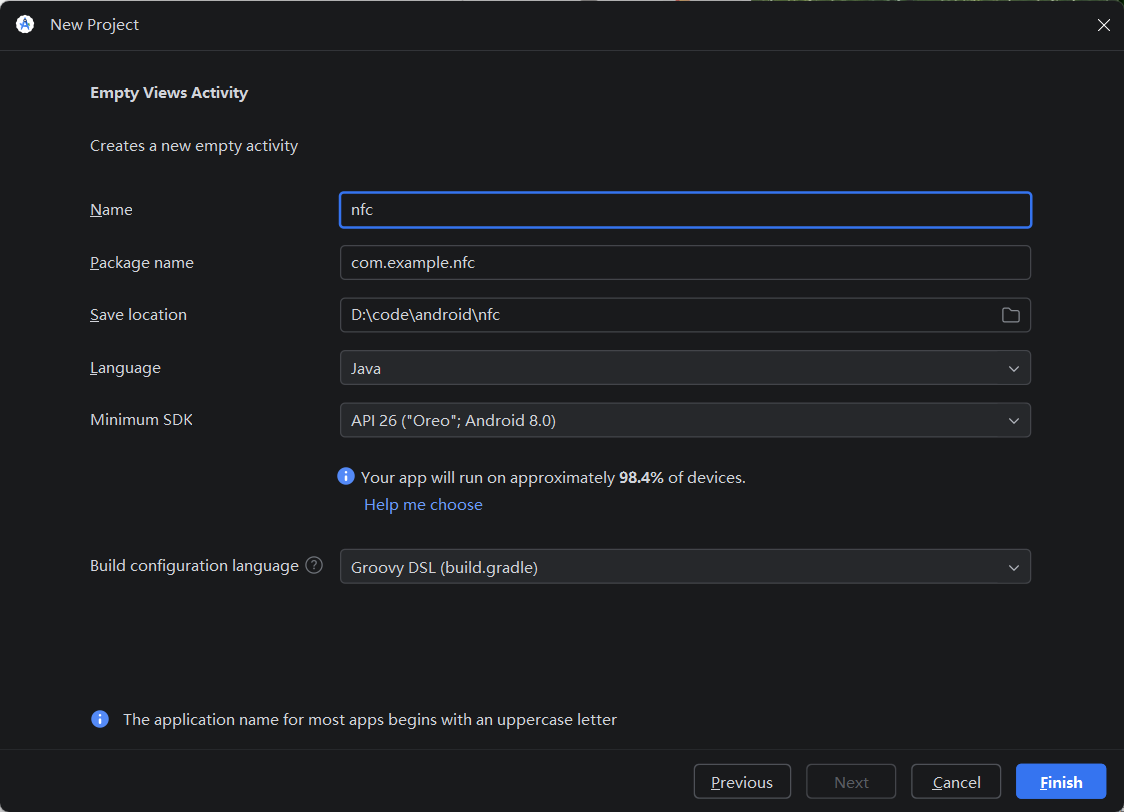
- 双击启动 Android Studio,点击 New Project 创建新项目。
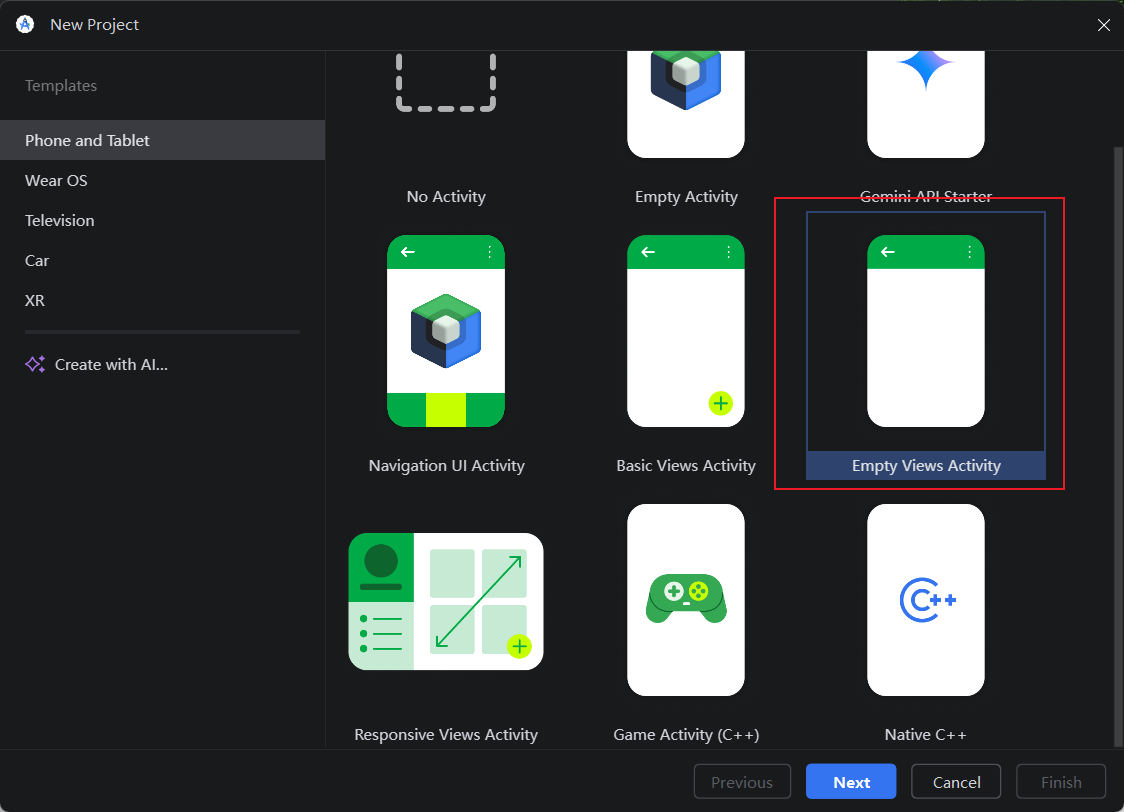
- 在项目模板中选择 Empty Views Activity,然后点击 Next。
- 配置项目信息:
- Name:输入项目名称
nfc; - Package name:保持默认即可;
- Save location:修改为本地的代码存储路径;
- Language:选择 Java。
- 确认无误后,点击 Finish 完成创建。
3
修改AndroidMainfest.xml文件
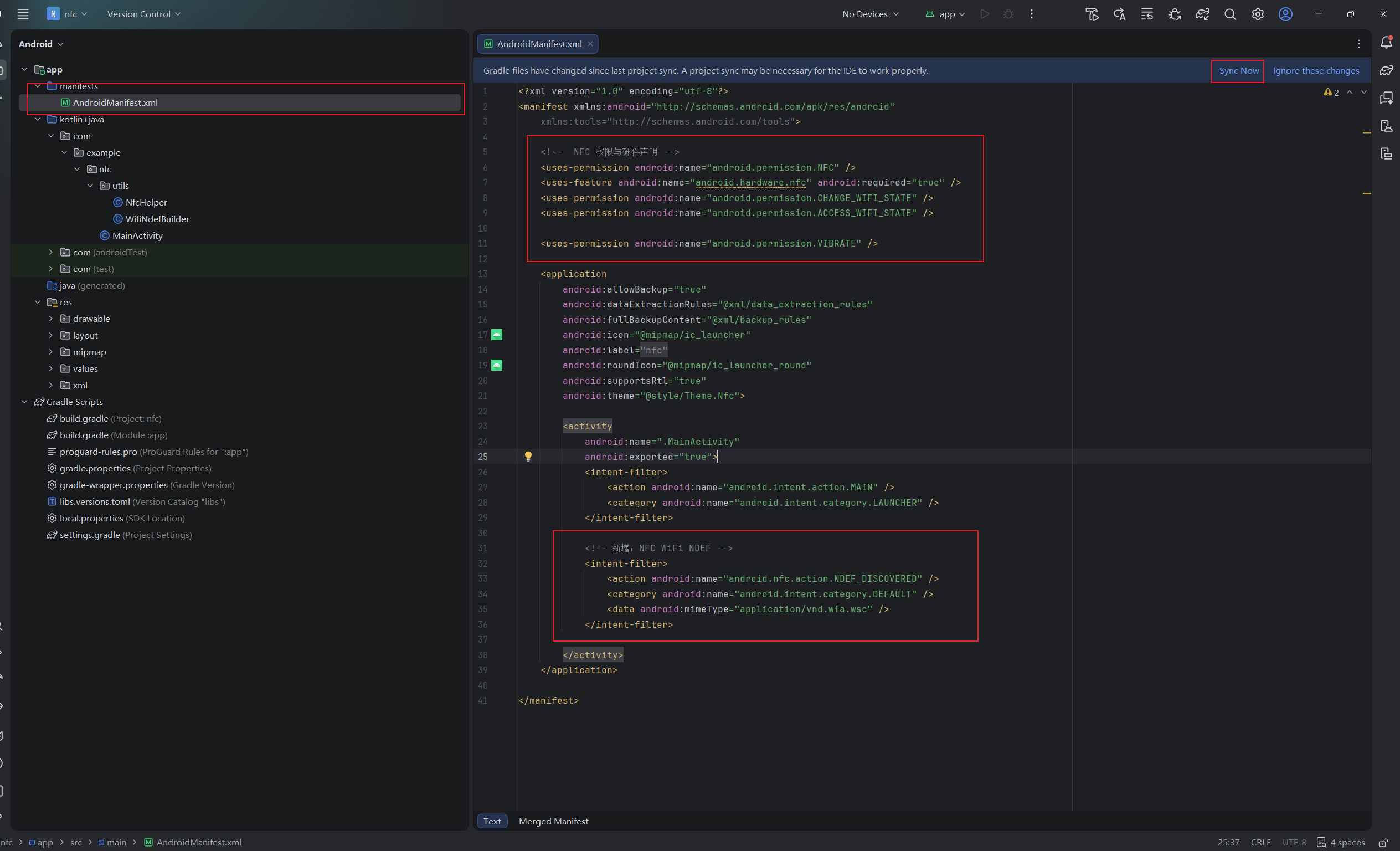
把红框选中部分的代码加入到你的项目内,写入完成后点击"Sync Now"重新加载。
<?xml version="1.0" encoding="utf-8"?>
<manifest xmlns:android="http://schemas.android.com/apk/res/android"
xmlns:tools="http://schemas.android.com/tools">
<!-- NFC 权限与硬件声明 -->
<uses-permission android:name="android.permission.NFC" />
<uses-feature android:name="android.hardware.nfc" android:required="true" />
<uses-permission android:name="android.permission.CHANGE_WIFI_STATE" />
<uses-permission android:name="android.permission.ACCESS_WIFI_STATE" />
<uses-permission android:name="android.permission.VIBRATE" />
<application
android:allowBackup="true"
android:dataExtractionRules="@xml/data_extraction_rules"
android:fullBackupContent="@xml/backup_rules"
android:icon="@mipmap/ic_launcher"
android:label="@string/app_name"
android:roundIcon="@mipmap/ic_launcher_round"
android:supportsRtl="true"
android:theme="@style/Theme.Nfc">
<activity
android:name=".MainActivity"
android:exported="true">
<!-- 原有的启动器 Intent Filter(保留不动) -->
<intent-filter>
<action android:name="android.intent.action.MAIN" />
<category android:name="android.intent.category.LAUNCHER" />
</intent-filter>
<!-- 新增:NFC WiFi NDEF -->
<intent-filter>
<action android:name="android.nfc.action.NDEF_DISCOVERED" />
<category android:name="android.intent.category.DEFAULT" />
<data android:mimeType="application/vnd.wfa.wsc" />
</intent-filter>
</activity>
</application>
</manifest>
4
NFC工具类
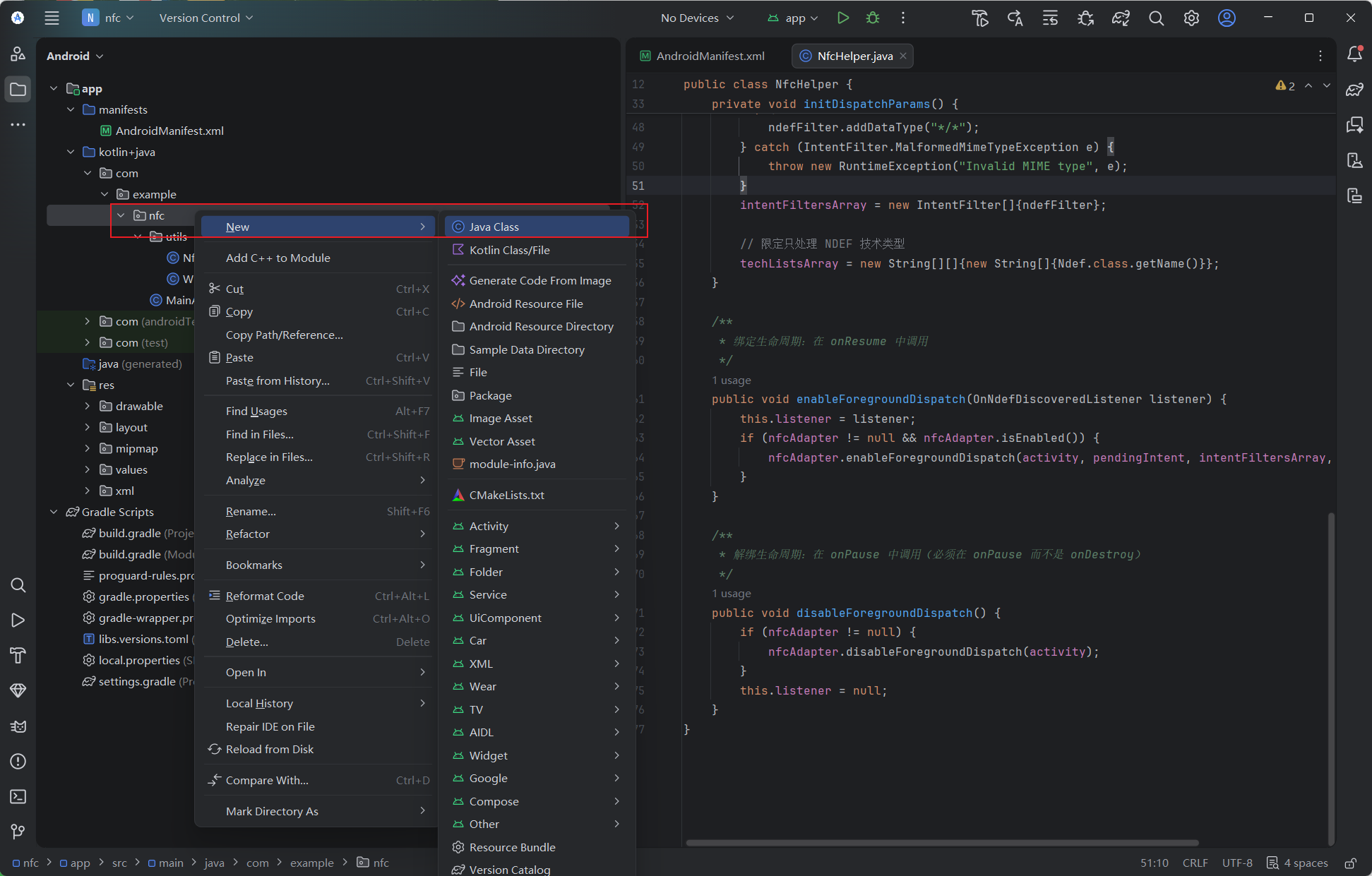
右键点击 nfc 包,选择 New > Java Class,输入类名 utils.NfcHelper 后确认,即可自动创建该类及其所属的 utils 包。主要用于拦截并读取 NFC NDEF 标签。
package com.example.nfc.utils;
import android.app.Activity;
import android.app.PendingIntent;
import android.content.Intent;
import android.content.IntentFilter;
import android.nfc.NdefMessage;
import android.nfc.NfcAdapter;
import android.nfc.tech.Ndef;
import android.os.Build;
public class NfcHelper {
private final Activity activity;
private final NfcAdapter nfcAdapter;
private PendingIntent pendingIntent;
private IntentFilter[] intentFiltersArray;
private String[][] techListsArray;
// 回调接口,用于将读取到的 NDEF 消息传递给 Activity
public interface OnNdefDiscoveredListener {
void onNdefDiscovered(NdefMessage message);
}
private OnNdefDiscoveredListener listener;
public NfcHelper(Activity activity) {
this.activity = activity;
this.nfcAdapter = NfcAdapter.getDefaultAdapter(activity);
initDispatchParams();
}
private void initDispatchParams() {
// Android 12+ 必须指定 FLAG_MUTABLE 或 FLAG_IMMUTABLE
int flags = Build.VERSION.SDK_INT >= Build.VERSION_CODES.S
? PendingIntent.FLAG_MUTABLE
: 0;
pendingIntent = PendingIntent.getActivity(
activity, 0,
new Intent(activity, activity.getClass()).addFlags(Intent.FLAG_ACTIVITY_SINGLE_TOP),
flags
);
// 只拦截 NDEF 格式的标签
IntentFilter ndefFilter = new IntentFilter(NfcAdapter.ACTION_NDEF_DISCOVERED);
try {
ndefFilter.addDataType("*/*");
} catch (IntentFilter.MalformedMimeTypeException e) {
throw new RuntimeException("Invalid MIME type", e);
}
intentFiltersArray = new IntentFilter[]{ndefFilter};
// 限定只处理 NDEF 技术类型
techListsArray = new String[][]{new String[]{Ndef.class.getName()}};
}
/**
* 绑定生命周期:在 onResume 中调用
*/
public void enableForegroundDispatch(OnNdefDiscoveredListener listener) {
this.listener = listener;
if (nfcAdapter != null && nfcAdapter.isEnabled()) {
nfcAdapter.enableForegroundDispatch(activity, pendingIntent, intentFiltersArray, techListsArray);
}
}
/**
* 解绑生命周期:在 onPause 中调用(必须在 onPause 而不是 onDestroy)
*/
public void disableForegroundDispatch() {
if (nfcAdapter != null) {
nfcAdapter.disableForegroundDispatch(activity);
}
this.listener = null;
}
}
5
WiFi写入工具
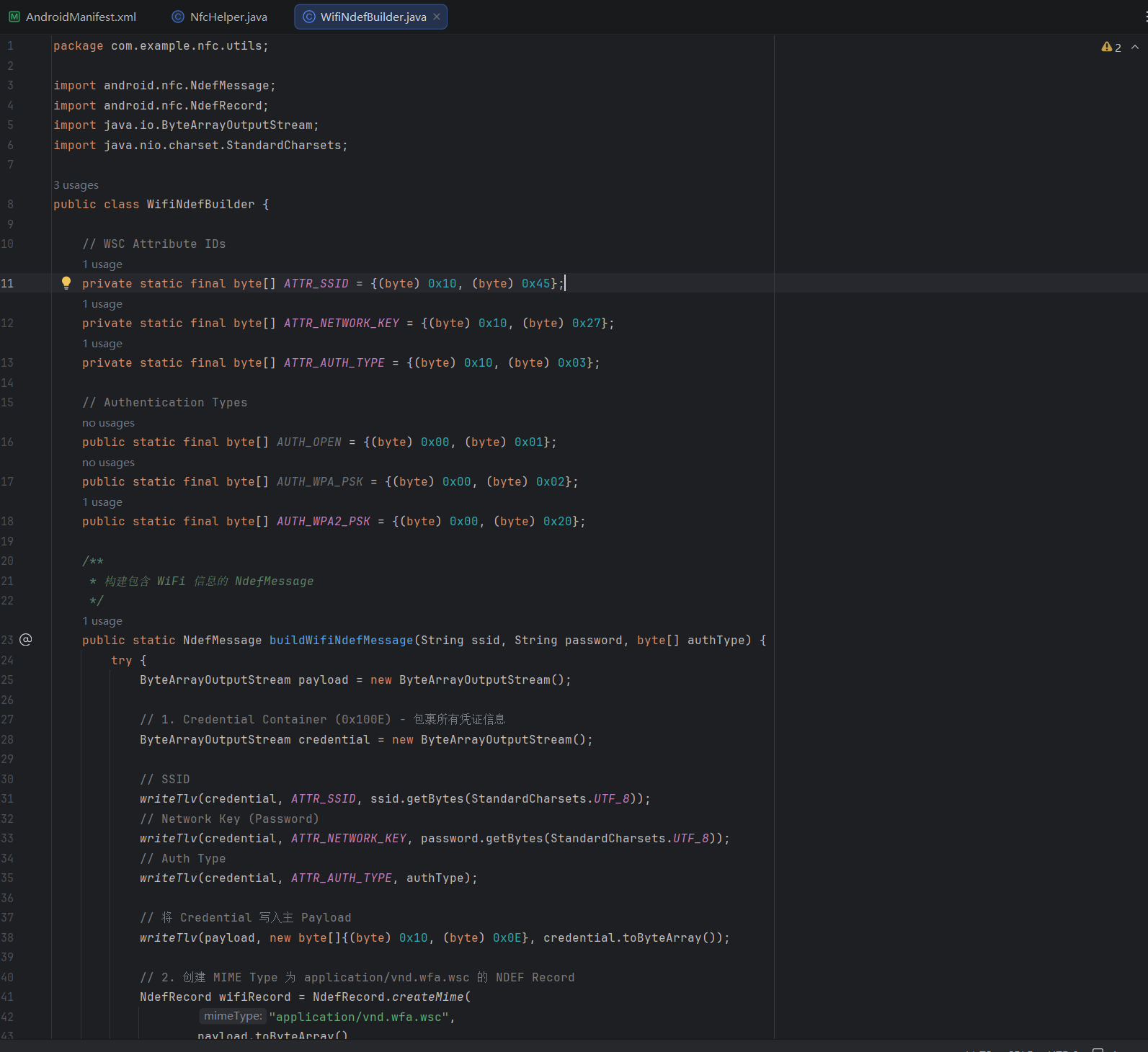
右键点击 uilts 包,选择 New > Java Class,输入类名 WifiNodeBuilder 后确认,即可自动创建该类。主要用于WiFi信息写入卡片。
package com.example.nfc.utils;
import android.nfc.NdefMessage;
import android.nfc.NdefRecord;
import java.io.ByteArrayOutputStream;
import java.nio.charset.StandardCharsets;
public class WifiNdefBuilder {
// WSC Attribute IDs
private static final byte[] ATTR_SSID = {(byte) 0x10, (byte) 0x45};
private static final byte[] ATTR_NETWORK_KEY = {(byte) 0x10, (byte) 0x27};
private static final byte[] ATTR_AUTH_TYPE = {(byte) 0x10, (byte) 0x03};
// Authentication Types
public static final byte[] AUTH_OPEN = {(byte) 0x00, (byte) 0x01};
public static final byte[] AUTH_WPA_PSK = {(byte) 0x00, (byte) 0x02};
public static final byte[] AUTH_WPA2_PSK = {(byte) 0x00, (byte) 0x20};
/**
* 构建包含 WiFi 信息的 NdefMessage
*/
public static NdefMessage buildWifiNdefMessage(String ssid, String password, byte[] authType) {
try {
ByteArrayOutputStream payload = new ByteArrayOutputStream();
// 1. Credential Container (0x100E) - 包裹所有凭证信息
ByteArrayOutputStream credential = new ByteArrayOutputStream();
// SSID
writeTlv(credential, ATTR_SSID, ssid.getBytes(StandardCharsets.UTF_8));
// Network Key (Password)
writeTlv(credential, ATTR_NETWORK_KEY, password.getBytes(StandardCharsets.UTF_8));
// Auth Type
writeTlv(credential, ATTR_AUTH_TYPE, authType);
// 将 Credential 写入主 Payload
writeTlv(payload, new byte[]{(byte) 0x10, (byte) 0x0E}, credential.toByteArray());
// 2. 创建 MIME Type 为 application/vnd.wfa.wsc 的 NDEF Record
NdefRecord wifiRecord = NdefRecord.createMime(
"application/vnd.wfa.wsc",
payload.toByteArray()
);
return new NdefMessage(wifiRecord);
} catch (Exception e) {
throw new RuntimeException("Failed to build WiFi NDEF message", e);
}
}
// 辅助方法:写入 TLV 结构 (Type[2bytes] + Length[2bytes] + Value)
private static void writeTlv(ByteArrayOutputStream out, byte[] type, byte[] value) throws Exception {
out.write(type);
out.write((value.length >> 8) & 0xFF); // Length High Byte
out.write(value.length & 0xFF); // Length Low Byte
out.write(value);
}
}
6
主程序MainActivity代码
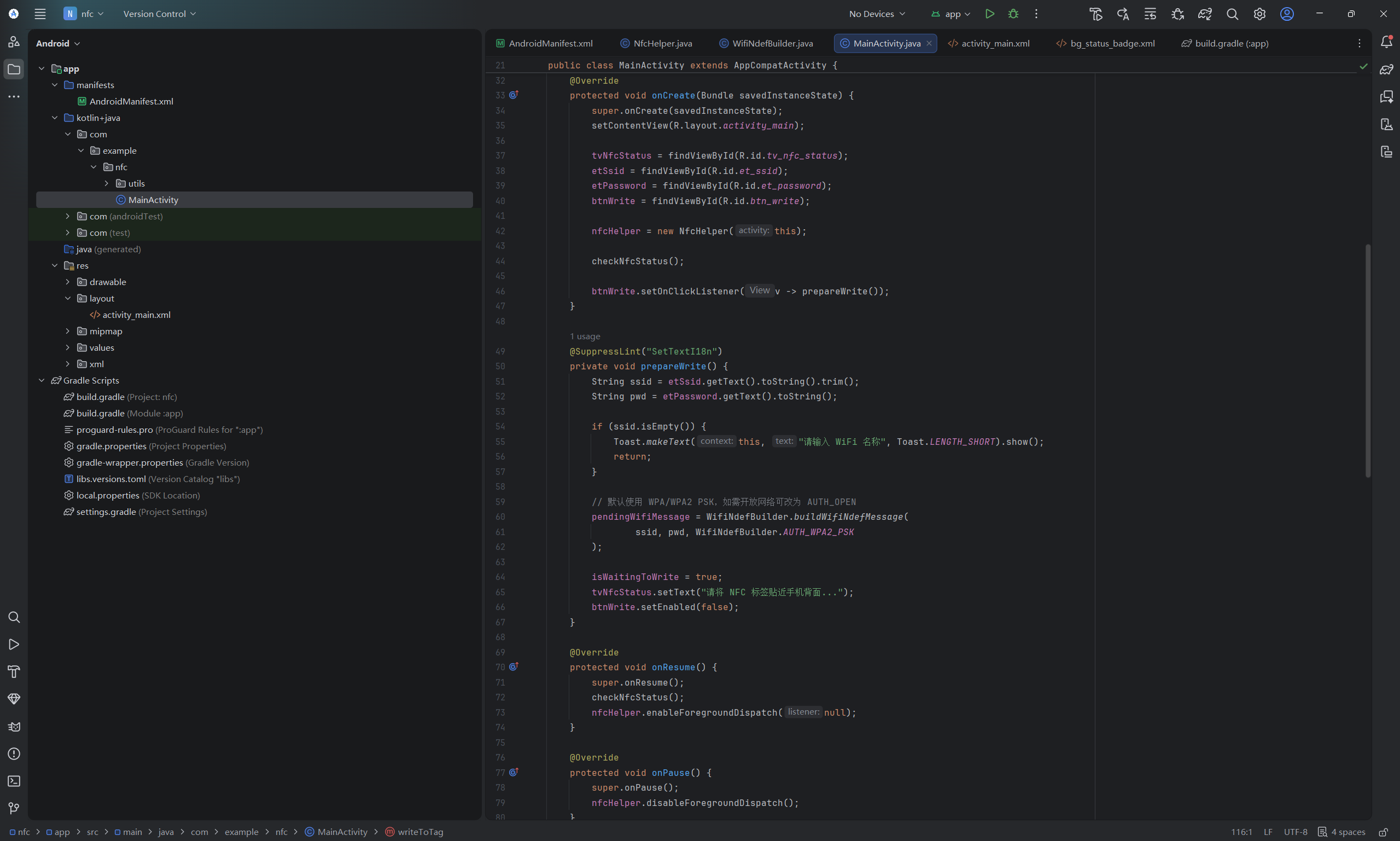
这是整个APP主要入口,在此处调用工具类以及XML文件。
package com.example.nfc;
import android.annotation.SuppressLint;
import android.nfc.FormatException;
import android.nfc.NfcAdapter;
import android.nfc.tech.Ndef;
import android.nfc.NdefMessage;
import android.nfc.Tag;
import android.os.Bundle;
import android.widget.Button;
import android.widget.EditText;
import android.widget.TextView;
import android.widget.Toast;
import androidx.appcompat.app.AppCompatActivity;
import com.example.nfc.utils.NfcHelper;
import com.example.nfc.utils.WifiNdefBuilder;
import java.io.IOException;
public class MainActivity extends AppCompatActivity {
private TextView tvNfcStatus;
private EditText etSsid, etPassword;
private Button btnWrite;
private NfcHelper nfcHelper;
// 关键状态标记:是否处于"等待贴卡写入"模式
private boolean isWaitingToWrite = false;
private NdefMessage pendingWifiMessage = null;
@Override
protected void onCreate(Bundle savedInstanceState) {
super.onCreate(savedInstanceState);
setContentView(R.layout.activity_main);
tvNfcStatus = findViewById(R.id.tv_nfc_status);
etSsid = findViewById(R.id.et_ssid);
etPassword = findViewById(R.id.et_password);
btnWrite = findViewById(R.id.btn_write);
nfcHelper = new NfcHelper(this);
checkNfcStatus();
btnWrite.setOnClickListener(v -> prepareWrite());
}
@SuppressLint("SetTextI18n")
private void prepareWrite() {
String ssid = etSsid.getText().toString().trim();
String pwd = etPassword.getText().toString();
if (ssid.isEmpty()) {
Toast.makeText(this, "请输入 WiFi 名称", Toast.LENGTH_SHORT).show();
return;
}
// 默认使用 WPA/WPA2 PSK,如需开放网络可改为 AUTH_OPEN
pendingWifiMessage = WifiNdefBuilder.buildWifiNdefMessage(
ssid, pwd, WifiNdefBuilder.AUTH_WPA2_PSK
);
isWaitingToWrite = true;
tvNfcStatus.setText("请将 NFC 标签贴近手机背面...");
btnWrite.setEnabled(false);
}
@Override
protected void onResume() {
super.onResume();
checkNfcStatus();
nfcHelper.enableForegroundDispatch(null);
}
@Override
protected void onPause() {
super.onPause();
nfcHelper.disableForegroundDispatch();
}
@Override
protected void onNewIntent(android.content.Intent intent) {
super.onNewIntent(intent);
setIntent(intent);
if (!isWaitingToWrite || pendingWifiMessage == null) return;
Tag tag = intent.getParcelableExtra(NfcAdapter.EXTRA_TAG);
if (tag == null) return;
new Thread(() -> writeToTag(tag)).start();
}
private void writeToTag(Tag tag) {
Ndef ndef = Ndef.get(tag);
String resultMsg;
boolean success = false;
try {
if (ndef == null) {
runOnUiThread(() -> Toast.makeText(this, "该标签不支持 NDEF 格式", Toast.LENGTH_SHORT).show());
return;
}
ndef.connect();
if (!ndef.isWritable()) {
runOnUiThread(() -> Toast.makeText(this, "该标签为只读,无法写入", Toast.LENGTH_SHORT).show());
return;
}
ndef.writeNdefMessage(pendingWifiMessage);
success = true;
resultMsg = "WiFi 信息写入成功!";
} catch (IOException | FormatException e) {
resultMsg = "写入失败: " + e.getMessage();
} finally {
try { if (ndef != null) ndef.close(); } catch (IOException ignored) {}
}
final boolean finalSuccess = success;
final String msg = resultMsg;
runOnUiThread(() -> {
Toast.makeText(this, msg, Toast.LENGTH_LONG).show();
tvNfcStatus.setText(finalSuccess ? "写入完成,可再次填写新配置" : "写入失败,请重试");
btnWrite.setEnabled(true);
isWaitingToWrite = false;
pendingWifiMessage = null;
});
}
@SuppressLint("SetTextI18n")
private void checkNfcStatus() {
android.nfc.NfcAdapter adapter = android.nfc.NfcAdapter.getDefaultAdapter(this);
if (adapter == null) {
tvNfcStatus.setText("此设备不支持 NFC");
} else if (!adapter.isEnabled()) {
tvNfcStatus.setText("请在系统设置中开启 NFC");
} else {
tvNfcStatus.setText("NFC 就绪,请填写 WiFi 信息");
btnWrite.setEnabled(true);
}
}
}
7
布局文件
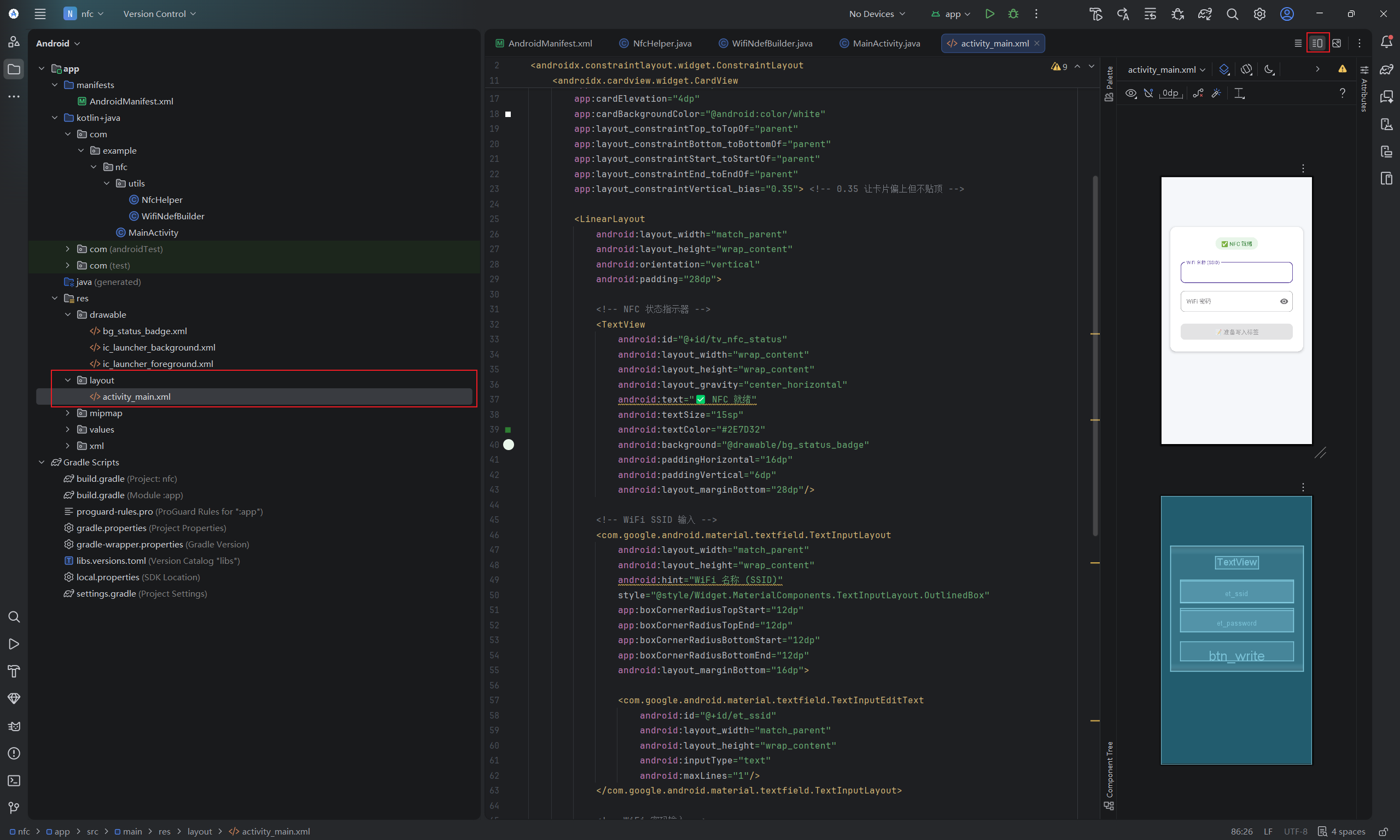
找到res->layout->activity_main.xml文件,在右上角部分切换视图。
<?xml version="1.0" encoding="utf-8"?>
<androidx.constraintlayout.widget.ConstraintLayout
xmlns:android="http://schemas.android.com/apk/res/android"
xmlns:app="http://schemas.android.com/apk/res-auto"
android:layout_width="match_parent"
android:layout_height="match_parent"
android:background="#F5F7FA"
android:fitsSystemWindows="true"> <!-- ✅ 关键:自动适配状态栏/刘海屏高度 -->
<!-- 内容容器:垂直居中,避免小屏幕贴顶,大屏幕太空 -->
<androidx.cardview.widget.CardView
android:id="@+id/card_content"
android:layout_width="0dp"
android:layout_height="wrap_content"
android:layout_marginHorizontal="24dp"
app:cardCornerRadius="16dp"
app:cardElevation="4dp"
app:cardBackgroundColor="@android:color/white"
app:layout_constraintTop_toTopOf="parent"
app:layout_constraintBottom_toBottomOf="parent"
app:layout_constraintStart_toStartOf="parent"
app:layout_constraintEnd_toEndOf="parent"
app:layout_constraintVertical_bias="0.35"> <!-- 0.35 让卡片偏上但不贴顶 -->
<LinearLayout
android:layout_width="match_parent"
android:layout_height="wrap_content"
android:orientation="vertical"
android:padding="28dp">
<!-- NFC 状态指示器 -->
<TextView
android:id="@+id/tv_nfc_status"
android:layout_width="wrap_content"
android:layout_height="wrap_content"
android:layout_gravity="center_horizontal"
android:text="✅ NFC 就绪"
android:textSize="15sp"
android:textColor="#2E7D32"
android:background="@drawable/bg_status_badge"
android:paddingHorizontal="16dp"
android:paddingVertical="6dp"
android:layout_marginBottom="28dp"/>
<!-- WiFi SSID 输入 -->
<com.google.android.material.textfield.TextInputLayout
android:layout_width="match_parent"
android:layout_height="wrap_content"
android:hint="WiFi 名称 (SSID)"
style="@style/Widget.MaterialComponents.TextInputLayout.OutlinedBox"
app:boxCornerRadiusTopStart="12dp"
app:boxCornerRadiusTopEnd="12dp"
app:boxCornerRadiusBottomStart="12dp"
app:boxCornerRadiusBottomEnd="12dp"
android:layout_marginBottom="16dp">
<com.google.android.material.textfield.TextInputEditText
android:id="@+id/et_ssid"
android:layout_width="match_parent"
android:layout_height="wrap_content"
android:inputType="text"
android:maxLines="1"/>
</com.google.android.material.textfield.TextInputLayout>
<!-- WiFi 密码输入 -->
<com.google.android.material.textfield.TextInputLayout
android:layout_width="match_parent"
android:layout_height="wrap_content"
android:hint="WiFi 密码"
style="@style/Widget.MaterialComponents.TextInputLayout.OutlinedBox"
app:boxCornerRadiusTopStart="12dp"
app:boxCornerRadiusTopEnd="12dp"
app:boxCornerRadiusBottomStart="12dp"
app:boxCornerRadiusBottomEnd="12dp"
app:endIconMode="password_toggle"
android:layout_marginBottom="28dp">
<com.google.android.material.textfield.TextInputEditText
android:id="@+id/et_password"
android:layout_width="match_parent"
android:layout_height="wrap_content"
android:inputType="textPassword"
android:maxLines="1"/>
</com.google.android.material.textfield.TextInputLayout>
<!-- 写入按钮 -->
<com.google.android.material.button.MaterialButton
android:id="@+id/btn_write"
android:layout_width="match_parent"
android:layout_height="52dp"
android:text="准备写入标签"
android:textSize="16sp"
android:enabled="false"
app:cornerRadius="12dp"/>
</LinearLayout>
</androidx.cardview.widget.CardView>
</androidx.constraintlayout.widget.ConstraintLayout>
8
创建背景文件
12
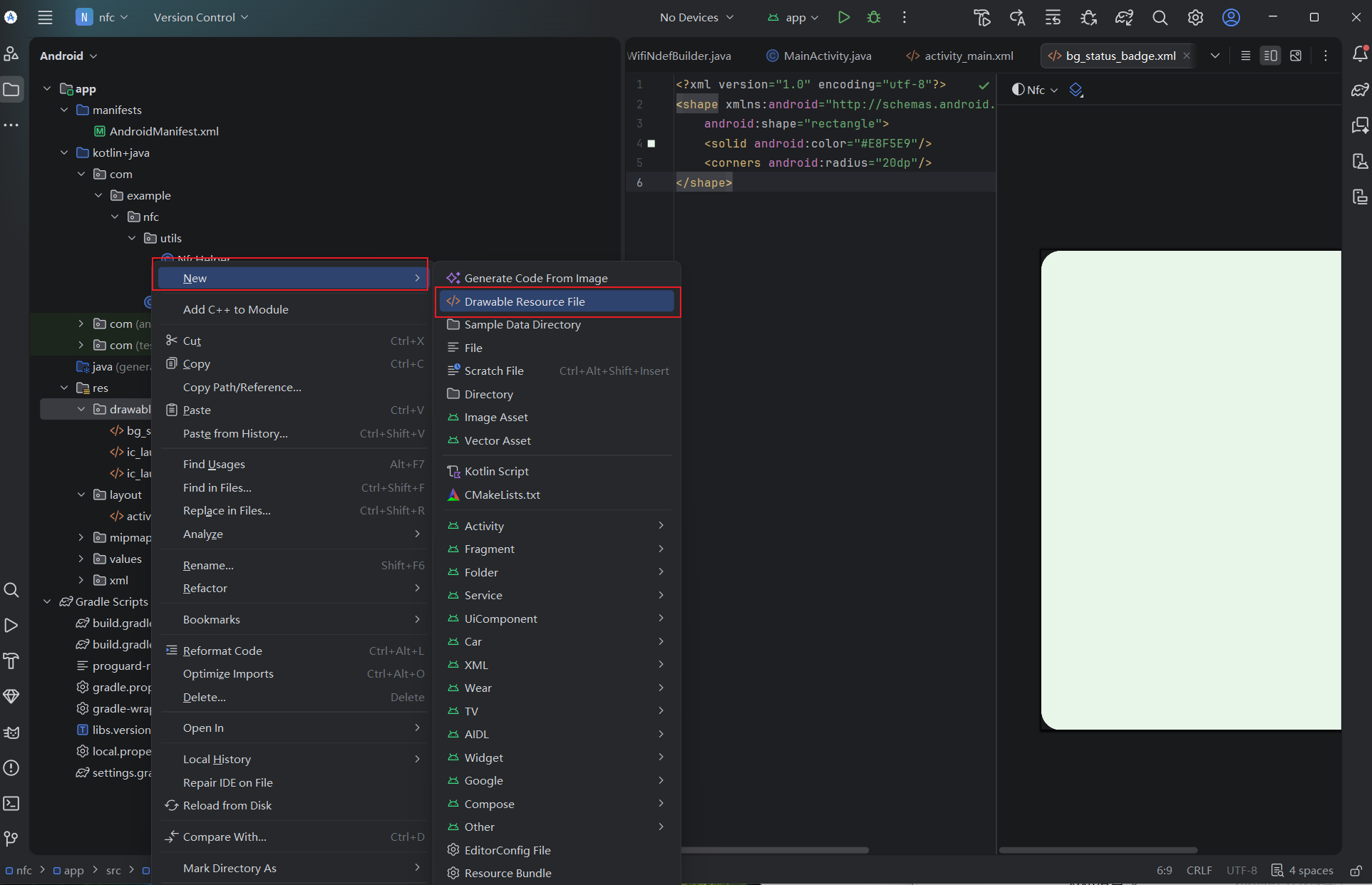
- 在项目中右键点击 drawable 目录,依次选择 New > Drawable Resource File
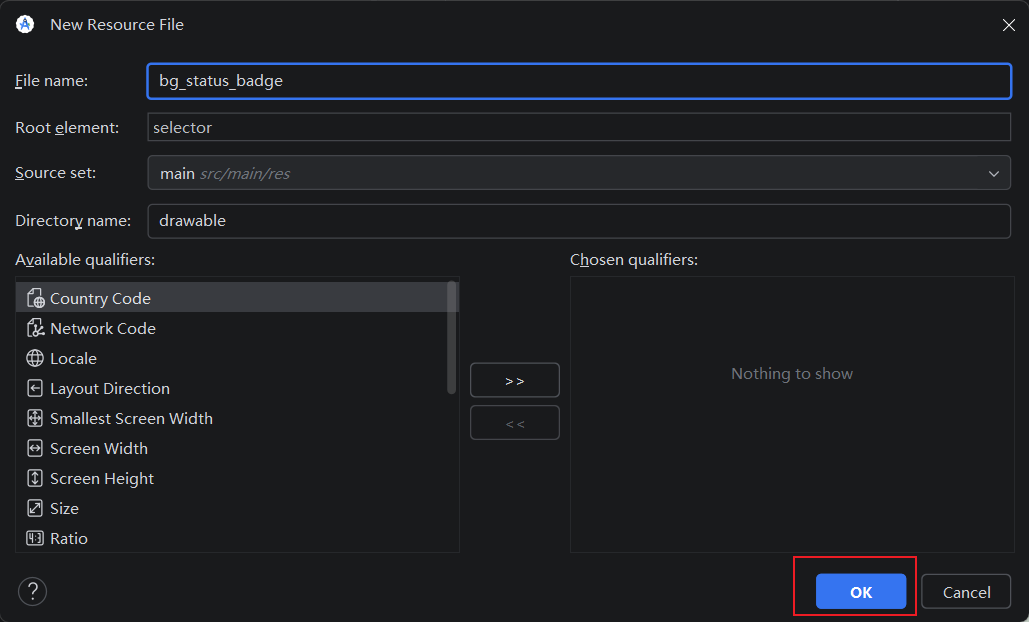
- 将文件命名为 bg_status_badge,点击 OK 完成创建
- 将文件内容替换为以下代码,用于定义一个浅绿色圆角矩形背景:
<?xml version="1.0" encoding="utf-8"?>
<shape xmlns:android="http://schemas.android.com/apk/res/android"
android:shape="rectangle">
<!-- 浅绿色填充 -->
<solid android:color="#E8F5E9"/>
<!-- 20dp 圆角 -->
<corners android:radius="20dp"/>
</shape>
9
打包APK
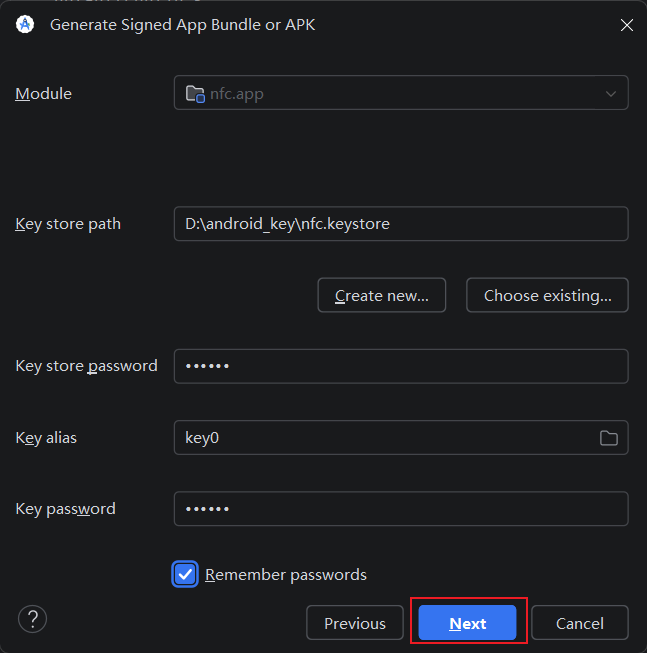
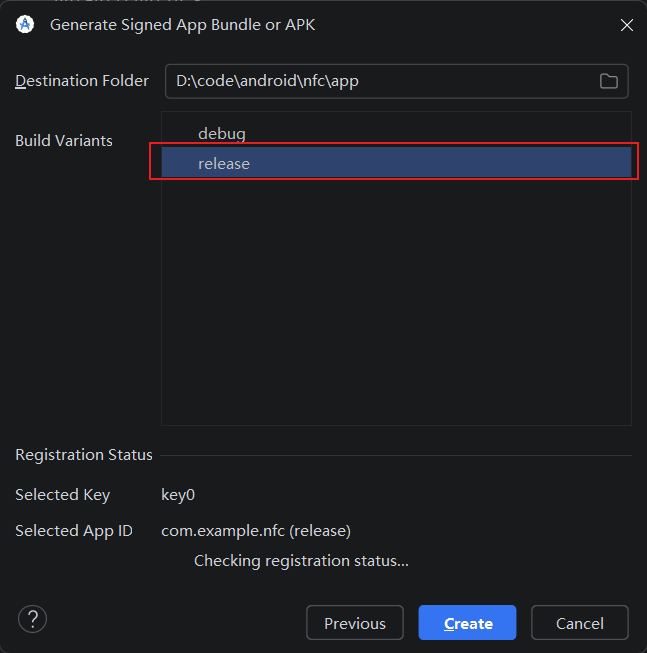
123456
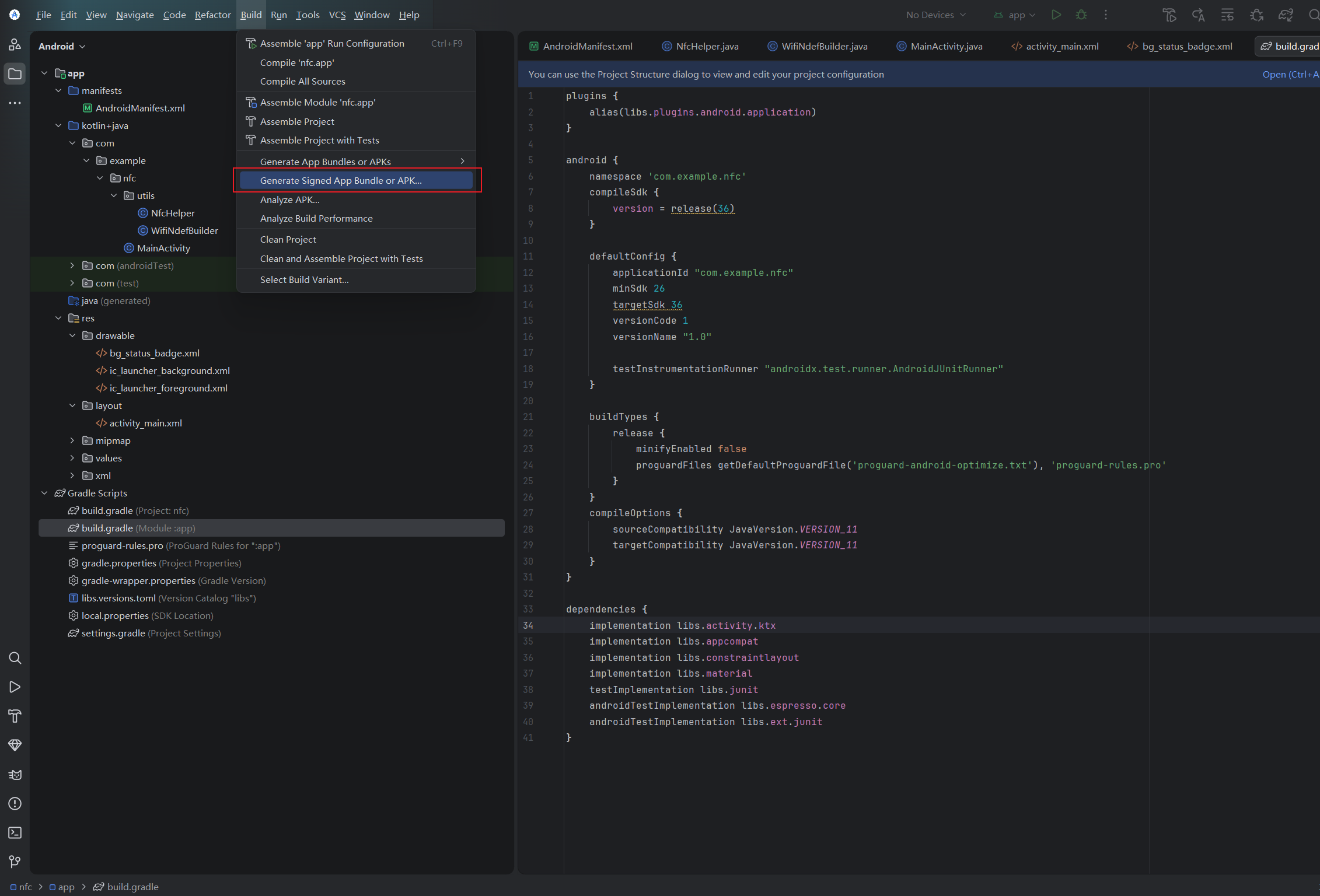
- 顶部菜单栏找到build->Generate Signed APP
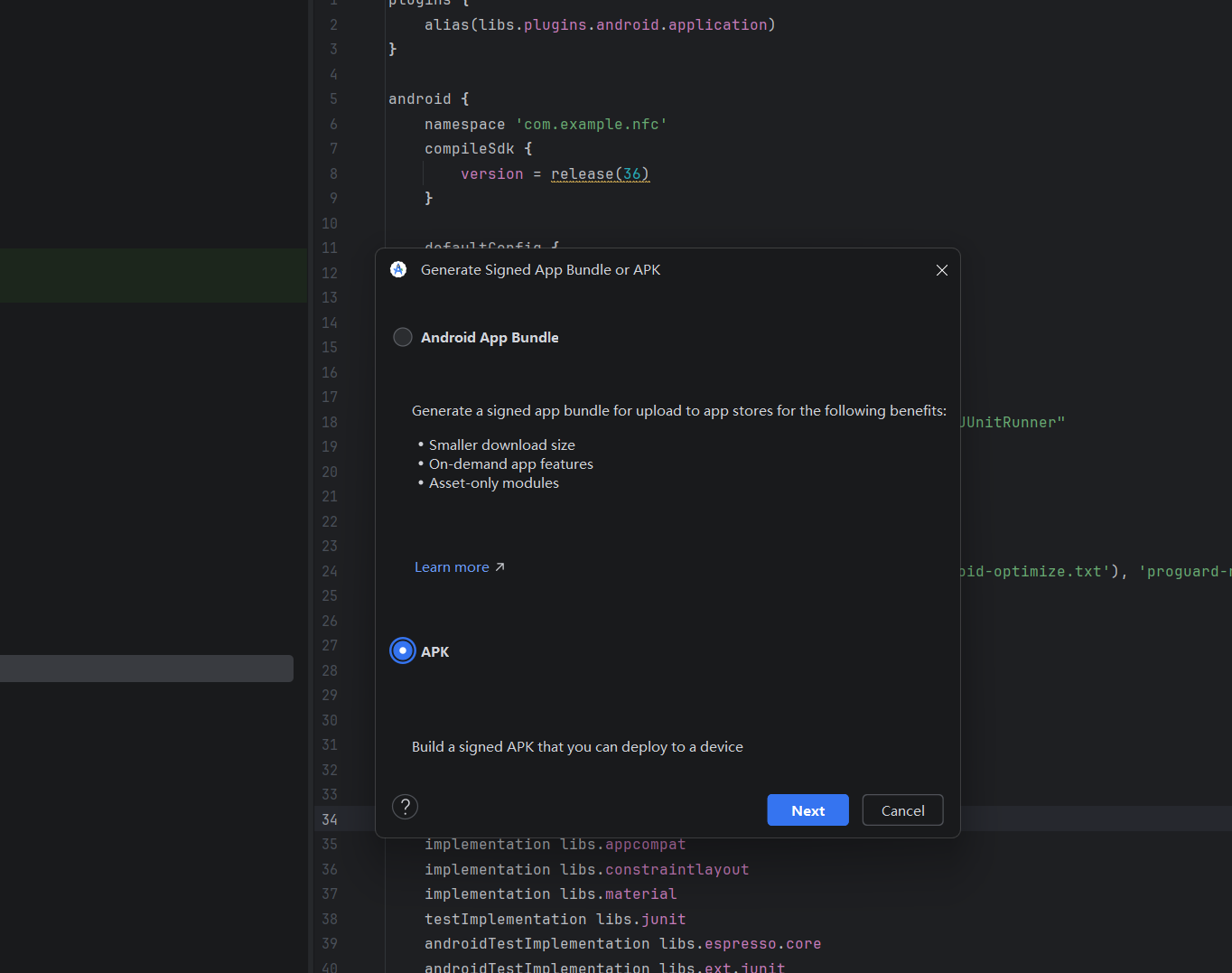
- 选择APK,Next下一步
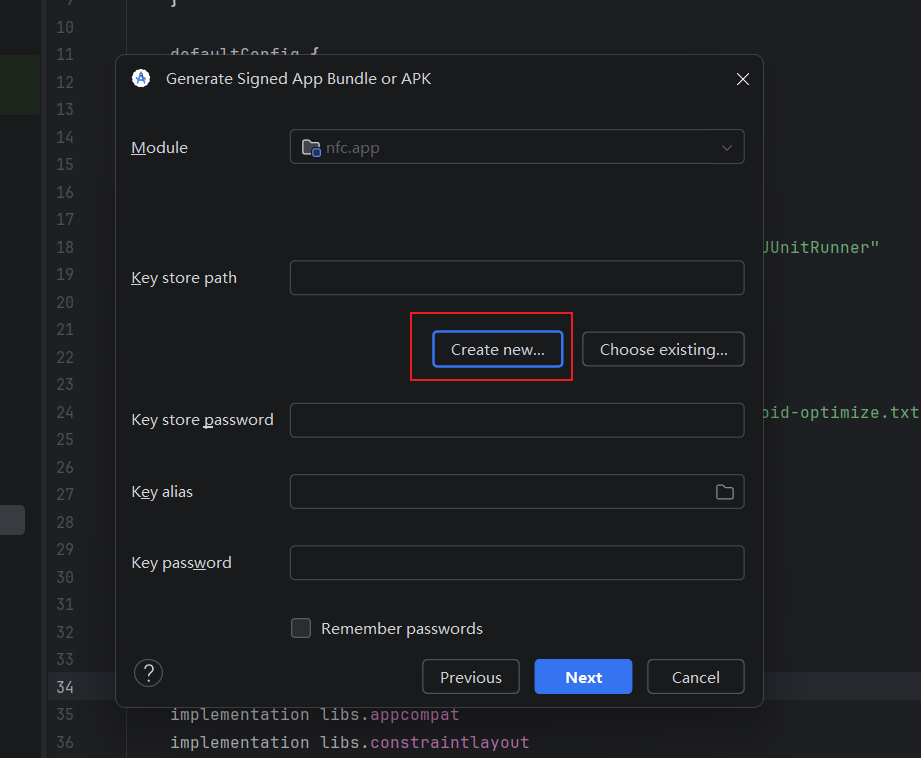
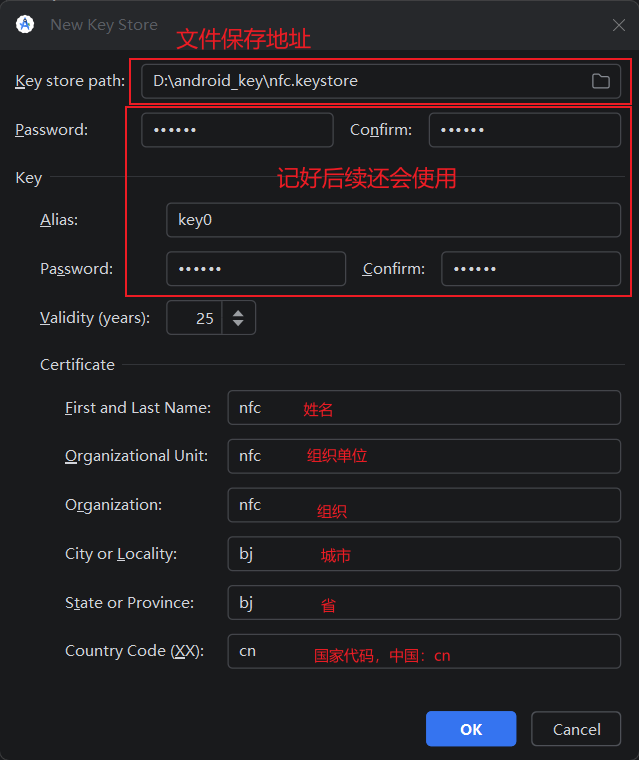
- 创建新的keyStore,填写信息,填写完成返回上一步
- 点击Next
- 选择release,点击Create
10
安装APK并体验
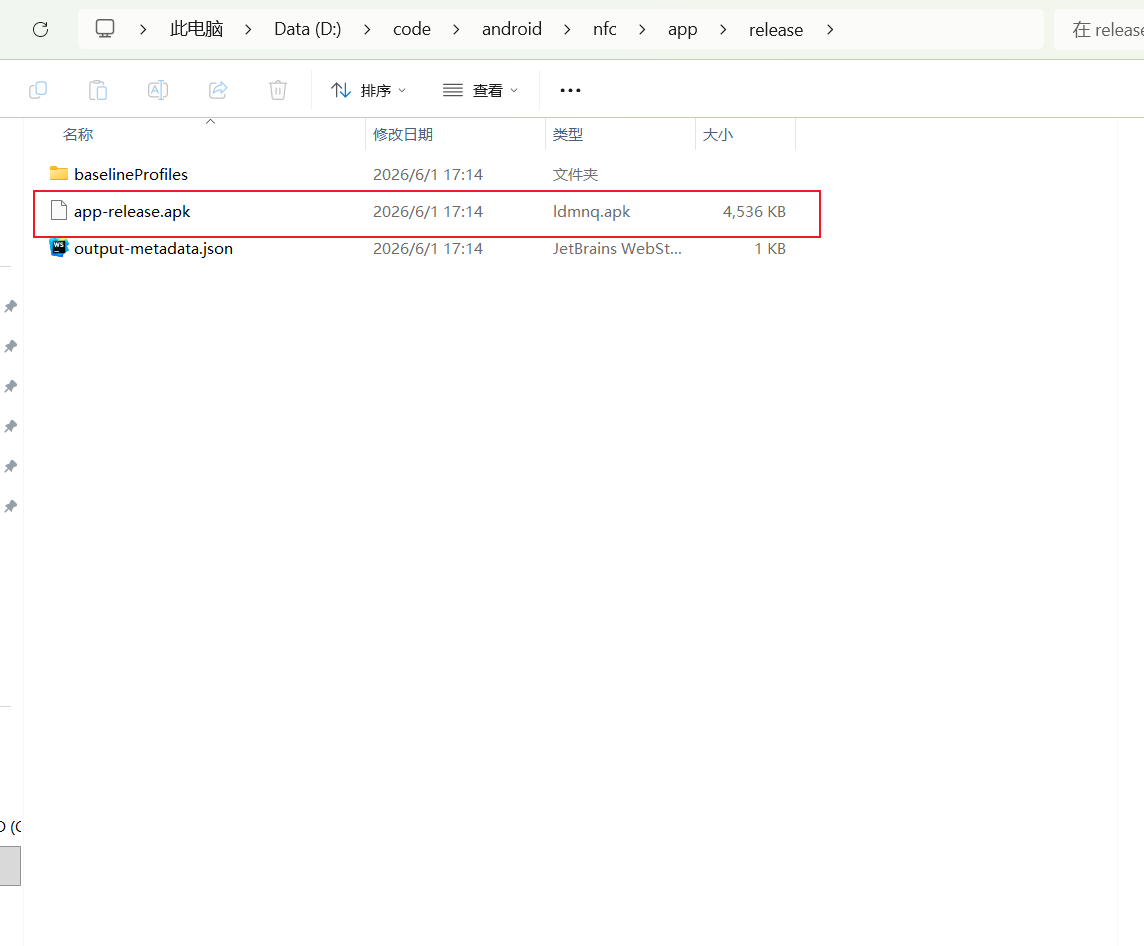
12
在磁盘中找到项目所在位置,app->release下可以看到APK安装包。
 0
0 0
0 0
0 qq空间
qq空间  微博
微博  复制链接
复制链接  分享
分享  本文未经作者允许授权,禁止转载
 更多相关项目
猜你喜欢
评论/提问(已发布 0 条)

 评论
评论  收藏
收藏  分享
分享  下载
下载  举报
举报  回顶部
回顶部