llama.cpp 安卓平台部署实战:在本地高效运行大语言模型

 0
0 0
0 0
0
想让你的安卓手机变成随身携带的 AI 助手吗?本教程将手把手教你如何利用 llama.cpp 工具,在不依赖网络的情况下,将开源大语言模型(如 Llama 3)部署并在手机本地高效运行,体验零延迟、高隐私的移动端 AI。
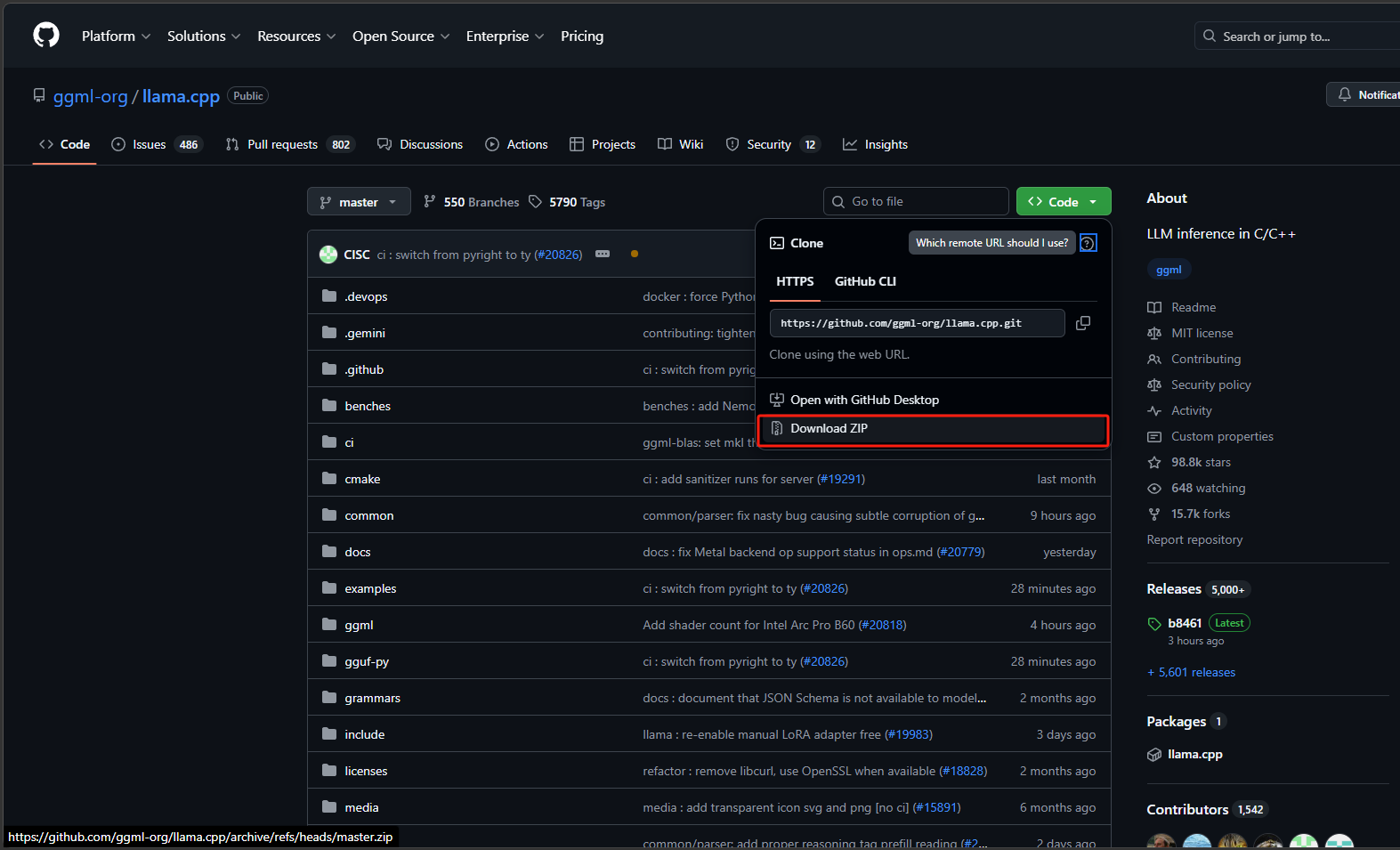
2
打开项目


1234
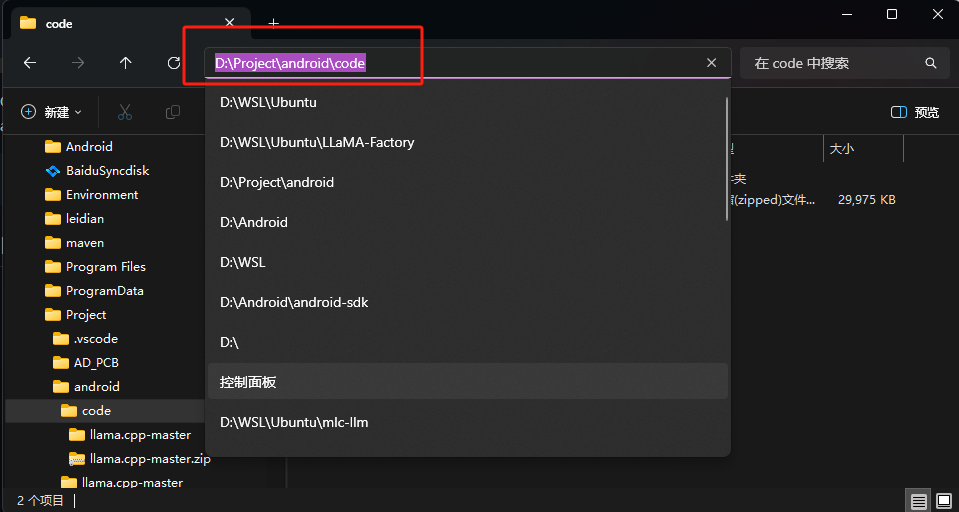
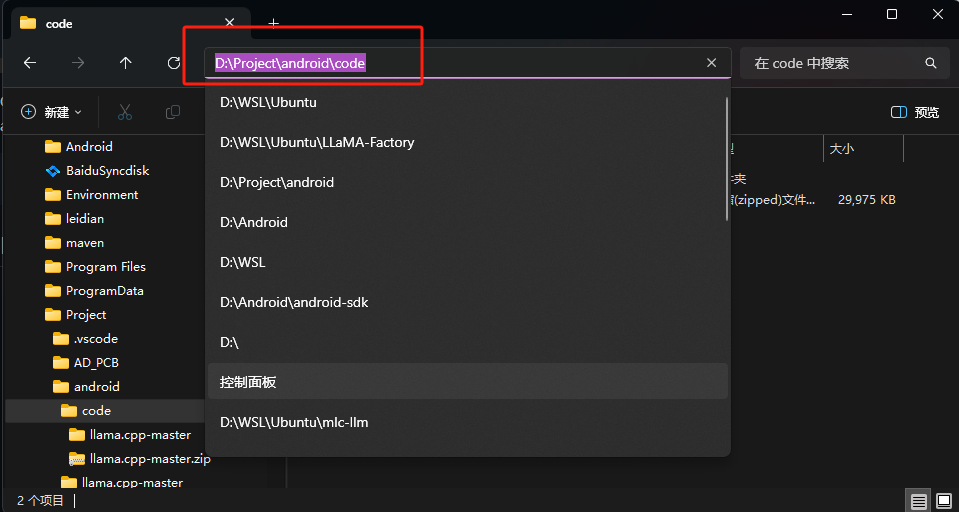
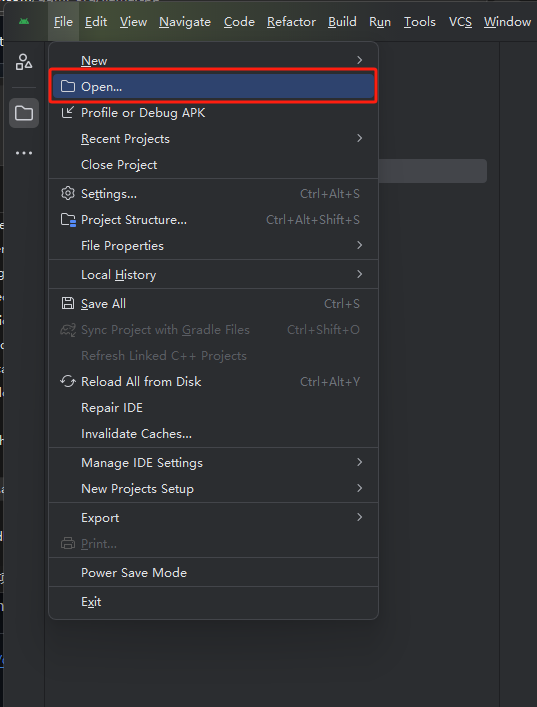
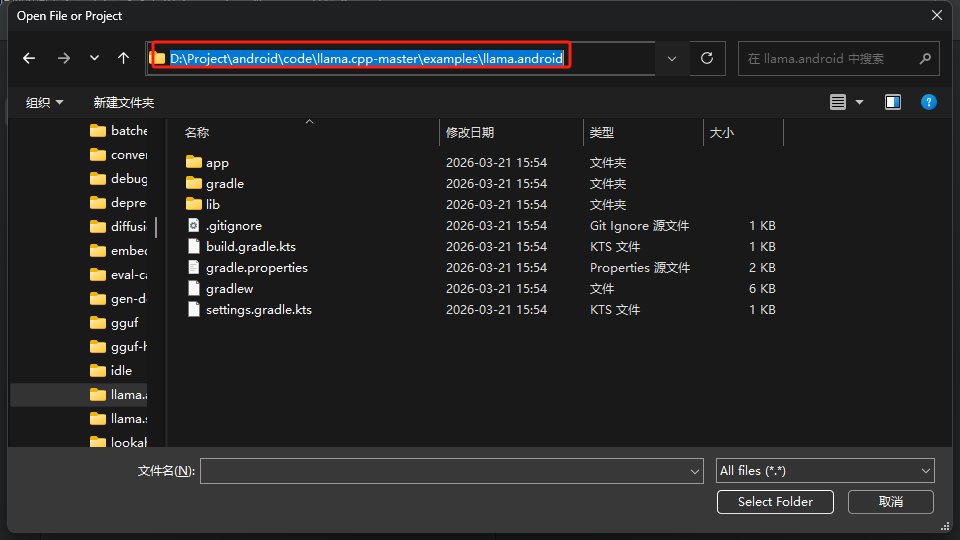
把下载的压缩包进行解压,进入到llama.cpp-master\examples\llama.android路径下,点击搜索栏复制路径。打开android stduio开发工具,点击左上角的菜单选择open打开项目,在搜索栏输入复制的路径点击回车,再点击右下角的 Select Folder。
3
存放模型
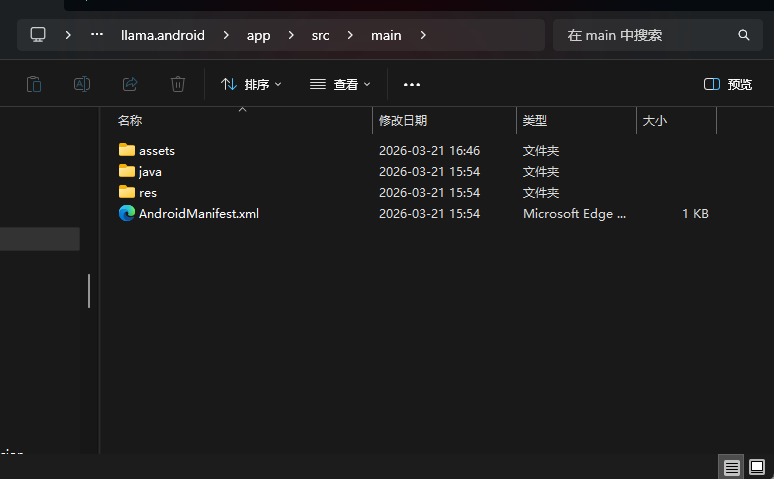
进入到进入到llama.cpp-master\examples\llama.android\app\src\main目录下新建一个目录,名称为:assets这里边存放我们要运行的模型。更多的模型可以去ModelScope中查找,需要的模型格式为gguf。
4
修改MainActivity.kt文件
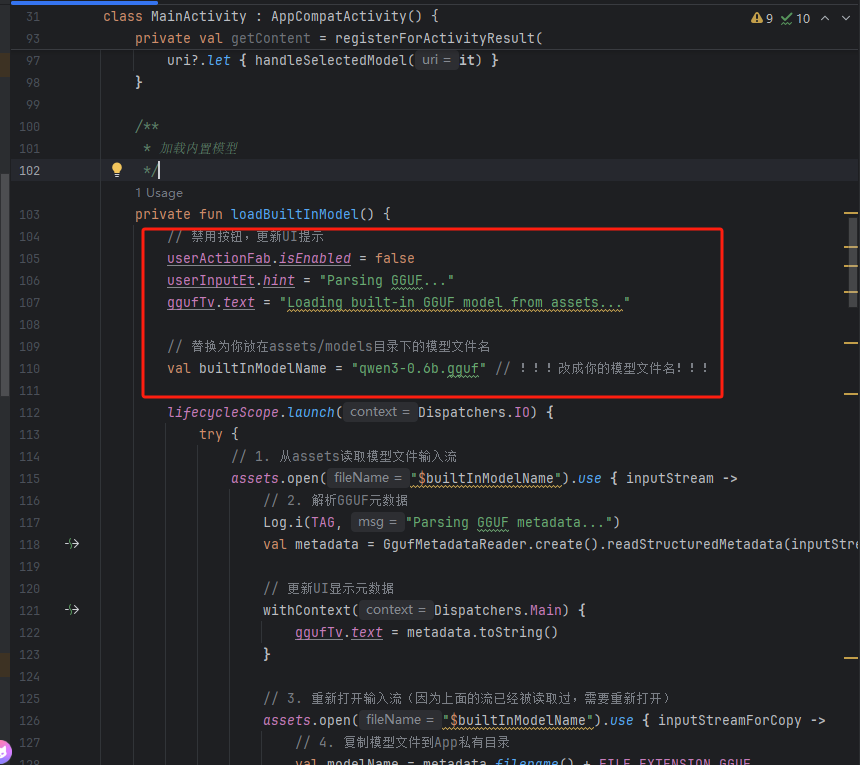
放好我们需要的模型之后需要修改一下MaxinActivity.kt文件。
需要注意的地方只有这部分:
// 替换为你放在assets/models目录下的模型文件名
val builtInModelName = "qwen3-0.6b.gguf" // !!!改成你的模型文件名!!!
package com.example.llama
import android.net.Uri
import android.os.Bundle
import android.util.Log
import android.widget.EditText
import android.widget.TextView
import android.widget.Toast
import androidx.activity.addCallback
import androidx.activity.enableEdgeToEdge
import androidx.activity.result.contract.ActivityResultContracts
import androidx.appcompat.app.AppCompatActivity
import androidx.lifecycle.lifecycleScope
import androidx.recyclerview.widget.LinearLayoutManager
import androidx.recyclerview.widget.RecyclerView
import com.arm.aichat.AiChat
import com.arm.aichat.InferenceEngine
import com.arm.aichat.gguf.GgufMetadata
import com.arm.aichat.gguf.GgufMetadataReader
import com.google.android.material.floatingactionbutton.FloatingActionButton
import kotlinx.coroutines.Dispatchers
import kotlinx.coroutines.Job
import kotlinx.coroutines.flow.onCompletion
import kotlinx.coroutines.launch
import kotlinx.coroutines.withContext
import java.io.File
import java.io.FileOutputStream
import java.io.InputStream
import java.util.UUID
class MainActivity : AppCompatActivity() {
// Android views
private lateinit var ggufTv: TextView
private lateinit var messagesRv: RecyclerView
private lateinit var userInputEt: EditText
private lateinit var userActionFab: FloatingActionButton
// Arm AI Chat inference engine
private lateinit var engine: InferenceEngine
private var generationJob: Job? = null
// Conversation states
private var isModelReady = false
private val messages = mutableListOf<Message>()
private val lastAssistantMsg = StringBuilder()
private val messageAdapter = MessageAdapter(messages)
override fun onCreate(savedInstanceState: Bundle?) {
super.onCreate(savedInstanceState)
enableEdgeToEdge()
setContentView(R.layout.activity_main)
// View model boilerplate and state management is out of this basic sample's scope
onBackPressedDispatcher.addCallback { Log.w(TAG, "Ignore back press for simplicity") }
// Find views
ggufTv = findViewById(R.id.gguf)
messagesRv = findViewById(R.id.messages)
messagesRv.layoutManager = LinearLayoutManager(this).apply { stackFromEnd = true }
messagesRv.adapter = messageAdapter
userInputEt = findViewById(R.id.user_input)
userActionFab = findViewById(R.id.fab)
// Arm AI Chat initialization
lifecycleScope.launch(Dispatchers.Default) {
engine = AiChat.getInferenceEngine(applicationContext)
}
// !!!新增:Activity创建后自动加载内置模型!!!
lifecycleScope.launch {
// 等待引擎初始化完成(可选,防止引擎未初始化就加载模型)
while (!::engine.isInitialized) {
kotlinx.coroutines.delay(100)
}
loadBuiltInModel() // 自动加载内置模型
}
// Upon CTA button tapped
userActionFab.setOnClickListener {
if (isModelReady) {
// If model is ready, validate input and send to engine
handleUserInput()
} else {
Toast.makeText(this, "模型正在加载中,请稍等...", Toast.LENGTH_SHORT).show()
// Otherwise, prompt user to select a GGUF metadata on the device
// 原有代码
// getContent.launch(arrayOf("*/*"))
}
}
}
private val getContent = registerForActivityResult(
ActivityResultContracts.OpenDocument()
) { uri ->
Log.i(TAG, "Selected file uri:\n $uri")
uri?.let { handleSelectedModel(it) }
}
/**
* 加载内置模型
*/
private fun loadBuiltInModel() {
// 禁用按钮,更新UI提示
userActionFab.isEnabled = false
userInputEt.hint = "Parsing GGUF..."
ggufTv.text = "Loading built-in GGUF model from assets..."
// 替换为你放在assets/models目录下的模型文件名
val builtInModelName = "qwen3-0.6b.gguf" // !!!改成你的模型文件名!!!
lifecycleScope.launch(Dispatchers.IO) {
try {
// 1. 从assets读取模型文件输入流
assets.open("$builtInModelName").use { inputStream ->
// 2. 解析GGUF元数据
Log.i(TAG, "Parsing GGUF metadata...")
val metadata = GgufMetadataReader.create().readStructuredMetadata(inputStream)
// 更新UI显示元数据
withContext(Dispatchers.Main) {
ggufTv.text = metadata.toString()
}
// 3. 重新打开输入流(因为上面的流已经被读取过,需要重新打开)
assets.open("$builtInModelName").use { inputStreamForCopy ->
// 4. 复制模型文件到App私有目录
val modelName = metadata.filename() + FILE_EXTENSION_GGUF
val modelFile = ensureModelFile(modelName, inputStreamForCopy)
// 5. 加载模型
loadModel(modelName, modelFile)
// 6. 更新状态:模型就绪
withContext(Dispatchers.Main) {
isModelReady = true
userInputEt.hint = "Type and send a message!"
userInputEt.isEnabled = true
userActionFab.setImageResource(R.drawable.outline_send_24)
userActionFab.isEnabled = true
}
}
}
} catch (e: Exception) {
// 异常处理:加载失败时提示用户
Log.e(TAG, "Failed to load built-in model", e)
withContext(Dispatchers.Main) {
ggufTv.text = "Load model failed: ${e.message}"
userInputEt.hint = "Model load failed!"
userActionFab.isEnabled = true
Toast.makeText(
this@MainActivity,
"内置模型加载失败:${e.message}",
Toast.LENGTH_LONG
).show()
}
}
}
}
/**
* Handles the file Uri from [getContent] result
*/
private fun handleSelectedModel(uri: Uri) {
// Update UI states
userActionFab.isEnabled = false
userInputEt.hint = "Parsing GGUF..."
ggufTv.text = "Parsing metadata from selected file \n$uri"
lifecycleScope.launch(Dispatchers.IO) {
// Parse GGUF metadata
Log.i(TAG, "Parsing GGUF metadata...")
contentResolver.openInputStream(uri)?.use {
GgufMetadataReader.create().readStructuredMetadata(it)
}?.let { metadata ->
// Update UI to show GGUF metadata to user
Log.i(TAG, "GGUF parsed: \n$metadata")
withContext(Dispatchers.Main) {
ggufTv.text = metadata.toString()
}
// Ensure the model file is available
val modelName = metadata.filename() + FILE_EXTENSION_GGUF
contentResolver.openInputStream(uri)?.use { input ->
ensureModelFile(modelName, input)
}?.let { modelFile ->
loadModel(modelName, modelFile)
withContext(Dispatchers.Main) {
isModelReady = true
userInputEt.hint = "Type and send a message!"
userInputEt.isEnabled = true
userActionFab.setImageResource(R.drawable.outline_send_24)
userActionFab.isEnabled = true
}
}
}
}
}
/**
* Prepare the model file within app's private storage
*/
private suspend fun ensureModelFile(modelName: String, input: InputStream) =
withContext(Dispatchers.IO) {
File(ensureModelsDirectory(), modelName).also { file ->
// Copy the file into local storage if not yet done
if (!file.exists()) {
Log.i(TAG, "Start copying file to $modelName")
withContext(Dispatchers.Main) {
userInputEt.hint = "Copying file..."
}
FileOutputStream(file).use { input.copyTo(it) }
Log.i(TAG, "Finished copying file to $modelName")
} else {
Log.i(TAG, "File already exists $modelName")
}
}
}
/**
* Load the model file from the app private storage
*/
private suspend fun loadModel(modelName: String, modelFile: File) =
withContext(Dispatchers.IO) {
Log.i(TAG, "Loading model $modelName")
withContext(Dispatchers.Main) {
userInputEt.hint = "Loading model..."
}
engine.loadModel(modelFile.path)
}
/**
* Validate and send the user message into [InferenceEngine]
*/
private fun handleUserInput() {
userInputEt.text.toString().also { userMsg ->
if (userMsg.isEmpty()) {
Toast.makeText(this, "Input message is empty!", Toast.LENGTH_SHORT).show()
} else {
userInputEt.text = null
userInputEt.isEnabled = false
userActionFab.isEnabled = false
// Update message states
messages.add(Message(UUID.randomUUID().toString(), userMsg, true))
lastAssistantMsg.clear()
messages.add(Message(UUID.randomUUID().toString(), lastAssistantMsg.toString(), false))
generationJob = lifecycleScope.launch(Dispatchers.Default) {
engine.sendUserPrompt(userMsg)
.onCompletion {
withContext(Dispatchers.Main) {
userInputEt.isEnabled = true
userActionFab.isEnabled = true
}
}.collect { token ->
withContext(Dispatchers.Main) {
val messageCount = messages.size
check(messageCount > 0 && !messages[messageCount - 1].isUser)
messages.removeAt(messageCount - 1).copy(
content = lastAssistantMsg.append(token).toString()
).let { messages.add(it) }
messageAdapter.notifyItemChanged(messages.size - 1)
}
}
}
}
}
}
/**
* Run a benchmark with the model file
*/
@Deprecated("This benchmark doesn't accurately indicate GUI performance expected by app developers")
private suspend fun runBenchmark(modelName: String, modelFile: File) =
withContext(Dispatchers.Default) {
Log.i(TAG, "Starts benchmarking $modelName")
withContext(Dispatchers.Main) {
userInputEt.hint = "Running benchmark..."
}
engine.bench(
pp = BENCH_PROMPT_PROCESSING_TOKENS,
tg = BENCH_TOKEN_GENERATION_TOKENS,
pl = BENCH_SEQUENCE,
nr = BENCH_REPETITION
).let { result ->
messages.add(Message(UUID.randomUUID().toString(), result, false))
withContext(Dispatchers.Main) {
messageAdapter.notifyItemChanged(messages.size - 1)
}
}
}
/**
* Create the `models` directory if not exist.
*/
private fun ensureModelsDirectory() =
File(filesDir, DIRECTORY_MODELS).also {
if (it.exists() && !it.isDirectory) {
it.delete()
}
if (!it.exists()) {
it.mkdir()
}
}
override fun onStop() {
generationJob?.cancel()
super.onStop()
}
override fun onDestroy() {
engine.destroy()
super.onDestroy()
}
companion object {
private val TAG = MainActivity::class.java.simpleName
private const val DIRECTORY_MODELS = "models"
private const val FILE_EXTENSION_GGUF = ".gguf"
private const val BENCH_PROMPT_PROCESSING_TOKENS = 512
private const val BENCH_TOKEN_GENERATION_TOKENS = 128
private const val BENCH_SEQUENCE = 1
private const val BENCH_REPETITION = 3
}
}
fun GgufMetadata.filename() = when {
basic.name != null -> {
basic.name?.let { name ->
basic.sizeLabel?.let { size ->
"$name-$size"
} ?: name
}
}
architecture?.architecture != null -> {
architecture?.architecture?.let { arch ->
basic.uuid?.let { uuid ->
"$arch-$uuid"
} ?: "$arch-${System.currentTimeMillis()}"
}
}
else -> {
"model-${System.currentTimeMillis().toHexString()}"
}
}
5
创建设备
123
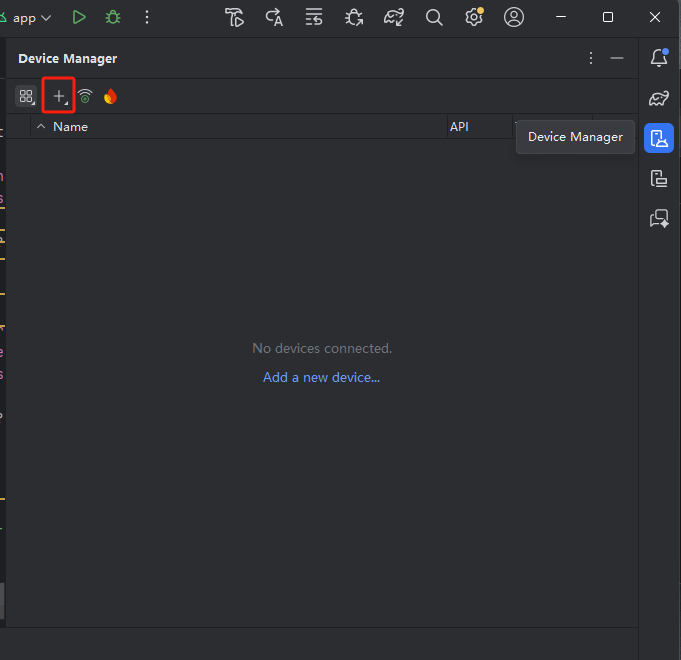
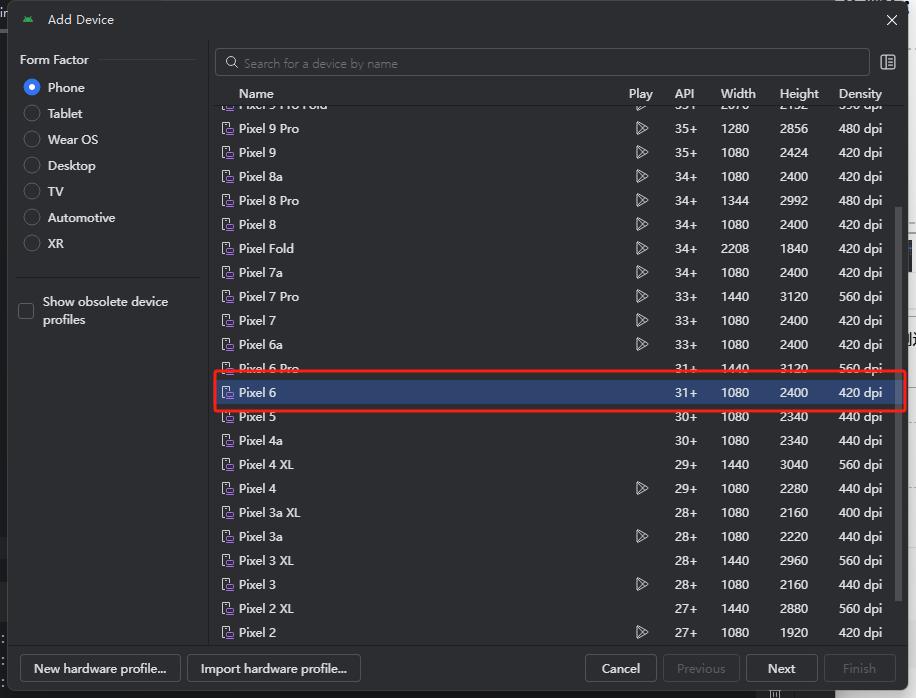
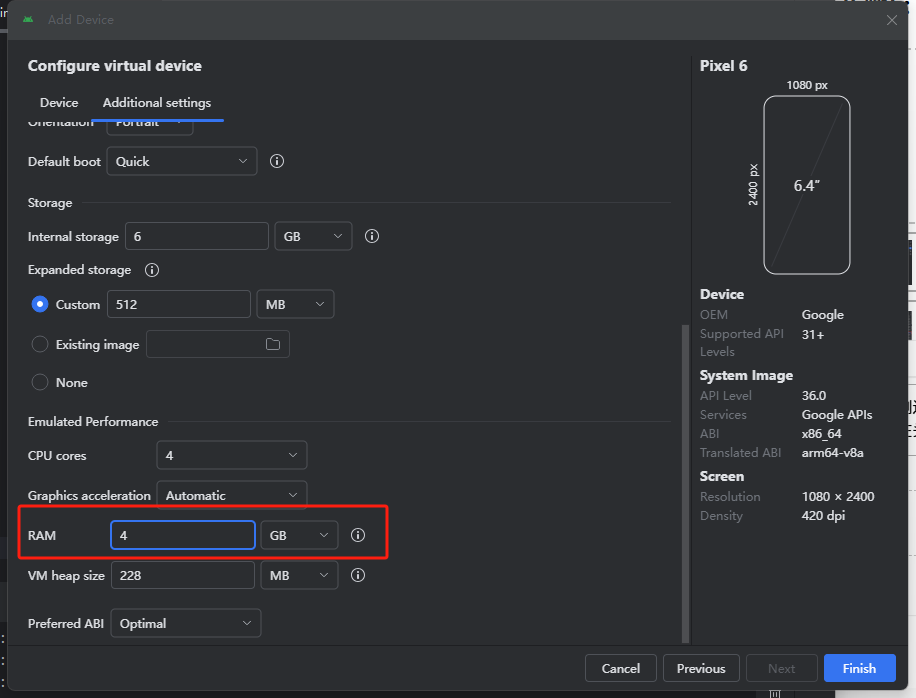
在右侧边栏中找到Device Manager(设备管理)创建新的设备,点击加号选择create Virtual device创建设备,在头部搜索“Pixel6”选中点击“next”,切换到Additional settings选项卡,找到RAM参数设置,设置为4G,然后点击finish完成。
6
修复报错
12
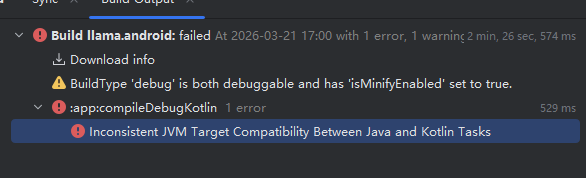
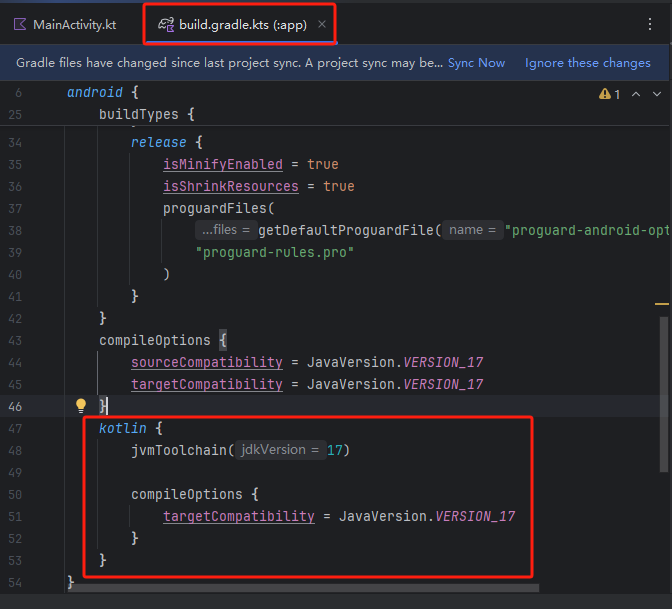
修改完成之后右上角有一个SyncNow重新加载文件。
在build.gradle.kts(:app)下的buildTypes中添加以下内容:
kotlin {
jvmToolchain(17)
compileOptions {
targetCompatibility = JavaVersion.VERSION_17
}
}
7
运行项目
12
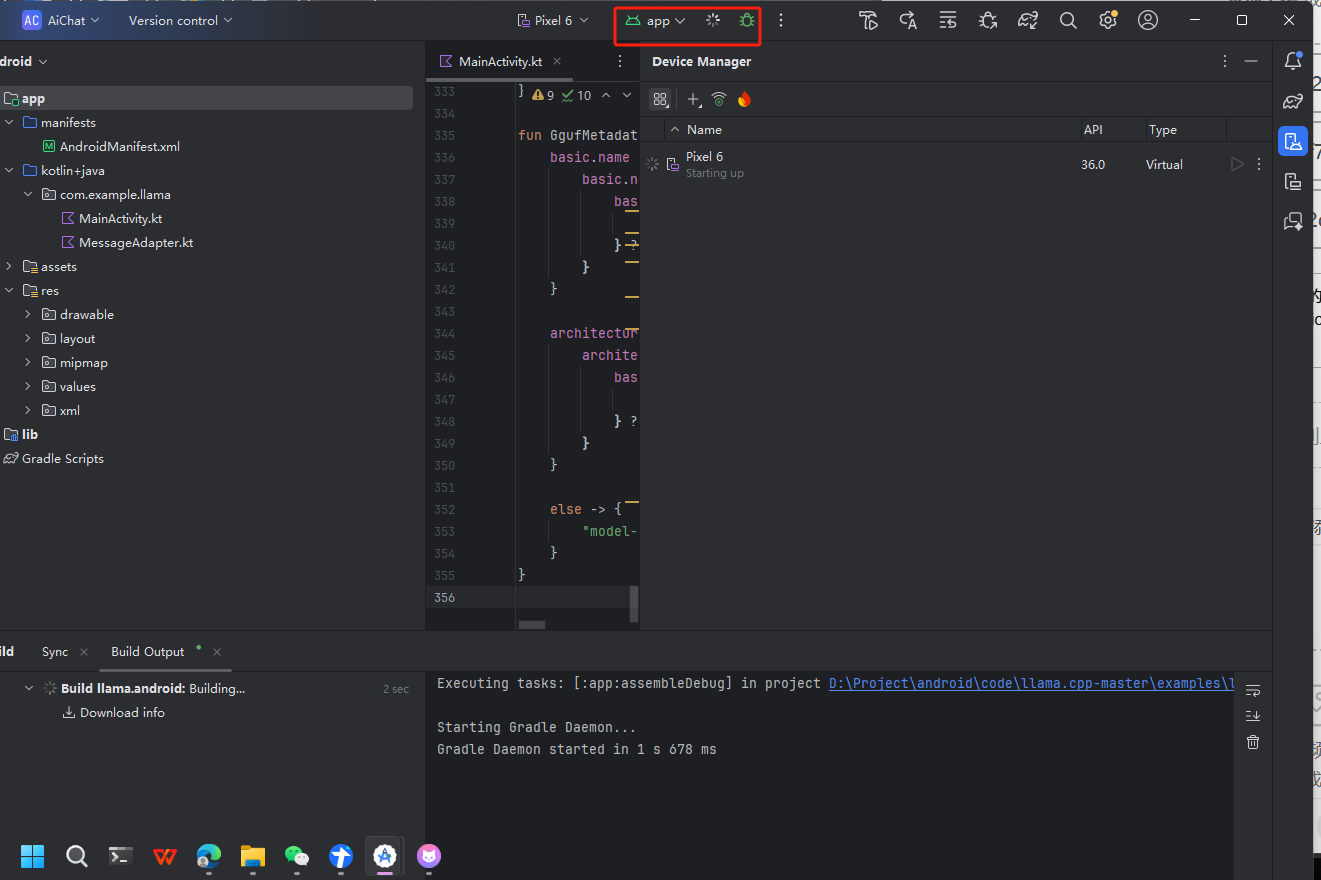
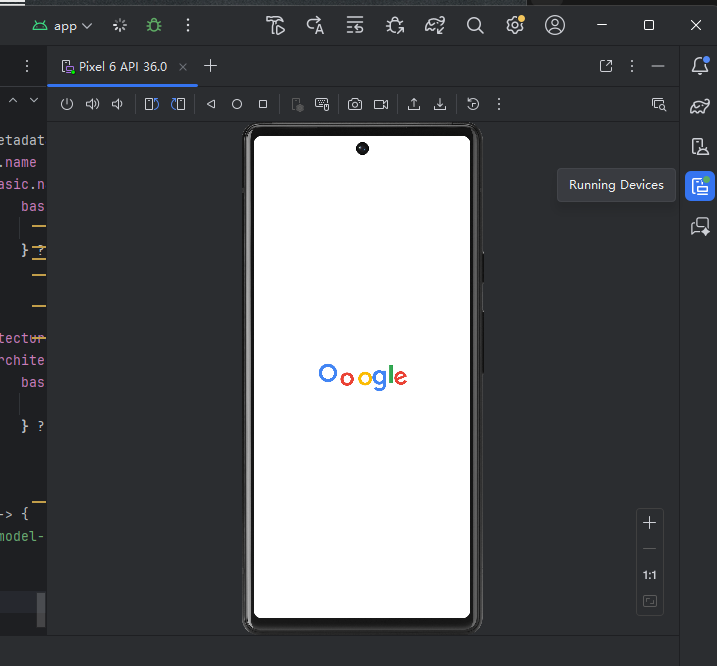
点击运行按钮开始启动项目,需要一些时间加载。在右侧工具栏中选择“Running device”可以看到设备的运行页面。
8
开始使用
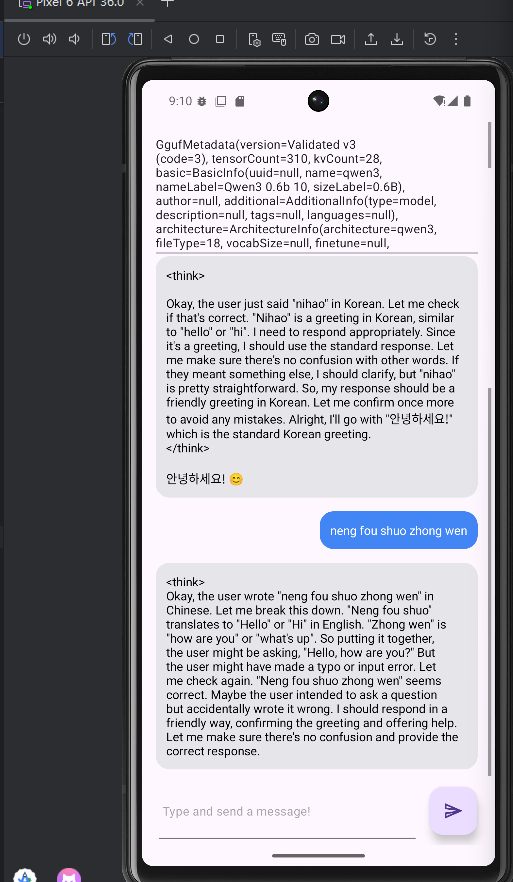
在对话框内输入内容,就可以开始对话了。
 0
0 0
0 0
0 qq空间
qq空间  微博
微博  复制链接
复制链接  分享
分享  本文未经作者允许授权,禁止转载
 更多相关项目
猜你喜欢
评论/提问(已发布 0 条)

 评论
评论  收藏
收藏  分享
分享  下载
下载  举报
举报  回顶部
回顶部